






 See Compatible Printers
 Read more about our ink!
Hewlett Packard
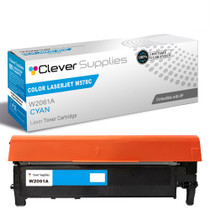
Compatible HP 212A (W2121A) Toner Cartridge Cyan
- Page Yield:
- Color: 4500
- Availability:
- In Stock
- Shipping:
- Free Shipping

Amazon Price:

- Page Yield:
- Color: 4500
- Availability:
- In Stock
- Shipping:
- Free Shipping
- Compatible Printers
- Specifications
- SKU:
- CS-HP-212A-CLJ-M555DN-C
- Printer Brand:
- Hewlett Packard
- OEM Number:
- W2121A
- Ink Color:
- Cyan
- Page Yield:
- Color: 4500
- Printer Type:
- Laser Cartridge
- Condition:
- New Compatible
- Description
- Reviews



Get vibrant, professional-quality prints with the HP 212A toner cartridge series, which includes HP 212A W2120A Black, W2121A Cyan, W2123A Magenta, and W2122A Yellow. These cartridges are designed to deliver sharp text and brilliant colors, making them ideal for high-impact business documents. Built for consistent performance, the HP 212A toner cartridge ensures every page meets high standards of clarity and detail. Whether you're printing presentations or detailed graphics, you can rely on these cartridges for outstanding color accuracy and smooth operation. Compatible with a wide range of HP printers, including COLOR LASERJET M554DN, COLOR LASERJET M555DN, COLOR LASERJET M555X, COLOR LASERJET M578C, COLOR LASERJET M578DN, COLOR LASERJET M578F, and COLOR LASERJET M578Z, the HP 212A series ensures seamless installation and optimal performance in each supported device. Rely on HP 212A toner cartridge technology to support high-volume printing needs with minimal interruptions. Designed for efficiency, these cartridges help reduce downtime and keep your office running smoothly, page after page.
Frequently Asked Questions
Which cartridge feeds the cyan channel?
W2121A, the cyan member of the 212A family. On a multifunction machine the same cartridge supplies prints and copies alike, so there is no separate 'copy toner' to hunt for — one cyan unit covers both jobs, and the stamp on the old cartridge confirms it.
My copies look washed out but prints from the PC look fine — is it the cartridge?
Look closer: both paths draw on the same cyan supply, but a pale scanned original can exaggerate the effect on copies first. Print the supplies page from the panel — if cyan reads near empty, the cartridge explains both, and copies simply showed it sooner. If cyan reads healthy, clean the scanner glass before ordering anything.
How is the cyan cartridge rated?
4,500 pages at five per cent coverage. Cyan does quiet, constant work in backgrounds, shading and charts, so on a busy MFP its level falls steadily even when nobody prints an obviously 'blue' document. The per-color gauge on the supplies page tracks it honestly.
Which machines use this cyan?
It fits the multifunction side of the range — M578c, M578dn, M578f, M578z — and equally the Color LaserJet M554dn, M555dn and M555x printers. The copy-focused M578c is a natural home: on that machine the cyan channel serves the copier as heavily as the printer.
Can cyan be swapped on its own between copy jobs?
Yes, in about a minute. The four channels are independent cartridges in a row; the cyan slides out and its replacement slides in while black, yellow and magenta stay untouched. The machine recalibrates the channel and the copy queue carries on.
What terms cover the cartridge?
The cartridge is backed by a 1-year warranty and by 1-year free returns — the shipping and returns page sets out both. Dispatch is from our warehouses in Illinois, Pennsylvania, Georgia and California, and help runs Monday through Friday, 9 AM to 5 PM CST.
Why does the cyan gauge fall during a month that felt like plain copying?
Because copies of everyday originals are rarely plain. Shaded forms, colored letterhead bands, charts and highlighted sections all draw on the cyan channel as the machine rebuilds them, and the W2121A supplies prints and copies from the same reservoir. Scanning itself spends nothing, but every copy that leaves the tray has laid a color mix down, so a copy-heavy month drains cyan quietly and steadily.
How can I check cyan before a heavy copy day without wasting the morning?
Make the supplies page a start-of-day glance rather than an investigation. The panel shows cyan's percentage in seconds; if it sits low before a long copy run is due, fit the spare first and let the queue run uninterrupted. Checking early converts a mid-run stoppage into a one-minute swap at a moment of your choosing, which is the whole discipline on a shared multifunction machine.
Do copies wear this cartridge down faster than prints do?
The cartridge makes no distinction, and neither does the rating: 4,500 pages at five per cent coverage counts pages, whichever path produced them. A copy of a dense, shaded original lays down as much toner as a dense print, and a copy of a pale memo lays down less. What matters is the density of what passes through, not whether it arrived from the scanner or the network.
What should I do with the spent cyan unit once its replacement is in?
Hold it briefly, because this channel has two jobs to prove. Let the new W2121A produce one ordinary print and one ordinary copy; if both come out at proper strength, the swap is confirmed on both paths the cartridge serves. After that double proof the spent unit is finished business and can go out with the next batch of office empties.
About This HP 212A (W2121A) Cyan Toner Cartridge
A single Clever Supplies compatible W2121A cyan cartridge from the 212A family, rated at 4,500 pages and priced at $81.71. One cyan supply covering both print and copy work on Enterprise color machines. The remaining family colors are in the wider HP toner range.
Related Items


Hewlett Packard
Compatible HP 212A (W2121A) Toner Cartridge Cyan



Hewlett Packard
Compatible HP 212A (W2121A) Toner Cartridge Cyan

Hewlett Packard
Compatible HP 212A (W2121A) Toner Cartridge Cyan


Hewlett Packard
Compatible HP 212A (W2121A) Toner Cartridge Cyan