






 See Compatible Printers
 Read more about our ink!
Hewlett Packard
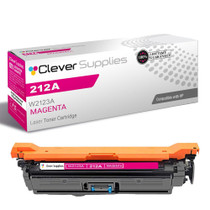
Compatible HP 212A (W2123A) Toner Cartridge Magenta
- Page Yield:
- Color: 4500
- Availability:
- In Stock
- Shipping:
- Free Shipping

Amazon Price:

- Page Yield:
- Color: 4500
- Availability:
- In Stock
- Shipping:
- Free Shipping
- Compatible Printers
- Specifications
- SKU:
- CS-HP-212A-CLJ-M578DN-M
- Printer Brand:
- Hewlett Packard
- OEM Number:
- W2123A
- Ink Color:
- Magenta
- Page Yield:
- Color: 4500
- Printer Type:
- Laser Cartridge
- Condition:
- New Compatible
- Description
- Reviews



Get vibrant, professional-quality prints with the HP 212A toner cartridge series, which includes HP 212A W2120A Black, W2121A Cyan, W2123A Magenta, and W2122A Yellow. These cartridges are designed to deliver sharp text and brilliant colors, making them ideal for high-impact business documents. Built for consistent performance, the HP 212A toner cartridge ensures every page meets high standards of clarity and detail. Whether you're printing presentations or detailed graphics, you can rely on these cartridges for outstanding color accuracy and smooth operation. Compatible with a wide range of HP printers, including COLOR LASERJET M554DN, COLOR LASERJET M555DN, COLOR LASERJET M555X, COLOR LASERJET M578C, COLOR LASERJET M578DN, COLOR LASERJET M578F, and COLOR LASERJET M578Z, the HP 212A series ensures seamless installation and optimal performance in each supported device. Rely on HP 212A toner cartridge technology to support high-volume printing needs with minimal interruptions. Designed for efficiency, these cartridges help reduce downtime and keep your office running smoothly, page after page.
Frequently Asked Questions
How can I be sure W2123A is the color I need?
It is the magenta code in the HP 212A family — the channel behind reds, pinks and warm tones. The four stations on this platform each carry a different code, so matching the stamp on your spent cartridge to this listing removes all guesswork.
Property photos look jaundiced and brickwork has gone orange — why?
Magenta is failing. When it thins, warm subjects lose their red component: bricks slide orange, faces go yellow, and sunset shots turn strange. Check the supplies gauge; a magenta reading near empty, beside healthier colors, confirms this cartridge as the fix.
What page rating applies to magenta?
4,500 pages at the standard five per cent coverage. Window cards and detail sheets are photograph-heavy and far denser than the standard, so a busy branch should expect fewer pages and let the printer's own percentage time the reorder.
Will replacing magenta alone upset color matching across the set?
The machine recalibrates after any single-channel change, blending the new unit with its older neighbours. Photographs may look a touch richer at first — that is the restored channel doing its full share again.
What happens if my $81.71 cartridge is faulty out of the box?
You are covered by a 1-year warranty and by 1-year free returns for a defective arrival. We ship from warehouses in Illinois, Pennsylvania, Georgia and California, and support is staffed Monday through Friday, 9 AM to 5 PM CST. The shipping and returns page explains the returns route in full.
Any trick to stretching the last of the old cartridge?
A gentle side-to-side tilt redistributes settled toner and can recover a few saleable pages while the replacement travels. Treat it as a bridge, not a cure — the color will fade again within the batch.
How should a branch plan magenta around window-card batches?
Cards print as a matched set, so a channel that fades halfway through a batch ruins the batch's consistency, not just its last sheet. Read the magenta gauge on the morning a batch is scheduled; if it sits low, fit the fresh W2123A before the run rather than after the first pale card appears. The swap belongs in the batch preparation, alongside the card stock itself.
Where should the branch keep its spare magenta?
In the office cupboard, sealed in its bag and lying flat — not in the window with the displays, where sun and heat work on it all day, and not in a stockroom where nobody looks until photographs have already gone orange. A spare that lives where the printing decisions are made gets fitted at the first symptom instead of the fifth.
The tilt trick revived the old cartridge — how long should we ride it?
Only until the next client-facing batch. The gentle tilt redistributes what toner remains and can return a few saleable pages, but the reservoir is still nearly empty and the fade will reappear without warning. Use the recovered pages for internal work, and treat needing the trick at all as the signal that the replacement W2123A should already be on its way.
What should happen to the spent magenta in a branch office?
Keep it until the new cartridge has reproduced one property photograph with brickwork and skin tones you trust, checked against a print from healthier days. That single sheet is the branch's proof that the window display will tell the truth again. With the proof accepted, the spent unit has no further evidence to give and can leave with the branch's recycling.
About This W2123A Magenta Cartridge
An estate agent's window lives on warm, believable color, and magenta carries most of it. This W2123A feeds the magenta station of printers like the Color LaserJet Enterprise M554dn, one sealed unit with a rated life built for branch volume. When brickwork starts lying about its color, the supplies page names the channel and this code names the cure. Every other member of the platform takes it too: COLOR LASERJET M555DN and COLOR LASERJET M555X, plus COLOR LASERJET M578C, COLOR LASERJET M578DN, COLOR LASERJET M578F and COLOR LASERJET M578Z. For the remaining colors the catalogue holds the black W2120A, the cyan W2121A and the yellow W2122A; this channel's longer-legged edition is the high-yield W2123X — the 212X magenta, and the 212A four-color set handles a full sweep.
Related Items


Hewlett Packard
Compatible HP 212A (W2123A) Toner Cartridge Magenta


Hewlett Packard
Compatible HP 212A (W2123A) Toner Cartridge Magenta


Hewlett Packard
Compatible HP 212A (W2123A) Toner Cartridge Magenta


Hewlett Packard
Compatible HP 212A (W2123A) Toner Cartridge Magenta