







 See Compatible Printers
 Read more about our ink!
Hewlett Packard
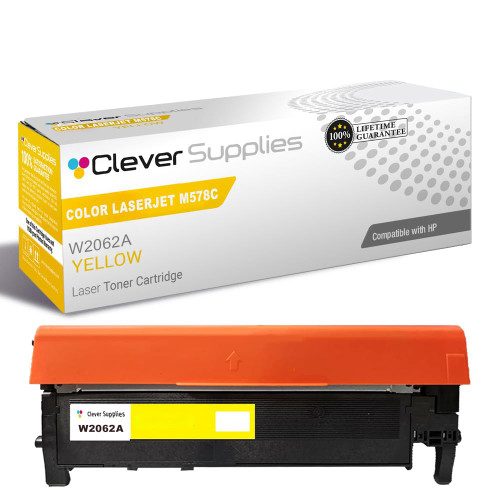
Compatible HP 212X (W2122X) Toner Cartridge Yellow
- Page Yield:
- Color: 10000
- Availability:
- In Stock
- Shipping:
- Free Shipping

Amazon Price:

- Page Yield:
- Color: 10000
- Availability:
- In Stock
- Shipping:
- Free Shipping
- Compatible Printers
- Specifications
- SKU:
- CS-HP-212X-CLJ-M578C-Y
- Printer Brand:
- Hewlett Packard
- OEM Number:
- W2122X
- Ink Color:
- Yellow
- Page Yield:
- Color: 10000
- Printer Type:
- Laser Cartridge
- Condition:
- New Compatible
- Description
- Reviews



Ensure peak performance and long-lasting results with the HP 212X toner cartridge series, which includes HP 212X W2120X Black, W2121X Cyan, W2123X Magenta, and W2122X Yellow. These high-yield cartridges are built to handle heavy workloads while delivering crisp, clear text and vibrant color. Designed for efficiency, the HP 212X toner cartridge offers more pages per cartridge compared to standard yield options, making it a smart choice for busy offices and high-volume printing environments. Every print showcases excellent quality and consistent results. Compatible with HP printers such as COLOR LASERJET M554DN, COLOR LASERJET M555DN, COLOR LASERJET M555X, COLOR LASERJET M578C, COLOR LASERJET M578DN, COLOR LASERJET M578F, and COLOR LASERJET M578Z, the HP 212X cartridge series ensures easy installation and smooth integration with your printing setup. Count on HP 212X toner cartridge technology to deliver reliability, professional-grade output, and reduced downtime. These cartridges are engineered to help your business maintain productivity without compromising print quality.
Frequently Asked Questions
Which station does the W2122X code belong to?
W2122X is the yellow cartridge in the HP 212X family. Yellow is the channel nobody notices until it is gone, so order by the stamped code rather than by the symptom. If the label on the spent unit reads W2122X, this is its exact replacement.
Our hazard signs are coming out pale — is that a toner problem?
It is, and it matters twice: a washed-out warning yellow is both a print defect and a signage failure. Yellow fades show up as signs that look sun-bleached and prints that skew oddly cool, because surviving cyan takes over the mix. Check the yellow level on the status page; a fresh W2122X restores the brightness safety signage depends on.
How far does the 10,000-page rating go on sign work?
The rating assumes five per cent coverage, and a hazard sign is nearly the reverse — huge fields of solid yellow. Real output on signage will be a fraction of the headline figure. Treat 10,000 as the standard measuring stick for the cartridge class, and reorder on the gauge, not on page arithmetic.
How can I prove it is yellow and not the paper stock?
Print the printer's own diagnostics or supplies page on plain office paper. If the yellow test band looks weak there too, the cartridge is the cause and the sign stock is innocent. That two-minute test settles the argument before anyone orders a different paper or calls a technician.
What support backs this $97.76 cartridge?
Every unit carries a 1-year warranty, and 1-year free returns apply if one arrives damaged or fades far too soon. We ship from warehouses in Illinois, Pennsylvania, Georgia and California, and help is available Monday through Friday, 9 AM to 5 PM CST. The fine print is gathered on the shipping and returns page.
How should reorder timing work when signs cannot wait?
Compliance signage is not a job that queues politely behind a toner order. Keep one sealed W2122X in the safety cabinet and reorder the day it goes into the machine, so the shelf is never empty when an inspector, an auditor or a new work zone needs signs printed today.
The green zones on our safety signs are printing blue — can yellow explain that too?
Yes. Green is built from cyan and yellow together; take the yellow away and the same artwork tips toward blue, while yellows themselves wash out. Two symptoms, one station. Check the yellow level on the status page, and a low W2122X accounts for both the pale warning fields and the blue-shifted greens.
What quick routine keeps a signage batch from starting on a dying cartridge?
Before queuing a run of signs, print the supplies page and read the yellow gauge as a go or no-go check. Starting a batch on a strong W2122X keeps every sign in the set at the same brightness; starting on a fading one guarantees the last signs fail inspection even if the first ones passed.
Does yellow strength matter for small-print labels, or only for big sign fields?
For both. A warning label is a yellow field carrying fine black print, and the label only reads as a warning while the field behind the text stays loud. As the W2122X fades, the contrast that makes small print legible at a distance fades with it — the text is unchanged, but the sign has stopped working.
How should a spent yellow cartridge be handled in a facilities workshop?
Box it on the spot and mark it spent with the date, then hold it until the fresh W2122X has printed a test sign at full brightness. That discipline stops a dead unit being picked up and refitted during a busy shift, and it preserves the evidence if the replacement, not the old cartridge, turns out to be faulty.
About This W2122X Yellow Cartridge
Safety yellow only works at full strength. Seated in the Color LaserJet Enterprise M554dn, it keeps hazard signs, labels and warning posters loud and legible instead of letting them bleach toward cream. For facilities work, treat it as part of the safety program, not just the print budget.
When the neighbouring slots fade, the matching singles are the black W2120X, the cyan W2121X and the magenta W2123X; the standard-yield W2122A covers the lighter months, and the 212X four-color set renews all four together.
The roster of machines on this platform reads longer than most — Color LaserJet Enterprise M555dn, Color LaserJet Enterprise M555x, Color LaserJet Enterprise M554dn, Color LaserJet Enterprise M578c, Color LaserJet Enterprise M578dn, Color LaserJet Enterprise M578f and Color LaserJet Enterprise M578z — and every one of them takes this cartridge.
Related Items


Hewlett Packard
Compatible HP 212X (W2122X) Toner Cartridge Yellow



Hewlett Packard
Compatible HP 212X (W2122X) Toner Cartridge Yellow


Hewlett Packard
Compatible HP 212X (W2122X) Toner Cartridge Yellow


Hewlett Packard
Compatible HP 212X (W2122X) Toner Cartridge Yellow