







 See Compatible Printers
 Read more about our ink!
Hewlett Packard
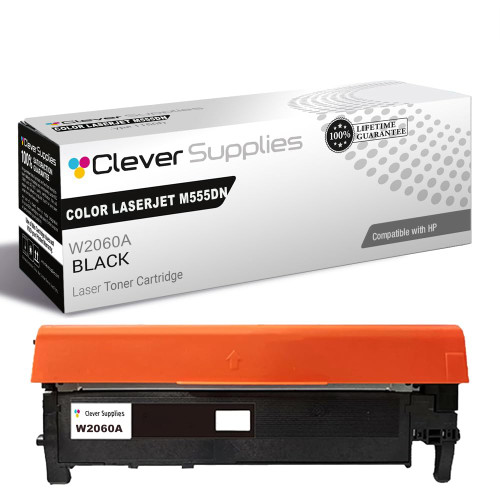
Compatible HP 212A (W2120A) Toner Cartridge Black
- Page Yield:
- Black: 5500
- Availability:
- In Stock
- Shipping:
- Free Shipping

Amazon Price:

- Page Yield:
- Black: 5500
- Availability:
- In Stock
- Shipping:
- Free Shipping
- Compatible Printers
- Specifications
- SKU:
- CS-HP-212A-CLJ-M555DN-BK
- Printer Brand:
- Hewlett Packard
- OEM Number:
- W2120A
- Ink Color:
- Black
- Page Yield:
- Black: 5500
- Printer Type:
- Laser Cartridge
- Condition:
- New Compatible
- Description
- Reviews



Get vibrant, professional-quality prints with the HP 212A toner cartridge series, which includes HP 212A W2120A Black, W2121A Cyan, W2123A Magenta, and W2122A Yellow. These cartridges are designed to deliver sharp text and brilliant colors, making them ideal for high-impact business documents. Built for consistent performance, the HP 212A toner cartridge ensures every page meets high standards of clarity and detail. Whether you're printing presentations or detailed graphics, you can rely on these cartridges for outstanding color accuracy and smooth operation. Compatible with a wide range of HP printers, including COLOR LASERJET M554DN, COLOR LASERJET M555DN, COLOR LASERJET M555X, COLOR LASERJET M578C, COLOR LASERJET M578DN, COLOR LASERJET M578F, and COLOR LASERJET M578Z, the HP 212A series ensures seamless installation and optimal performance in each supported device. Rely on HP 212A toner cartridge technology to support high-volume printing needs with minimal interruptions. Designed for efficiency, these cartridges help reduce downtime and keep your office running smoothly, page after page.
Frequently Asked Questions
How do I know this is the black my printer takes?
Look at the cartridge coming out: the black of the 212A family is stamped W2120A, and this is that cartridge. Small offices often inherit a printer with no records kept, so the stamp on the old unit — not the model badge, not a guess from the screen — is the reliable identifier.
What happens the first time I fit it?
Pull the sealing strip straight out, keep the cartridge level, and slide it into the black bay until it clicks. The printer then runs a short calibration before printing. Early pages can look slightly light while toner distributes through the new unit; by the second or third document, density settles to normal.
How many pages will a small office get from it?
The rating is 5,500 pages at five per cent coverage, which for a small office printing letters, quotes and invoices typically stretches across many months. Your own figure depends on page density — the supplies page percentage is the figure to watch, dropping steadily rather than by guesswork.
Which printers does it belong to?
It belongs to the Enterprise color range that starts at the Color LaserJet M554dn and continues through the M555dn, M555x and the M578 multifunctions — c, dn, f and z. A single-function M554dn on a small-office desk is the everyday picture: color in reserve, black doing the daily work.
Where should a spare live in a small office?
In its sealed bag, flat in a drawer or cupboard, away from the radiator and out of sunlight. Toner does not spoil sitting in storage, so buying the next cartridge when the current one is fitted — rather than when it fails — costs nothing in freshness and removes the emergency order entirely.
What support and returns come with it?
You get a 1-year warranty and 1-year free returns, the pair of them explained on our shipping and returns page. A real support team answers Monday through Friday, 9 AM to 5 PM CST, and shipping runs from our warehouses in Illinois, Pennsylvania, Georgia and California.
What does one page from this cartridge cost at its rated yield?
At the listed $81.71 and the 5,500-page rating, the arithmetic lands near one and a half cents of toner per page at standard coverage. Letters and invoices sit close to that standard, so the figure is a fair planning number for a small office; denser pages — solid letterheads, heavy forms — push the real cost up in proportion to the extra toner they lay down.
A faint band repeats down every page — cartridge or machine?
Use the swap as the test. Fit the new W2120A, let the printer calibrate, and reprint the same familiar document. If the band is gone, the old cartridge was the source and the matter is closed. If the identical band survives a fresh cartridge in exactly the same place, the cause sits in the machine, and that is the point at which a service conversation makes sense.
Our office also runs an M578 multifunction — can one spare black serve both machines?
Yes. The W2120A bay repeats across the M554dn, the M555dn and M555x, and the M578c, M578dn, M578f and M578z, so a single sealed spare on the shelf covers whichever machine calls for black first. There is no per-model version to stock or to order by mistake — one code, one cartridge, and either desk can be rescued by the same box.
When is it safe to get rid of the empty black cartridge?
After the replacement has settled. The first pages from a new unit can print slightly light while toner distributes, so judge the cartridge on its second or third ordinary document rather than its first. Once a normal letter prints at full density, the old unit has nothing left to prove or to fall back on, and it can leave with the office recycling.
About This HP 212A (W2120A) Black Toner Cartridge
A single Clever Supplies compatible W2120A black cartridge — the 212A black — rated at 5,500 pages, priced at $81.71. The straightforward replacement black for smaller offices running Enterprise color machines. Companion color cartridges are listed in the HP range at Clever Supplies. The bay repeats across the line-up, in COLOR LASERJET M555DN and COLOR LASERJET M555X and in COLOR LASERJET M578C, COLOR LASERJET M578DN, COLOR LASERJET M578F and COLOR LASERJET M578Z, so a single cartridge design serves them all. Should the other channels follow, they are listed as the cyan W2121A, the yellow W2122A and the magenta W2123A; this slot's own upgrade is the high-yield W2120X — the 212X black, and the 212A four-color set sweeps the full set in one order.
Related Items


Hewlett Packard
Compatible HP 212A (W2120A) Toner Cartridge Black



Hewlett Packard
Compatible HP 212A (W2120A) Toner Cartridge Black

Hewlett Packard
Compatible HP 212A (W2120A) Toner Cartridge Black

Hewlett Packard
Compatible HP 212A (W2120A) Toner Cartridge Black