






 See Compatible Printers
 Read more about our ink!
Hewlett Packard
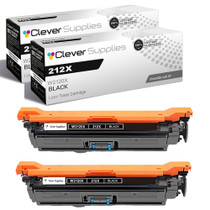
Compatible HP 212X (W2120X) Toner Cartridge 2 Black
- Page Yield:
- Black: 13000
- Availability:
- In Stock
- Shipping:
- Free Shipping

Amazon Price:

- Page Yield:
- Black: 13000
- Availability:
- In Stock
- Shipping:
- Free Shipping
- Compatible Printers
- Specifications
- SKU:
- CS-HP-212X-CLJ-M578DN-2Black
- Printer Brand:
- Hewlett Packard
- OEM Number:
- W2120X
- Ink Color:
- Black
- Page Yield:
- Black: 13000
- Printer Type:
- Laser Cartridge
- Condition:
- New Compatible
- Description
- Reviews



Ensure peak performance and long-lasting results with the HP 212X toner cartridge series, which includes HP 212X W2120X Black, W2121X Cyan, W2123X Magenta, and W2122X Yellow. These high-yield cartridges are built to handle heavy workloads while delivering crisp, clear text and vibrant color. Designed for efficiency, the HP 212X toner cartridge offers more pages per cartridge compared to standard yield options, making it a smart choice for busy offices and high-volume printing environments. Every print showcases excellent quality and consistent results. Compatible with HP printers such as COLOR LASERJET M554DN, COLOR LASERJET M555DN, COLOR LASERJET M555X, COLOR LASERJET M578C, COLOR LASERJET M578DN, COLOR LASERJET M578F, and COLOR LASERJET M578Z, the HP 212X cartridge series ensures easy installation and smooth integration with your printing setup. Count on HP 212X toner cartridge technology to deliver reliability, professional-grade output, and reduced downtime. These cartridges are engineered to help your business maintain productivity without compromising print quality.
Frequently Asked Questions
What does '2 Black' mean in this box, exactly?
Two separate W2120X black cartridges, each a complete high-yield unit from the HP 212X family — not a single double-size cartridge. Each twin installs, prints and runs out on its own, which makes the pair flexible across machines and months.
Can the pair be split between two printers on our floor?
Yes — that is one of its best uses. Both cartridges carry the identical code, so one can feed the front-office machine while the second serves the back office, or one installs today and its twin waits sealed as the floor's shared spare. Nothing about the pair ties them to a single printer.
How much printing does the pair represent in total?
Each cartridge is rated at 13,000 pages, so the box holds two full service lives — two turns at the machine rather than one long one. When the first finishes, the second starts at full density, and text quality never rides a half-empty unit.
Only one printer is low right now — should both cartridges go in somewhere?
No. Install the one that is needed and keep its twin sealed in the box. An unopened cartridge stores perfectly, while an installed one simply ages in a machine that did not need it yet. The sealed twin is your insurance for the other printer's turn.
What stands behind the $177.03 pair if one unit disappoints?
Both cartridges carry the same cover: a 1-year warranty on each unit, and 1-year free returns if one arrives damaged or fades far too early. Shipments leave our Illinois, Pennsylvania, Georgia and California warehouses, and support runs Monday through Friday, 9 AM to 5 PM CST. Terms are spelled out on the shipping and returns page.
How do we keep track of which cartridge went where?
A strip of tape and a date on each box solves it. Note the machine and the install date when a cartridge goes in; when its twin is still sealed months later, the label tells you it is the reserve and not a forgotten duplicate. Floors that label spares never double-order by accident.
What does the pair work out at per page?
The box is $177.03 for two cartridges rated at 13,000 pages each — 26,000 pages of black in total, which puts a standard page at roughly two-thirds of a cent. Dense label and manifest work spends toner faster than the five per cent basis, but even allowing for that, the pair is the cheapest way this floor buys its black pages.
What happens if one of the two cartridges arrives damaged?
The cover is per unit, not per box: each W2120X carries its own 1-year warranty, and 1-year free returns apply if a single cartridge arrives damaged or fades far too early. Fit the healthy twin, send the faulty one back on its own, and the floor's printing never waits on the paperwork.
When the second twin goes into a machine, what should happen the same day?
A reorder. The moment the reserve cartridge is fitted, the floor's black cover is exactly one cartridge deep, with nothing sealed behind it. Offices that treat the second install as the order trigger never meet the empty-printer morning; the pair quietly renews itself, one box at a time.
How should each spent unit leave the building?
Back in the carton its replacement arrived in, with the removal date noted on the box — the same labeling habit that tracks the spares. When both twins have had their turn, the two dated cartons go out with the office's toner recycling collection. Nothing about the pair needs special handling; it only needs the date habit to stay tidy.
About This W2120X 2-Pack Black Set
One purchase that covers a whole floor's black printing: two full-life cartridges for the machines that share the corridor. Loaded into a Color LaserJet Enterprise M554dn or its siblings on the platform, each unit delivers the same dense text and the same long interval between changes. Buy the pair, split it as the floor demands, and let black toner stop being a per-printer emergency.
From the print room to the corner office, Color LaserJet Enterprise M554dn, Color LaserJet Enterprise M555dn, Color LaserJet Enterprise M555x, Color LaserJet Enterprise M578c, Color LaserJet Enterprise M578dn, Color LaserJet Enterprise M578f and Color LaserJet Enterprise M578z all run the same cartridge.
One emergency swap is what the single W2120X is for; the standard-yield W2120A twin pack covers the same pairing for lighter months, and the 212X four-color set takes care of the colors when their turn comes.
Related Items

Hewlett Packard
Compatible HP 212X (W2120X) Toner Cartridge 2 Black



Hewlett Packard
Compatible HP 212X (W2120X) Toner Cartridge 2 Black


Hewlett Packard
Compatible HP 212X (W2120X) Toner Cartridge 2 Black


Hewlett Packard
Compatible HP 212X (W2120X) Toner Cartridge Black