







 See Compatible Printers
 Read more about our ink!
Hewlett Packard
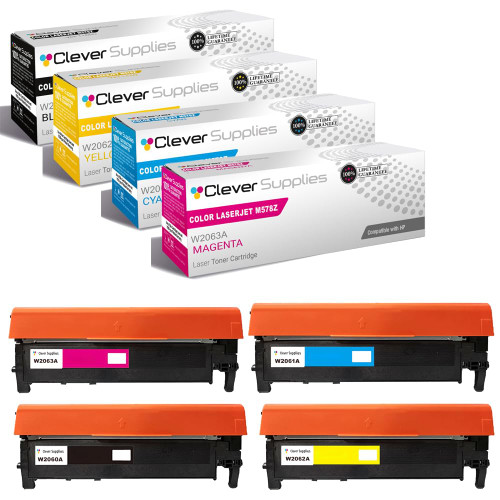
Compatible HP 212A (W2120A, W2121A, W2123A, W2122A) Toner Cartridge 4 Color Set

Amazon Price:

- Page Yield:
- Black: 4500
- Availability:
- In Stock
- Shipping:
- Free Shipping
- Compatible Printers
- Specifications
- SKU:
- CS-HP-212A-CLJ-M578Z-4Color-Set
- Printer Brand:
- Hewlett Packard
- OEM Number:
- W2120A, W2121A, W2123A, W2122A
- Ink Color:
- Black, Cyan, Magenta, Yellow
- Page Yield:
- Black: 4500
- Printer Type:
- Laser Cartridge
- Condition:
- New Compatible
- Description
- Reviews



Get vibrant, professional-quality prints with the HP 212A toner cartridge series, which includes HP 212A W2120A Black, W2121A Cyan, W2123A Magenta, and W2122A Yellow. These cartridges are designed to deliver sharp text and brilliant colors, making them ideal for high-impact business documents. Built for consistent performance, the HP 212A toner cartridge ensures every page meets high standards of clarity and detail. Whether you're printing presentations or detailed graphics, you can rely on these cartridges for outstanding color accuracy and smooth operation. Compatible with a wide range of HP printers, including COLOR LASERJET M554DN, COLOR LASERJET M555DN, COLOR LASERJET M555X, COLOR LASERJET M578C, COLOR LASERJET M578DN, COLOR LASERJET M578F, and COLOR LASERJET M578Z, the HP 212A series ensures seamless installation and optimal performance in each supported device. Rely on HP 212A toner cartridge technology to support high-volume printing needs with minimal interruptions. Designed for efficiency, these cartridges help reduce downtime and keep your office running smoothly, page after page.
Frequently Asked Questions
What does the district receive in this set?
The platform's complete cartridge family in one box: black W2120A, cyan W2121A, magenta W2123A and yellow W2122A — the four coded members of the HP 212A set, one of each, ready for the four stations of a single printer.
Why would a central office buy the set instead of singles?
Because a shared district machine serves every department and its channels age together. When two or more gauges sit low at once, a set renews the whole printer in one maintenance visit and one purchase order, instead of four separate emergency orders across a term.
What are the rated lives of the four members?
The black is rated at 5,500 pages; cyan, magenta and yellow at 4,500 each, all by the standard coverage method. Certificates, newsletters and color forms spend the color trio faster than correspondence spends black, so expect the colors to call first.
Can the set be installed across several days?
Yes — nothing binds the four together once the box is open. Fit the black when it warns, the colors as theirs land, and kept sealed the remainder wait in the store cupboard without going stale.
What cover applies across the $271.35 set?
Each cartridge carries a 1-year warranty, and 1-year free returns cover a faulty unit in the box. Fulfilment comes from our warehouses in Illinois, Pennsylvania, Georgia and California, and support runs Monday through Friday, 9 AM to 5 PM CST. The shipping and returns page sets out the delivery and returns arrangements.
How should a district store the unopened members?
In the central store, flat and sealed, logged like any other stock item. A set bought in the summer lull is then ready for the September surge, when every department discovers the printer at once.
What is the set's blended cost per printed page?
Add the ratings together: 5,500 pages of black plus 4,500 each of cyan, magenta and yellow make 19,000 rated pages in the box, and $271.35 across that total works out at roughly a cent and a half a page. Certificates and newsletters spend the colors faster than correspondence spends black, so the real blended figure lands a little higher — still a tidy planning number for a district budget.
Must all four members of the set serve the same printer?
No. The four codes — W2120A, W2121A, W2123A and W2122A — are the platform's codes, not one machine's. A district running several of these printers can treat the set as a small pool: the black goes to whichever printer flags black first, a color to another whose gauge complains, and the audit trail stays as simple as if one printer had taken all four.
How should a renewal visit end before the technician leaves?
With a page that uses everything. Print one certificate or newsletter sheet — something carrying black text and all three colors — and read it channel by channel: text crisp, colors true, nothing banded. That single page is the whole set's acceptance test. Sign the visit off only when it passes, and keep the spent cartridges until it has.
What happens to the four spent cartridges after a full renewal?
Load them back into the set's carton as they come out, one per station, so the empties leave the office as a single item rather than four loose cartridges in four waste bins. The boxed set of spent units is also the tidy way to hold them until the proof page has been accepted; after that, the carton can go as one.
About This 212A Four-Color Set
One printer serving a whole district cannot afford color surprises in enrollment week. This full 212A set renews every station of machines like the Color LaserJet Enterprise M554dn from a single box — black for the letters, cyan, magenta and yellow for everything that makes them noticed. Four codes, one order, a printer reset to full strength. District buyers also find the set simplifies the audit trail: one line item, one delivery, four stations accounted for, instead of a scatter of small orders across the school year. Whichever of these printers a department runs, the cartridge is the same — COLOR LASERJET M555DN and COLOR LASERJET M555X and COLOR LASERJET M578C, COLOR LASERJET M578DN, COLOR LASERJET M578F and COLOR LASERJET M578Z included. Its members lead separate lives as the black W2120A, the cyan W2121A, the yellow W2122A and the magenta W2123A; the 212X four-color set stretches the set further, and a twin pack of the W2120A black tops up the black side on its own schedule.
Related Items


Hewlett Packard
Compatible HP 212A (W2120A, W2121A, W2123A, W2122A) Toner Cartridge 4 Color Set


Hewlett Packard
Compatible HP 212A (W2120A, W2121A, W2123A, W2122A) Toner Cartridge 4 Color Set


Hewlett Packard
Compatible HP 212A (W2120A, W2121A, W2123A, W2122A) Toner Cartridge 4 Color Set


Hewlett Packard
Compatible HP 212A (W2120A, W2121A, W2123A, W2122A) Toner Cartridge 4 Color Set