







 See Compatible Printers
 Read more about our ink!
Hewlett Packard
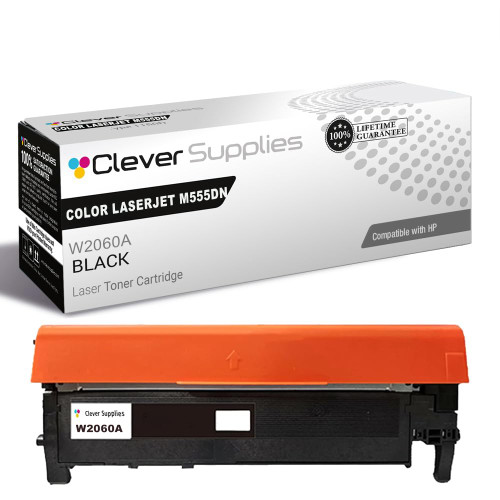
Compatible HP 212X (W2120X) Toner Cartridge Black
- Page Yield:
- Black: 13000
- Availability:
- In Stock
- Shipping:
- Free Shipping

Amazon Price:

- Page Yield:
- Black: 13000
- Availability:
- In Stock
- Shipping:
- Free Shipping
- Compatible Printers
- Specifications
- SKU:
- CS-HP-212X-CLJ-M555DN-BK
- Printer Brand:
- Hewlett Packard
- OEM Number:
- W2120X
- Ink Color:
- Black
- Page Yield:
- Black: 13000
- Printer Type:
- Laser Cartridge
- Condition:
- New Compatible
- Description
- Reviews



Ensure peak performance and long-lasting results with the HP 212X toner cartridge series, which includes HP 212X W2120X Black, W2121X Cyan, W2123X Magenta, and W2122X Yellow. These high-yield cartridges are built to handle heavy workloads while delivering crisp, clear text and vibrant color. Designed for efficiency, the HP 212X toner cartridge offers more pages per cartridge compared to standard yield options, making it a smart choice for busy offices and high-volume printing environments. Every print showcases excellent quality and consistent results. Compatible with HP printers such as COLOR LASERJET M554DN, COLOR LASERJET M555DN, COLOR LASERJET M555X, COLOR LASERJET M578C, COLOR LASERJET M578DN, COLOR LASERJET M578F, and COLOR LASERJET M578Z, the HP 212X cartridge series ensures easy installation and smooth integration with your printing setup. Count on HP 212X toner cartridge technology to deliver reliability, professional-grade output, and reduced downtime. These cartridges are engineered to help your business maintain productivity without compromising print quality.
Frequently Asked Questions
Which black cartridge does our dock printer actually call for?
Pull the empty unit and read its label: this listing is the W2120X, the high-yield black in the HP 212X family. If the label, the printer's supplies screen and your purchase order all say W2120X, you are holding the right page on the store.
Why are our barcode labels suddenly failing scans?
Barcode readers need contrast, and a black cartridge near empty lays gray bars that scanners reject. Bills of lading show it before plain text does. Rock the cartridge once as a field test; if scan rates recover for a day and collapse again, the unit is done and a fresh W2120X restores first-pass reads.
How many label-and-manifest days fit in one cartridge?
It is rated at 13,000 pages at five per cent coverage. A full label sheet runs heavier than that, so count on fewer sheets in practice — still thousands of manifests and pick tickets per unit on a working dock, which is why this high-yield code is the one warehouses standardise on.
Will this cartridge run in both our dock and office machines?
If both machines belong to this platform family, yes — the W2120X is a platform cartridge, not a single-model one. That commonality is the quiet benefit: one code on the shelf feeds every compatible printer in the building.
What protection stands behind the $97.76?
A 1-year warranty covers the cartridge, with 1-year free returns if it arrives damaged or quits early. Stock moves out of our warehouses in Illinois, Pennsylvania, Georgia and California, and a person answers support Monday through Friday, 9 AM to 5 PM CST. The full wording sits on the shipping and returns page.
Does a hot dock office shorten a stored cartridge's life?
Heat is the one storage enemy worth respecting. Keep sealed spares in the climate-controlled office rather than beside the dock door, flat and in the bag, and they will print at full density whenever the rotation calls them up.
What does each dock page from this cartridge cost?
At the $97.76 shelf price and the 13,000-page rating, a standard page lands at about three-quarters of a cent. Full label sheets run heavier than the five per cent test basis, so the honest working figure is a little higher — still well under a cent for the manifests, pick tickets and bills of lading the dock prints all day.
A W2120A turned up in the delivery instead of the X — will it run in our printer?
It will. The W2120A is the standard-yield black for this same station, listed for quieter workloads, so it fits and prints without any fuss. What changes is the interval: it will ask for replacement sooner than the W2120X you standardized on. Fit it where the volume is lightest, and put the full code back on the next purchase order.
What should we look for on the first run after fitting a fresh unit?
Two things. The supplies page should register the new W2120X at full, and the first manifest off the printer should carry bars at full density from the top of the sheet — no warm-up paleness. Run one real label sheet as the proof before the shift's main batch; if those bars scan first-pass, the swap is done.
How long should the spent cartridge stay on the dock before it goes out for recycling?
Keep it in the fresh unit's carton until the replacement has printed cleanly through a full working shift. If the new cartridge were to disappoint early, the returns cover exists — and having the carton makes any swap painless. Once the new unit is proven, the old one leaves with the warehouse's next recycling collection rather than the general trash.
About This W2120X Black Cartridge
The black a shipping desk can forget about: dense barcodes, readable manifests, no mid-shift surprises. It loads into the Color LaserJet Enterprise M554dn in under a minute and reports honestly on the supplies page as it works through its 13,000-page rating. Standardise on the code and the label printer stops being a bottleneck. From one end of the range to the other the slot is common: COLOR LASERJET M555DN and COLOR LASERJET M555X, and COLOR LASERJET M578C, COLOR LASERJET M578DN, COLOR LASERJET M578F and COLOR LASERJET M578Z as well. Should the other channels follow, they are listed as the cyan W2121X, the yellow W2122X and the magenta W2123X; this slot also comes as the standard-yield W2120A — the 212A black for quieter workloads, and the 212X four-color set sweeps the full set in one order.
Related Items

Hewlett Packard
Compatible HP 212X (W2120X) Toner Cartridge Black



Hewlett Packard
Compatible HP 212X (W2120X) Toner Cartridge Black

Hewlett Packard
Compatible HP 212X (W2120X) Toner Cartridge Black


Hewlett Packard
Compatible HP 212X (W2120X) Toner Cartridge Black