







 See Compatible Printers
 Read more about our ink!
Hewlett Packard
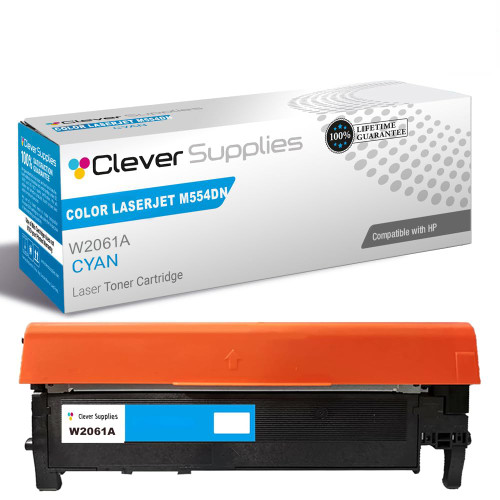
Compatible HP COLOR LASERJET M554DN (W2121A) Toner Cartridge Cyan

Amazon Price:

- Page Yield:
- Color: 4500
- Availability:
- In Stock
- Shipping:
- Free Shipping
- Compatible Printers
- Specifications
- SKU:
- CS-HP-212A-CLJ-M554DN-C
- Printer Brand:
- Hewlett Packard
- OEM Number:
- W2121A
- Ink Color:
- Cyan
- Page Yield:
- Color: 4500
- Printer Type:
- Laser Cartridge
- Condition:
- New Compatible
- Description
- Reviews



Get vibrant, professional-quality prints with the HP 212A toner cartridge series, which includes HP 212A W2120A Black, W2121A Cyan, W2123A Magenta, and W2122A Yellow. These cartridges are designed to deliver sharp text and brilliant colors, making them ideal for high-impact business documents. Built for consistent performance, the HP 212A toner cartridge ensures every page meets high standards of clarity and detail. Whether you're printing presentations or detailed graphics, you can rely on these cartridges for outstanding color accuracy and smooth operation. Compatible with a wide range of HP printers, including COLOR LASERJET M554DN, COLOR LASERJET M555DN, COLOR LASERJET M555X, COLOR LASERJET M578C, COLOR LASERJET M578DN, COLOR LASERJET M578F, and COLOR LASERJET M578Z, the HP 212A series ensures seamless installation and optimal performance in each supported device. Rely on HP 212A toner cartridge technology to support high-volume printing needs with minimal interruptions. Designed for efficiency, these cartridges help reduce downtime and keep your office running smoothly, page after page.
Frequently Asked Questions
How do I confirm cyan is the cartridge I need?
Start with the unit in your hand: the cyan of this family is stamped W2121A, and no other code belongs in that slot. Screen prompts are no help here — a vague 'color low' never names the channel — so the stamp, cross-checked against the per-color supplies breakdown, is the certain route to ordering the right cartridge first time.
What does the supplies status page tell me?
It breaks the estimate down channel by channel — percentages and rough pages remaining for each of the four. That makes it the fastest diagnosis for color complaints: cyan near zero while black, yellow and magenta hold healthy levels explains washed-out charts on the spot, and names this single cartridge as the whole remedy.
How many pages is the cyan rated for?
4,500 pages at five per cent coverage of the cyan channel. Report charts sip cyan; full-bleed presentation covers and photo pages drink it. Two offices with the same printer can see wildly different cyan life, which is why the per-color gauge matters more than any average.
Why do my greens look wrong when cyan runs low?
Green on paper is cyan laid over yellow. As cyan fades, greens slide yellow and muddy, while blues thin towards gray — often the first visible clue arrives in a familiar chart or logo rather than in any warning. Restoring the cyan channel brings both color families back in one swap.
Which printers does this cartridge serve?
It serves the M578c, M578dn, M578f and M578z multifunctions, the M555dn and M555x, and the Color LaserJet M554dn. Any of them reporting low cyan takes this W2121A in the cyan slot, with no other cartridge needing to move an inch.
What terms cover this cyan cartridge?
The terms: a 1-year warranty, 1-year free returns, all of it written out on our shipping and returns page. We ship from our warehouses in Illinois, Pennsylvania, Georgia and California, and the support desk is staffed Monday through Friday, 9 AM to 5 PM CST.
What happens after I swap only the cyan cartridge?
The printer recalibrates that single channel and carries on with a row of mixed ages — a fresh W2121A beside part-used black, yellow and magenta is entirely normal. Expect the first page or two to settle, then blues and greens back at full strength. No settings need resetting and no other cartridge needs to move for the balance to return.
How do I prepare for a big chart-heavy print run?
Check the per-color supplies breakdown before the run starts, not after the first washed-out chart appears. Charts draw cyan far faster than text pages, so if the W2121A percentage is already low, fitting the replacement beforehand costs one quiet minute; discovering the fade halfway through costs a reprint of every page produced since the channel gave out.
What does the cyan cartridge cost per page?
At $81.71 against a 4,500-page rating, the W2121A works out at roughly 1.8 cents per page at the standard five per cent coverage of its channel. Text pages with a small blue heading barely touch that figure's assumptions, while full-page graphics exceed them — which is why graphics-heavy teams budget color by the supplies percentage rather than by cartridge age.
How do I dispose of the finished cyan cartridge?
Seal the spent W2121A into the bag and carton its replacement came in and send it out with your recycling or e-waste collection. Doing it the same day matters with colors: an unboxed empty cyan beside the printer looks exactly like a spare to the next person, and refitting a finished cartridge wastes more time than the swap itself.
About This HP 212A (W2121A) Cyan Toner Cartridge
A single Clever Supplies compatible W2121A cyan cartridge from the 212A family, rated at 4,500 pages and priced at $81.71. The chart-and-graphics channel, replaced on its own as its percentage falls. Find black, yellow and magenta in the wider HP toner range.
Related Items


Hewlett Packard
Compatible HP COLOR LASERJET M554DN (W2121X) Toner Cartridge Cyan



Hewlett Packard
Compatible HP COLOR LASERJET M578DN (W2121A) Toner Cartridge Cyan


Hewlett Packard
Compatible HP COLOR LASERJET M555X (W2121A) Toner Cartridge Cyan

Hewlett Packard
Compatible HP COLOR LASERJET M578C (W2121A) Toner Cartridge Cyan