




Color Laser 1250
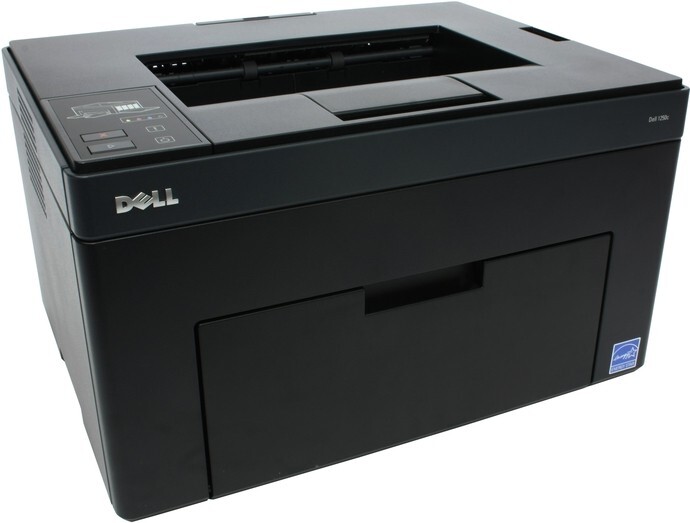
The Dell 1250 brought color laser printing down to a desktop-friendly size and price: a single-function machine with a straightforward USB setup, aimed at home offices and tiny workgroups that need crisp color for flyers, charts and everyday documents without paying for features they will never use. Its toner comes in two naming styles for the same four high-yield cartridges - the long part numbers, 331-0778 black, 331-0777 cyan, 331-0780 magenta and 331-0779 yellow, and the short codes 810WH, C5GC3, XMX5D and WM2JC for the same four slots. Whichever number is printed on the cartridge you pull out, the replacement below matches it.
Running costs matter most on a budget color laser, and the 1250 was sold on exactly that promise: inexpensive hardware, then toner that does not punish you for owning it. Every listing on this page is a high-yield compatible cartridge, so the cost per page stays low and replacements come less often than the standard sizes this printer originally shipped against. Small offices tend to print in bursts - a flyer run here, a set of charts there - and a cartridge shelf with one spare black and one set of colors covers nearly every week a 1250 will ever see.
Toner Cartridges for Dell 1250
| Cartridge | Color | Page Yield |
|---|---|---|
| 331-0778 | Black, high yield | See product page |
| 810WH | Black, high yield | See product page |
| 331-0777 | Cyan, high yield | See product page |
| C5GC3 | Cyan, high yield | See product page |
| 331-0780 | Magenta, high yield | See product page |
| XMX5D | Magenta, high yield | See product page |
| 331-0779 | Yellow, high yield | See product page |
| WM2JC | Yellow, high yield | See product page |
| 331-0778, black (1250 listing) | Black, high yield | See product page |
| 331-0777, cyan (1250 listing) | Cyan, high yield | See product page |
| 331-0777, cyan (alternate 1250 listing) | Cyan, high yield | See product page |
| 331-0780, magenta (1250 listing) | Magenta, high yield | See product page |
| 331-0779, yellow (1250 listing) | Yellow, high yield | See product page |
| 810WH, 2 Pack | Black, high yield | See product page |
| 810WH, 3 Pack | Black, high yield | See product page |
| 810WH, 5 Pack | Black, high yield | See product page |
| 331-0778, 3 Pack | Black, high yield | See product page |
| 331-0778, Black 2 Pack (1250 listing) | Black, high yield | See product page |
| 331-0778, Black 3 Pack (1250 listing) | Black, high yield | See product page |
| 331-0778, Black 5 Pack (1250 listing) | Black, high yield | See product page |
| Dell 1250 High Yield, 4 Color Set | Black, cyan, magenta, yellow | See product page |
| Dell 1250 Premium Quality High Yield, 4 Color Set | Black, cyan, magenta, yellow | See product page |
| 331-0778 / 331-0777 / 331-0780 / 331-0779, 4 Color Set | Black, cyan, magenta, yellow | See product page |
| 810WH / C5GC3 / XMX5D / WM2JC, 4 Color Set | Black, cyan, magenta, yellow | See product page |
| Dell 1250, 4 Color Set (long codes) | Black, cyan, magenta, yellow | See product page |
| Dell 1250, 4 Color Set (alternate listing) | Black, cyan, magenta, yellow | See product page |
| C5GC3 / XMX5D / WM2JC, 3 Color Set | Cyan, magenta, yellow | See product page |
| Dell 1250, 3 Color Set (colors only) | Cyan, magenta, yellow | See product page |
| Dell 1250, 6 Color Set (colors only) | Cyan, magenta, yellow | See product page |
| 2 Black and CMY, 5 Color Set (short codes) | Black, cyan, magenta, yellow | See product page |
| Dell 1250, 5 Color Set | Black, cyan, magenta, yellow | See product page |
| 2 x CMY, 6 Color Set (short codes) | Cyan, magenta, yellow | See product page |
| 2 x BCMY, 8 Color Set (short codes) | Black, cyan, magenta, yellow | See product page |
| Dell 1250, 8 Color Set | Black, cyan, magenta, yellow | See product page |
Which cartridge should you buy?
Start with the code on your old cartridge. If it shows a long number, order from the 331-0778 series listings; if it shows a short code, use the 810WH series - they are the same cartridges under Dell two naming styles, and both are stocked as singles, black multipacks and color sets. For everyday use, single high-yield cartridges replaced one color at a time are the economical pattern: the 1250 empties its colors at different rates, so there is no reason to retire a half-full magenta because the yellow ran dry. Black is the exception worth stocking ahead, and the 2, 3 and 5-packs of black exist for that. Choose a 4 Color Set when several cartridges are low together or when you are setting up a spare shelf from scratch; the Premium Quality set is the closest equivalent to the original build. All compatible cartridges here include a 1-year warranty and 1-year returns.
Chip, toner and everyday use
The 1250 reads each cartridge chip to report levels, so a replacement that is not pushed fully into its slot can trigger a false toner warning; reseating it firmly almost always clears that. When a color starts printing thin, take that cartridge out and rock it gently from side to side - the toner settles evenly again and output often recovers for a good stretch of pages. Smudges that wipe off the finished page point away from the cartridge entirely, toward the fuser, while smudges fused into the paper suggest a dirty drum or a cartridge past its best. Keep unopened spares in a cool, dark drawer; budget printers often sit near windows, and heat is quietly hard on stored toner.
Frequently Asked Questions
What toner cartridges fit the Dell 1250?
Four high-yield cartridges, each known by two codes: black is 331-0778 or 810WH, cyan is 331-0777 or C5GC3, magenta is 331-0780 or XMX5D, and yellow is 331-0779 or WM2JC. Buying by the code printed on your current cartridge avoids mismatches.
Why does my 1250 say a color is low when I mostly print black?
Because the printer uses a little color toner even on mostly-black pages, for calibration and registration routines that keep the four drums aligned. A color cartridge can therefore drift low ahead of the black one; it is normal behavior, not a leak or a fault.
Are the long-code and short-code cartridges really interchangeable?
Yes. Dell sold the same four cartridges under both naming styles, so a slot that held an 810WH black accepts the 331-0778 black, and likewise for each color pair. Order by whichever code is printed on the cartridge you already have, and the listings here cover both.
Why does my 1250 leave toner smudges on pages?
Smudges that wipe off mean the toner is not being fused to the paper, which points to the fuser rather than the cartridge. Smudges baked into the page usually mean a dirty drum or a cartridge past its best - try a fresh cartridge first, since it is the cheaper and easier of the two fixes.
More printers that use the same cartridges
This high-yield cartridge family is shared well beyond the 1250 itself; the printers and cartridge pages below all belong to the same supply line: Color Laser 1250C, Color Laser 1250CNW, Color Laser 1350, Color Laser 1350CNW, Color Laser 1355, Color Laser 1355CN, Color Laser 1355CNW, Color Laser 1755NF, Color Laser 1755NFW, Color Laser C1760, Color Laser C1760NW, Color Laser C1765, Color Laser C1765NF, Color Laser C1765NFW, Dell (331-0778, 331-0777, 331-0780, 331-0779), Dell (810WH, C5GC3, XMX5D, WM2JC), Dell (XKP2P, YX24V, MHT79, J95NM), Multifunction 1355CN, Multifunction 1355CNW.