





 See Compatible Printers
 Read more about our ink!
Dell
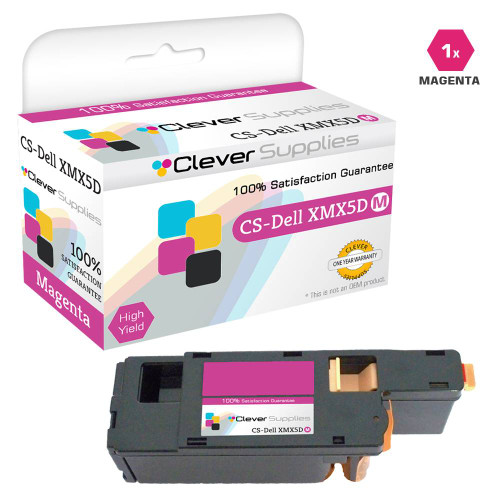
Compatible Dell XMX5D Laser Toner Cartridge High Yield Magenta
- Page Yield:
- 1,400 Pages
- Availability:
- In Stock
- Shipping:
- Calculated at Checkout

Amazon Price:

- Page Yield:
- 1,400 Pages
- Availability:
- In Stock
- Shipping:
- Calculated at Checkout
- Compatible Printers
- Specifications
- SKU:
- XMX5D
- Printer Brand:
- Dell
- OEM Number:
- XMX5D
- Ink Color:
- High Yield Magenta
- Page Yield:
- 1,400 Pages
- Printer Type:
- Laser Cartridge Set
- Condition:
- New Compatible
- Description
- Yields up to 1400 pages
- Compatible Dell High Yield Magenta color Toner Cartridge consistently produces high-resolution printouts with enhanced graphics and sharp text
- Unlike bargain brand toners Dell High Yield XMX5D Toner Cartridge is specifically engineered to work in Dell printers for optimum quality and performance
- Packaging: Each
- Compatible with: Dell C1760NW C1765NF C1765NFW C1765NFW 1350 C1765 1755NF series color printers
- Print technology: Laser
- Ink/Toner Color: Magenta
- Ink/Toner Pack Size: 1/Pack
- Cartridge Yield Type: High Yield
- Ink/Toner Cartridge Type: Compatible
- Reviews

/> 

Compatible Dell XMX5D Laser Toner Cartridge High Yield Magenta produces high-resolution printouts sharper images and text.
Dell high yield magenta color toner cartridge yields up to 1400 pages. Cartridge is specifically designed to work in Dell printers for optimum quality and performance.
Features:
Frequently Asked Questions
What are the warning signs that the XMX5D magenta is nearly empty?
Watch the reds first. On a Dell Color Laser C1760nw or C1765nf, a fading XMX5D turns reds orange, makes purple look blue and washes pink out of photographs, while text stays perfectly sharp — a pattern owners often blame on the printer itself. A test page with a bold red block tells the story in seconds: if the block looks rusty or uneven, the magenta is the culprit.
What does the XMX5D cost me per printed page?
The XMX5D is rated at up to 1,400 pages and priced at $25.24, which works out to roughly 1.80 cents per page. Small Dell color cartridges like this one trade a higher per-page cost for a low upfront price and a compact printer; that is the honest profile of this cartridge, and for light-to-moderate color printing it is a fair trade.
Which printers take the XMX5D?
This magenta serves the Dell Color Laser 1250c, 1350cnw, 1355cn, 1355cnw, 1755nf, 1755nfw, C1760nw and C1765nf. The order code to match is XMX5D — if that is the number on the magenta cartridge you pulled out, this listing is the same cartridge. Full details of the range are on our Dell toner page.
Will one new XMX5D fix banding that runs across every color?
Probably not, and we would rather say so than sell you a cartridge that cannot help. Banding or streaks that appear in all colors usually point to the printer rather than a single cartridge. If the defect shows only in reds, pinks and purples, the XMX5D is the likely fix; if it shows everywhere, call us first — support runs Monday to Friday, 9 AM to 5 PM CST — and we will help you narrow it down.
What protection comes with this compatible magenta?
The XMX5D includes a 1-year warranty and 1-year free returns, spelled out on our shipping and returns page. Early fading, leaking or a cartridge the printer refuses are covered outcomes: reach out and we will replace or refund according to the policy rather than leaving you with a dud.
From where does my XMX5D ship?
From the nearest of our four warehouses in Illinois, Pennsylvania, Georgia and California that has it in stock. That routing keeps a small, light cartridge like the XMX5D moving quickly without cross-country detours, and it is the same whichever of the eight supported Dell models you are feeding.
What is involved in fitting the XMX5D?
Open the printer and pull out the old magenta cartridge. Unpack the XMX5D, remove its protective material, and rock it gently from side to side a few times to loosen the toner after transit. Slide it into the magenta slot until it seats firmly, then print a page carrying strong reds or a photograph: full, even color on that first test page confirms the new cartridge is properly home.
Which kinds of work drain the XMX5D fastest?
Anything red, pink or purple, and photographs above all. Magenta is a core ingredient in skin tones and warm colors, so a month of photo printing or full-color flyers pulls on the XMX5D far harder than the same month of letters and invoices, which barely touch it. If your color work comes in bursts, expect the interval between magenta changes to follow those bursts rather than the calendar.
Reds still look wrong after fitting a new XMX5D — what else could it be?
Check the other colors before blaming the new cartridge. Rusty reds can also mean the yellow is running low, since red is built from magenta and yellow together. Print a test page with a separate solid block for each color: if the magenta block is strong and even, the XMX5D is doing its job and the weak block names the real culprit. If you cannot pin it down, support is available Monday to Friday, 9 AM to 5 PM CST.
How should I handle the spent XMX5D?
Return it to the box the new cartridge came in and mark it clearly as used, then keep it apart from any spare stock so the two are never confused. Holding on to it for a few days costs nothing and lets you compare output if the replacement misbehaves. Once the new XMX5D has proved itself, the empty goes out with a toner recycling collection.
About This XMX5D Magenta Cartridge
The compatible Dell XMX5D is a high yield magenta toner cartridge rated at up to 1,400 pages, priced at $25.24 (about 1.80 cents per page), for the Dell Color Laser 1250c, 1350cnw, 1355cn, 1355cnw, 1755nf, 1755nfw, C1760nw and C1765nf. It replaces the magenta slot only, is backed by a 1-year warranty and 1-year free returns, and ships from our warehouses in IL, PA, GA and CA.
Related Items

Dell
Compatible Dell 5PG7P Laser Toner Cartridge High Yield Magenta
/>


Dell
Compatible Dell Laser Toner Cartridges High Yield 3 Color Set (C5GC3/ XMX5D/ WM2JC)
/>

Dell
Compatible Dell Laser Toner Cartridges High Yield 4 Color Set (810WH/ C5GC3/ XMX5D/ WM2JC)
/>

Xerox
Compatible Xerox 106R02226 Laser Toner Cartridge High Yield Magenta
/>