





 See Compatible Printers
 Read more about our ink!
Dell
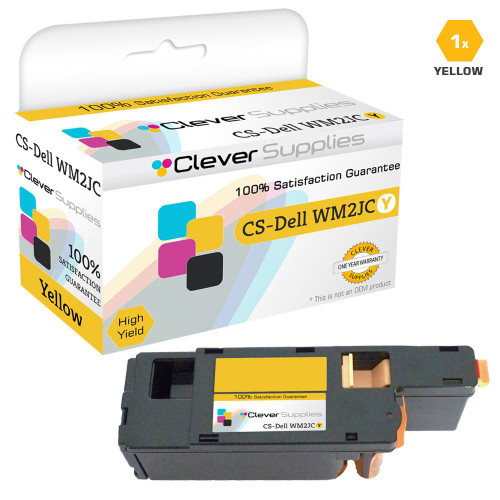
Compatible Dell WM2JC Laser Toner Cartridge High Yield Yellow
- Page Yield:
- 1,400 Pages
- Availability:
- In Stock
- Shipping:
- Calculated at Checkout

Amazon Price:

- Page Yield:
- 1,400 Pages
- Availability:
- In Stock
- Shipping:
- Calculated at Checkout
- Compatible Printers
- Specifications
- SKU:
- WM2JC
- Printer Brand:
- Dell
- OEM Number:
- WM2JC
- Ink Color:
- High Yield Yellow
- Page Yield:
- 1,400 Pages
- Printer Type:
- Laser Cartridge
- Condition:
- New Compatible
- Description
- Yields up to 1400 pages
- Compatible Dell High Yield Yellow color Toner Cartridge consistently produces high-resolution printouts with enhanced graphics and sharp text
- Unlike bargain brand toners Dell High Yield WM2JC Toner Cartridge is specifically engineered to work in Dell printers for optimum quality and performance
- Packaging: Each
- Compatible with: Dell C1760NW C1765NF C1765NFW C1765NFW 1350 C1765 1755NF series color printers
- Print technology: Laser
- Ink/Toner Color: Yellow
- Ink/Toner Pack Size: 1/Pack
- Cartridge Yield Type: High Yield
- Ink/Toner Cartridge Type: Compatible
- Reviews

/> 

Compatible Dell WM2JC Laser Toner Cartridge High Yield Yellow produces high-resolution printouts sharper images and text.
Dell high yield yellow color toner cartridge yields up to 1400 pages. Cartridge is specifically designed to work in Dell printers for optimum quality and performance.
Features:
Frequently Asked Questions
Why does a low yellow cartridge change colors I would never connect with yellow?
Because yellow is a building block, not just a highlight color. On the Dell Color Laser 1355cn and its siblings, green is cyan plus yellow, warm skin tones need yellow, and even neutral grays carry a yellow component. When the WM2JC runs low, greens go blue, faces look cold and prints take on a magenta cast — often before the printer ever warns you. Replacing the WM2JC restores the full mix at once.
How many pages should I realistically expect from the WM2JC?
The WM2JC is rated at up to 1,400 pages at the standard 5% coverage. Photo-heavy or full-color pages use far more than 5%, so a household printing pictures will see fewer pages, while mixed text-and-graphics office work usually lands close to the rating. At $25.24, that is about 1.80 cents per page for yellow — typical for this compact cartridge class, and we state it plainly rather than dressing it up.
Is WM2JC the right yellow for my printer?
The WM2JC is the high yield yellow for the Dell Color Laser 1250c, 1350cnw, 1355cn, 1355cnw, 1755nf, 1755nfw, C1760nw and C1765nf. If the cartridge you removed from the yellow slot is stamped WM2JC, you are looking at its direct replacement. Each color in this family has a distinct code, so the number on the old cartridge settles the question.
What is covered if this compatible yellow disappoints?
Every WM2JC is covered by a 1-year warranty and 1-year free returns — the details are on our shipping and returns page. Premature fading, streaking or a cartridge that stops being recognized are all reasons to call us, Monday to Friday, 9 AM to 5 PM CST, rather than reasons to absorb the loss.
Do I need to replace the other colors when I install the WM2JC?
No. The four cartridges in these Dell models work independently, and the printer tracks them separately. Install the WM2JC on its own, then print a page containing yellow, green and a photograph: if all three look right, the rest of your cartridges still have useful life and can stay put.
How quickly can I get a WM2JC if the printer stops mid-job?
We ship from four warehouses — Illinois, Pennsylvania, Georgia and California — and route your order from the closest one with stock. The full compatible range for these printers is listed on our Dell page. Because yellow failures announce themselves as wrong colors rather than blank pages, many owners keep a spare WM2JC ready instead of diagnosing prints under deadline.
What is the fitting routine for the WM2JC?
Open the printer and lift out the old yellow cartridge. Unpack the WM2JC, remove its protective material, and give it a gentle rock from side to side to loosen the toner after its journey. Then slide it into the yellow slot until it seats. The cartridges in these Dell models work independently, so nothing else needs to come out or be disturbed for a yellow change.
How do I verify the new WM2JC has actually fixed the color shift?
Reprint the page that first looked wrong. Greens should be green again rather than blue, skin tones should look warm instead of cold, and the magenta cast should be gone. Laying the old print and the new one side by side makes the verdict obvious. If the colors are still off with a fresh WM2JC in place, another cartridge is low as well — yellow was only part of the story.
Yellow runs out mid-job — finish the run or swap the WM2JC first?
It depends on what the job is. Text-heavy documents barely touch the yellow cartridge, so a run of letters or forms can finish without visible harm. Anything color-critical — photographs, charts, branded material — will drift further off color with every page, so stop and swap first; the change takes only a few minutes and saves reprinting the whole batch afterward.
How should a spare WM2JC be stored in a home or small office?
Sealed in its box, flat, in a drawer or cupboard away from heat and direct sunlight. Stored that way, the cartridge waits ready for as long as it takes the installed one to fade. Because a failing yellow announces itself as wrong colors rather than an empty tray — often discovered against a deadline — a properly stored spare earns its drawer space many times over.
About This WM2JC Yellow Cartridge
The compatible Dell WM2JC is a high yield yellow toner cartridge rated at up to 1,400 pages and priced at $25.24 (about 1.80 cents per page). It fits the Dell Color Laser 1250c, 1350cnw, 1355cn, 1355cnw, 1755nf, 1755nfw, C1760nw and C1765nf, replacing only the yellow slot. It is covered by a 1-year warranty and 1-year free returns, with support Monday to Friday, 9 AM to 5 PM CST and shipping from IL, PA, GA or CA.
Related Items

Dell
Compatible Dell 3P7C4 Laser Toner Cartridge High Yield Yellow
/>


Dell
Compatible Dell Laser Toner Cartridges High Yield 3 Color Set (C5GC3/ XMX5D/ WM2JC)
/>

Dell
Compatible Dell Laser Toner Cartridges High Yield 4 Color Set (810WH/ C5GC3/ XMX5D/ WM2JC)
/>

Xerox
Compatible Xerox 106R01509 Laser Toner Cartridge High Yield Yellow
/>