




SF-650P
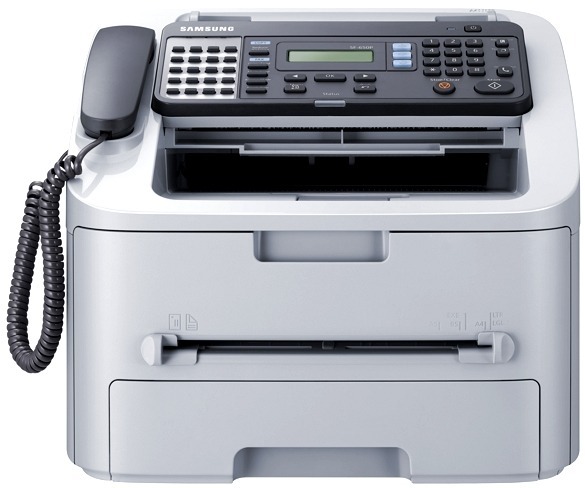
Samsung's SF-650P squeezes a proper laser fax into a compact body meant for front desks and back offices where counter space is short and faxes still need to land on paper quickly. Copy and print support round out the unit, but its reason for existing is the fax line. It feeds on the same supply family as its SF-650 sibling: the MLT-D105S in standard yield, or the MLT-D105L high-yield cartridge that this page stocks in single and multipack form.
Compact fax units earn their keep in the in-between spaces of a business — the reception counter, the parts desk, the small office that cannot justify a full multifunction machine. What those spots share is unpredictability: nobody schedules an incoming fax. The SF-650P answers that with laser output, so a received page comes out sharp, dry and ready to hand to a customer or file away without a second thought.
Toner Cartridges for SF-650P
| Cartridge | Color | Page Yield |
|---|---|---|
| SF-650P Toner Cartridge (MLT-D105L) | Black | See product page |
| MLT-D105L High-Yield Toner Cartridge | Black | See product page |
| MLT-D105L High-Yield Toner Cartridge — 2 Pack | Black | See product page |
| MLT-D105L High-Yield Toner Cartridge — 3 Pack | Black | See product page |
| MLT-D105L High-Yield Toner Cartridge — 5 Pack | Black | See product page |
Which cartridge should you buy?
There is one fit to get right and one yield decision to make. The fit is the MLT-D105 family; inside it, Samsung offers the MLT-D105S standard cartridge and the MLT-D105L high-yield version. This page stocks the L, because compact fax units tend to live far from the supply closet and benefit from longer stretches between changeovers. A front desk that receives a handful of faxes a day does fine with the single cartridge or the listing sold under the SF-650P's own name. Busier counters should look at the 2 pack, 3 pack or 5 pack: the per-page cost falls, and the machine never sits empty while a shipment is in transit. Every option here carries a 1-year warranty with 1-year returns behind it.
Chip, toner and everyday use
A small chip on the cartridge reports toner levels to the SF-650P, and clean contacts keep that conversation honest. When a cartridge goes in, pull every seal and tab first, keep fingers off the chip, and push the unit home until it sits level. If output fades near the end of a cartridge's life, lifting it out and rocking it gently from side to side redistributes the remaining toner and often restores even coverage for a while longer. Store the next cartridge sealed, flat and indoors — a dry shelf beats a garage through every season.
Frequently Asked Questions
Does the SF-650P take color cartridges?
No. This is a monochrome laser fax, so black is the only color it will ever ask for. Order the MLT-D105L high-yield cartridge from this page, or the MLT-D105S if you are buying Samsung's standard-yield version elsewhere in the family. Anyone offering you a cyan or magenta cartridge for this machine is selling you a return trip.
Which wears out first on the SF-650P — toner or drum?
Toner, by a wide margin. The cartridge and the imaging drum are separate parts with very different service lives, and the drum typically survives several cartridge changes. That is why nearly every supply order for this machine is simply another MLT-D105L. Suspect the drum only when defects keep repeating in the same rhythm down the page after a fresh cartridge has gone in.
Why do vertical streaks repeat on every page my SF-650P prints?
A mark that returns at regular intervals usually traces back to the drum surface rather than the toner supply. Before replacing anything, wipe the accessible rollers with a dry, lint-free cloth — loose toner shaken free during a recent cartridge change can spot pages temporarily. If the rhythm of the streak survives that cleaning and a cartridge swap, the drum is the part asking for attention.
Can I stretch a cartridge that the SF-650P calls empty?
Often, yes, at least for a while. The low-toner warning is an estimate, not a measurement of an empty tank, and output quality is the honest signal. Remove the cartridge, rock it gently to level the toner inside, and keep printing while the spare you ordered is on its way. When pages stay pale after that treatment, the cartridge really has given what it had.
More printers that use the same cartridges
One supply shelf covers the whole MLT-D105 family, including these Samsung models: SCX-4600, SCX-4623, SCX-4623F, SCX-4623FN, SCX-4623FW, ML-1910, ML-1915, ML-2525, ML-2525W, ML-2526, ML-2540, ML-2540R, ML-2545, ML-2580, ML-2580N, ML-2581, ML-2850N, SF-650, Samsung-MLTD105.