




SCX-4623
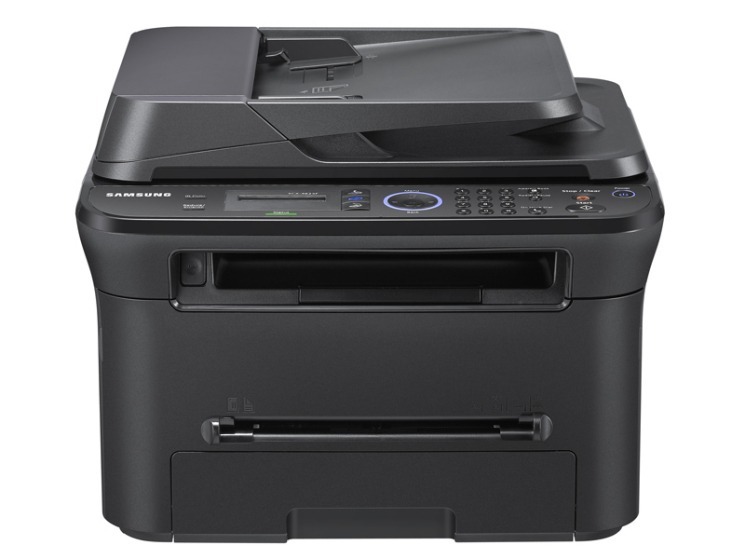
The Samsung SCX-4623 is the base multifunction of the 4623 workgroup line: it prints, scans and copies, and leaves faxing to its F, FN and FW siblings. One black cartridge family feeds it, in two capacities — the standard MLT-D105S, and the high-yield MLT-D105L, which is what this page stocks: as a single cartridge, in two-, three- and five-packs, and in a listing that carries the printer's own name.
A shared MFP earns its place by not interrupting anyone, and the SCX-4623's supply routine is built for exactly that. There is no fax line to manage and no color set to balance — one black cartridge, ordered under one code, swapped in minutes when the workgroup's output starts to thin. Offices that print steadily but fax rarely or never get the full print-scan-copy toolkit here without paying for hardware they will never touch, and the high-yield cartridge keeps the interval between swaps long.
Toner Cartridges for SCX-4623
| Cartridge | Color | Page Yield |
|---|---|---|
| MLT-D105L High Yield Toner Cartridge | Black | High yield — see product page |
| MLT-D105L High Yield Toner Cartridge — 2 Pack | Black | High yield — see product page |
| MLT-D105L High Yield Toner Cartridge — 3 Pack | Black | High yield — see product page |
| MLT-D105L High Yield Toner Cartridge — 5 Pack | Black | High yield — see product page |
| SCX-4623 Toner Cartridge (MLT-D105L) | Black | High yield — see product page |
Which cartridge should you buy?
Two capacities, one decision. The MLT-D105S is the standard fill, suited to a machine that sees a few documents a day. The MLT-D105L carries more toner in the same shell, so a shared printer goes longer between swaps and each page costs less to produce — for a workgroup machine, that is normally the right default. If the printer sits within reach of several desks, the two-, three- and five-packs cut reorder frequency further, and one sealed spare on the shelf means a low-toner morning never turns into a stalled office. The listing sold under the SCX-4623 name is the same MLT-D105L cartridge, so pick whichever listing style you prefer when reorder time comes.
Chip, toner and everyday use
The SCX-4623 reads the chip on the cartridge to track its toner, so seat a fresh unit firmly until it clicks — a half-seated cartridge is the usual reason a printer claims not to see a cartridge that is plainly there. When pages start to fade near the end of a cartridge's life, pull it out and rock it gently from side to side; redistributing the remaining toner evens coverage back out for a while and buys time until the replacement lands. Store spares sealed, upright and out of direct sunlight, and the toner inside stays evenly settled for its first day of work. Every cartridge on this page is covered by a 1-year warranty and 1-year returns.
Frequently Asked Questions
Which toner cartridge does the SCX-4623 use?
It takes the MLT-D105 family in black: the MLT-D105S in standard capacity, or the MLT-D105L high-yield version stocked on this page. The two are the same fit — the L simply holds more toner — so the choice is about how often you want to change cartridges, not about compatibility.
My pages are coming out faint. Is the toner empty, or is it the drum?
Light output on solid areas is the classic low-toner sign, and a fresh cartridge settles most cases. If a new MLT-D105L goes in and the same washed-out look stays, inspect the drum surface next: a worn, shiny finish or visible scoring means the imaging unit is reaching the end of its life. Diagnosing in that order keeps you from replacing the wrong part.
Does the SCX-4623 use the same cartridge as the SCX-4623FN and SCX-4623FW?
Yes. The whole 4623 family — this base model, the SCX-4623F, the SCX-4623FN and the SCX-4623FW — runs on the same MLT-D105 cartridges. The letters add fax, networking and wireless hardware; the toner bay never changes, so a single spare covers any of them.
Should a backup cartridge stay sealed until the day it is needed?
Yes — keep the spare in its original packaging, upright, in a cool, dry place away from sunlight. Standing it upright rather than on its side keeps the toner distributed and the seals unstressed, so when its turn comes it prints the way a fresh cartridge should.
More printers that use the same cartridges
The same MLT-D105 cartridges also power these Samsung printers: ML-1910, ML-1915, ML-2525, ML-2525W, ML-2526, ML-2540, ML-2540R, ML-2545, ML-2580, ML-2580N, ML-2581, ML-2850N, SCX-4600, SCX-4623F, SCX-4623FN, SCX-4623FW, SF-650, SF-650P, Samsung-MLTD105.