




Color LaserJet M276
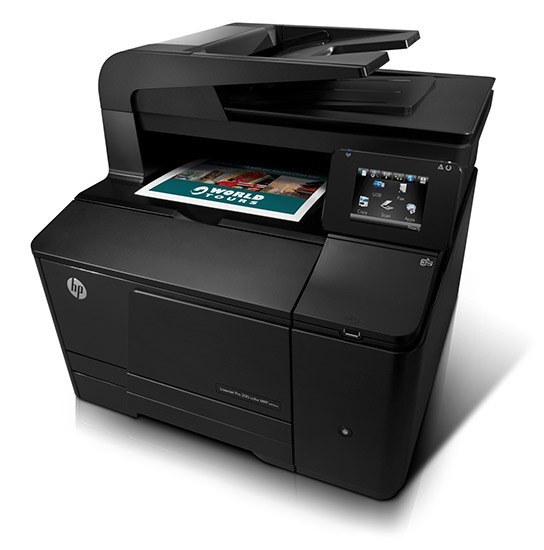
HP aimed the Color LaserJet M276 squarely at small teams when it launched this 2012-era color workgroup printer, and its reputation rests on consistent output rather than gimmicks. Under the covers it runs the HP 131A line: standard black CF210A, high-yield black CF210X (131X), and a color trio of cyan CF211A, yellow CF212A and magenta CF213A.
A workgroup printer earns its place by being boring in the best way: the same clean text page after page, shared by a handful of people who never think about it until the toner light comes on. The M276 was bought in large numbers by exactly those teams, which is why its cartridge family remains one of the most heavily stocked lines in this catalog — dozens of listings below, from single cartridges through eight-piece stock-up sets.
Toner Cartridges for Color LaserJet M276
| Cartridge | Color | Page Yield |
|---|---|---|
| CF210A | Black (standard) | See product page |
| CF210X | Black (high yield) | See product page |
| CF211A | Cyan | See product page |
| CF212A | Yellow | See product page |
| CF213A | Magenta | See product page |
| M276 Black (CF210A) | Black | See product page |
| M276 Cyan (CF211A) | Cyan | See product page |
| M276 Yellow (CF212A) | Yellow | See product page |
| M276 Magenta (CF213A) | Magenta | See product page |
| M276 4 Color Set | Four-color set | See product page |
Every remaining listing for this model on one line — alternate singles, black multi-packs and the larger color sets:
CF210A Toner Cartridge Black HP 131A Toner, 131A Toner Cartridge 4 Color Set (CF210A CF211A CF212A CF213A), 131X and HP 131A Toner Cartridge color laserjet 5 Color Set (2 x CF210X CF211A CF212A CF213A), 131A (CF210A) Toner Cartridge 2 Black, 131A (CF211A CF212A CF213A) Toner Cartridge 3 Color Set, 131A (CF210A) Toner Cartridge 5 Black, M276 (CF210A) Toner Cartridge 3 Black, M276 (CF210 CF211A CF212A CF213A) Toner Cartridge 4 Color Set, M276 (CF210 CF211A CF212A CF213A) Toner Cartridge 5 Color Set, PRO 200 COLOR M276 (CF210A) Toner Cartridge Black, PRO 200 COLOR M276 (CF213A) Toner Cartridge Magenta, PRO 200 COLOR PRINTER M276 (CF210A) Toner Cartridge 2 Black, PRO 200 COLOR PRINTER M276 (CF210 CF211A CF212A CF213A) Toner Cartridge 4 Color Set, PRO 200 M276 (CF210 CF211A CF212A CF213A) Toner Cartridge 4 Color Set, 131A (CF210A) Toner Cartridge Black, 131A (CF211A) Toner Cartridge Cyan, 131A (CF212A) Toner Cartridge Yellow, M276 (CF210A) Toner Cartridge 3 Black, M276 (CF211A CF212A CF213A) Toner Cartridge 3 Color Set, M276 (CF210A CF211A CF212A CF213A) Toner Cartridge 5 Color Set, PRO 200 CLR PRINTER M276 (CF211A CF212A CF213A) Toner Cartridge 3 Color Set, PRO 200 CLR PRINTER M276 (CF210 CF211A CF212A CF213A) Toner Cartridge 5 Color Set, PRO 200 COLOR PRINTER M276 (CF210A) Toner Cartridge 3 Black, PRO 200 COLOR PRINTER M276 (CF213A) Toner Cartridge Magenta, 131A (CF210 CF211A CF212A CF213A) Toner Cartridge 4 Color Set
Which cartridge should you buy?
Workgroup printing is black-heavy, so decide the black tier first. A standard CF210A covers a quiet desk; a shared M276 that prints all day belongs on the high-yield CF210X, which cuts both cost per page and the number of interruptions. When black volume is predictable, the two, three and five-black multi-packs in the listings above remove reordering from someone's to-do list entirely. Colors are the opposite pattern: they fade one at a time and unevenly, so buy them as singles and keep the four and five-color sets for the day the whole machine gets refreshed. All of the compatible cartridges on this page include a 1-year warranty and 1-year returns.
Chip, toner and everyday use
Each cartridge's chip reports its level to the M276 as soon as it is installed, so a replacement needs no counter reset — open the door, slide the old unit out, seat the new one, and print. If the panel questions a new cartridge, a slow reseat with the printer on settles it in almost every case. Treat the printed yield as a five-percent-coverage estimate: a workgroup that prints presentation pages with heavy color blocks will see shorter real life from the color cartridges than from the black. Keep the spare shelf simple — one black plus whichever color your team burns fastest.
Frequently Asked Questions
Which codes does the Color LaserJet M276 use?
Five: CF210A and CF210X for black, and CF211A (cyan), CF212A (yellow) and CF213A (magenta) for color. The code printed on the cartridge coming out is the code to match on the box going in.
How do I clear a paper jam without tearing the sheet?
Turn the printer off and pull the jammed sheet slowly through the rear or toner access door, always in the direction the paper travels. Hunting for torn scraps afterward — and fanning the reloaded stack — prevents the repeat jam.
Can I run the high-yield black with standard colors?
Yes. The tiers mix freely; the black slot's choice has no effect on the color slots. Many workgroups run a CF210X black permanently and replace colors singly as they fade.
Why are there so many listings for the same cartridges?
Years of demand produced singles under several naming styles, plus multi-packs and sets in sizes from two to eight pieces. They are the same cartridge family — pick by pack size and the code on your old cartridge.
More printers that use the same cartridges
The rest of the 131A family, in reverse order:
LaserJet Pro 200 color Printer M276NW, LaserJet Pro 200 color Printer M276, LaserJet Pro 200 color Printer M251NW, LaserJet Pro 200 color Printer M251, LaserJet Pro 200 color M276NW, LaserJet Pro 200 color M276, LaserJet Pro 200 color M251NW, LaserJet Pro 200 color M251, HP 131A, Color LaserJet Pro 200 M276NW, Color LaserJet Pro 200 M276N, Color LaserJet Pro 200 M276, Color LaserJet Pro 200 M251NW, Color LaserJet Pro 200 M251N, Color LaserJet Pro 200 M251, Color LaserJet M276NW, Color LaserJet M251NW, Color LaserJet M251