




Color LaserJet M251NW
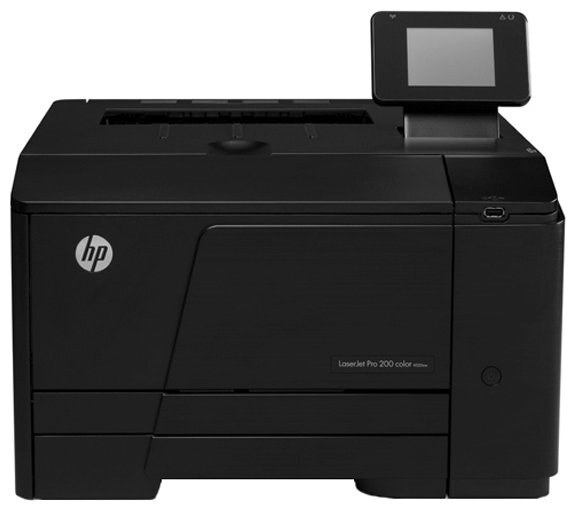
The Color LaserJet M251NW was HP's 2012-era answer for small teams that wanted a dependable color office printer without enterprise bulk. Second-hand units still circulate widely, because the consumable market for them never dried up. It runs on HP's 131A cartridge family: the standard black is the CF210A, the high-yield black is the CF210X (131X), and the three color slots take the cyan CF211A, the yellow CF212A and the magenta CF213A.
What keeps this printer in service is its simplicity. It is a single-function color laser — no scanner lid, no fax modem — placed on a desk or shelf and shared over the network, doing one job for years. Owners tend to be small teams and home offices that print a modest but steady stream of documents with color in them: proposals, timetables, invoices with a logo. For that workload, the buying question is rarely about speed or features; it is about keeping five cartridge codes straight and a spare black within reach.
Toner Cartridges for Color LaserJet M251NW
| Cartridge | Color | Page Yield |
|---|---|---|
| CF210A | Black (131A standard) | See product page |
| CF210X | Black (131X high yield) | See product page |
| CF211A | Cyan | See product page |
| CF212A | Yellow | See product page |
| CF213A | Magenta | See product page |
| CF210A (CS listing) | Black | See product page |
| 131A Black | Black | See product page |
| 131A Cyan (CF211A) | Cyan | See product page |
| 131A Yellow (CF212A) | Yellow | See product page |
| M251NW 4 Color Set | Four-color set | See product page |
Further listings stocked for this printer — multi-packs, larger sets and alternate listings of the same cartridges:
- 131A Toner Cartridge 4 Color Set (CF210A CF211A CF212A CF213A)
- 131X and HP 131A Toner Cartridge color laserjet 5 Color Set (2 x CF210X CF211A CF212A CF213A)
- 131A (CF210A) Toner Cartridge 2 Black
- 131A (CF211A CF212A CF213A) Toner Cartridge 3 Color Set
- 131A (CF210A) Toner Cartridge 5 Black
- M251NW (CF210A) Toner Cartridge 2 Black
- M251NW (CF210 CF211A CF212A CF213A) Toner Cartridge 5 Color Set
- M251NW (CF210 CF211A CF212A CF213A) Toner Cartridge 8 Color Set
- PRO 200 COLOR M251NW (CF211A CF212A CF213A) Toner Cartridge 3 Color Set
- PRO 200 M251NW (CF211A CF212A CF213A) Toner Cartridge 3 Color Set
- PRO 200 CLR P M251NW (CF210 CF211A CF212A CF213A) Toner Cartridge 5 Color Set
- PRO 200 CLR PRINTER M251NW (CF210A) Toner Cartridge Black
- PRO 200 COLOR M251NW (CF210A) Toner Cartridge 3 Black
- PRO 200 COLOR PRINTER M251NW (CF212A) Toner Cartridge Yellow
- 131A (CF210 CF211A CF212A CF213A) Toner Cartridge 4 Color Set
Which cartridge should you buy?
Black first. A small team's color printer still spends most of its life printing text, so the black slot decides how often you are swapping cartridges. The standard CF210A is fine for light use; the high-yield CF210X is the better default once the printer is shared, because it stretches the swap interval and lowers the cost per page. The colors genuinely are independent — when one runs out, replace that one and leave the others alone. Sets make sense at a full refresh or when stocking a supply drawer: the four-color set covers every slot in one box, and the five-color set doubles the high-yield black for heavier months. Every compatible cartridge listed here carries a 1-year warranty and 1-year returns.
Chip, toner and everyday use
These cartridges are chipped, and the M251NW reads the chip as you slide the cartridge in — levels then show on the printer's status without any manual reset. If a fresh cartridge draws a recognition error, take it out and reseat it slowly until it sits flat; that fixes nearly every case. Remember that quoted yields are measured at five percent coverage, so a month of full-bleed color flyers will empty a color cartridge long before a month of letters does. When output starts to fade, rocking the cartridge gently side to side redistributes the remaining toner and usually buys enough pages to finish the job while a replacement ships.
Frequently Asked Questions
Is there a high-yield black for the M251NW?
Yes — the CF210X, the 131X tier of the family. It fits the same slot as the standard CF210A and simply holds more toner, so shared printers and heavier months are where it earns its keep.
Do I have to change all four cartridges together?
No. Each slot is tracked separately, and the printer will tell you which one is empty. Changing a cartridge that still has toner left only throws toner away.
My printer says toner is low but pages still look fine. What should I do?
Order the replacement, then keep printing. The low warning is an early estimate, not a hard stop — swap the cartridge when pages actually start to fade, and you will have the spare on hand when that moment comes.
Are these original HP cartridges?
These listings are Clever Supplies compatibles, built and chipped for the 131A codes above. They are covered by a 1-year warranty and 1-year returns, as opposed to the manufacturer coverage on original HP stock.
More printers that use the same cartridges
The complete 131A family — the M251 and M276 lines under all their store names:
Color LaserJet M251, Color LaserJet M276, Color LaserJet M276NW, Color LaserJet Pro 200 M251, Color LaserJet Pro 200 M251N, Color LaserJet Pro 200 M251NW, Color LaserJet Pro 200 M276, Color LaserJet Pro 200 M276N, Color LaserJet Pro 200 M276NW, HP 131A, LaserJet Pro 200 color M251, LaserJet Pro 200 color M251NW, LaserJet Pro 200 color M276, LaserJet Pro 200 color M276NW, LaserJet Pro 200 color Printer M251, LaserJet Pro 200 color Printer M251NW, LaserJet Pro 200 color Printer M276, LaserJet Pro 200 color Printer M276NW