




LaserJet Pro 200 color M251
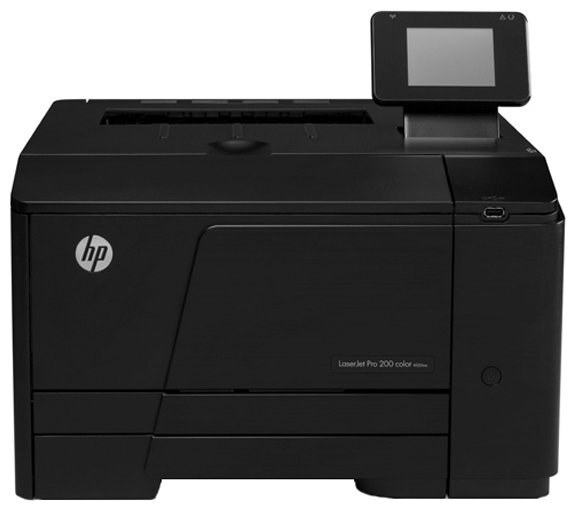
A 2012-era color workgroup printer for small teams, the LaserJet Pro 200 color M251 keeps color printing simple — it is the single-desk base model of its line, with no network layer and no fuss. It runs on the CF210A black cartridge or the high-yield CF210X (131X), with the CF211A cyan, the CF212A yellow and the CF213A magenta alongside. Together those four cartridges form the HP 131A family, and this page stocks the family as compatibles in singles, multipacks and sets.
One workstation, one printer, one small shelf of toner — that is the working picture this model was built for. It suits the desk where color actually earns its keep: the proposal with the chart on page two, the invoice run, the handout that has to look right. Because a single person usually owns the machine, its toner habits are personal too; the owner learns quickly which slot empties first and orders against that rhythm rather than a department schedule.
Toner Cartridges for LaserJet Pro 200 color M251
| Cartridge | Color | Page Yield |
|---|---|---|
| CF210A Black | Black | See product page |
| CF210X High Yield Black | Black | See product page |
| CF211A Cyan | Cyan | See product page |
| CF212A Yellow | Yellow | See product page |
| CF213A Magenta | Magenta | See product page |
| 131A 4 Color Set (CF210A CF211A CF212A CF213A) | Black + 3 colors | See product page |
| 131X & 131A 5 Color Set (2 x CF210X CF211A CF212A CF213A) | 2 Black + 3 colors | See product page |
| Pro 200 color M251 4 Color Set | Black + 3 colors | See product page |
The same family appears under a long list of model-named listings on this shelf — additional black multipacks, single colors and alternate sets, every one built on the same four codes:
131A (CF210A) — 2 Black; 131A (CF211A CF212A CF213A) — 3 Color Set; 131A (CF210A) — 5 Black; PRO 200 M251 (CF213A) — Magenta; 131A (CF210A) — Black; 131A (CF211A) — Cyan; 131A (CF212A) — Yellow; M251 (CF213A) — Magenta; M251 (CF212A) — Yellow; PRO 200 COLOR M251 (CF210A) — 3 Black; PRO 200 COLOR M251 (CF211A) — Cyan; PRO 200 COLOR M251 (CF213A) — Magenta; 131A (CF210 CF211A CF212A CF213A) — 4 Color Set.
Which cartridge should you buy?
The only real decision on this page is black. The standard CF210A is the economical cartridge for a desk that prints modestly, while the CF210X carries more toner and suits the workstation that runs color documents daily — fewer swaps, and a lower cost per page across its life. Colors should follow need: the CF211A, CF212A and CF213A deplete at their own pace, so replace the one that fades and leave the rest. A four-color set earns its place when the machine is freshly installed, when several slots run low together, or when you want a matched set before a heavy run. Every compatible cartridge sold here is covered by a 1-year warranty and 1-year returns.
Chip, toner and everyday use
Paper choice quietly decides how this printer’s output looks. Plain laser-rated office stock is the everyday answer; heavier laser paper carries presentations, and inkjet-only paper should never go through a laser engine, since its coating is not built for fuser heat. For the cartridges themselves: quoted yields assume ordinary text coverage, glossy full-bleed pages draw far more toner, and a cartridge stored sealed in a cool drawer will outlast one left in a hot windowsill. Keep the next black where you can reach it — on a single-desk machine, the spare’s location is the whole supply system.
Frequently Asked Questions
What cartridge codes does the LaserJet Pro 200 color M251 take?
The CF210A and its high-yield version the CF210X for black, plus the CF211A, CF212A and CF213A for cyan, yellow and magenta. Match the code on your current cartridge before ordering.
What type of paper should I use in the M251?
Plain laser-compatible office paper for everyday jobs and heavier laser-rated stock for presentations. Keep inkjet-only paper out of it — that paper is coated for liquid ink, not for a laser printer’s heated fuser.
How do I fix wrong or washed-out colors?
Run the color calibration or cleaning routine from the printer’s menu and confirm all four cartridges are properly seated. If one color is missing from prints entirely while the others print, that color’s cartridge has run out or failed and should be replaced.
Is the M251 a network printer?
No — this is the base configuration, a single-desk machine that connects to one workstation. Its networked siblings in the family list below share the same cartridges, which is why their listings and this one draw on one toner family.
More printers that use the same cartridges
The rest of the Pro 200 color family running on this cartridge set:
Color LaserJet M251, Color LaserJet M251NW, Color LaserJet M276, Color LaserJet M276NW, Color LaserJet Pro 200 M251, Color LaserJet Pro 200 M251N, Color LaserJet Pro 200 M251NW, Color LaserJet Pro 200 M276, Color LaserJet Pro 200 M276N, Color LaserJet Pro 200 M276NW, HP 131A, LaserJet Pro 200 color M251NW, LaserJet Pro 200 color M276, LaserJet Pro 200 color M276NW, LaserJet Pro 200 color Printer M251, LaserJet Pro 200 color Printer M251NW, LaserJet Pro 200 color Printer M276, LaserJet Pro 200 color Printer M276NW.