




LaserJet Pro 200 color M276
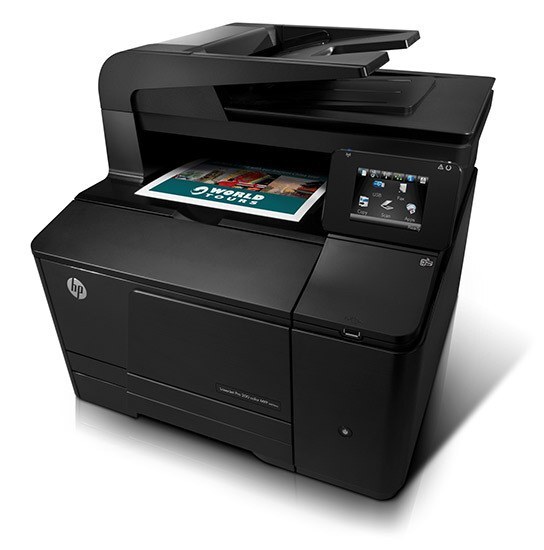
The LaserJet Pro 200 color M276 is the base-model color laser of the Pro 200 family — a 2012-era machine for the small team that prints from one workstation. Straightforward, compact and inexpensive to keep in toner, it draws on the CF210A black cartridge or the high-yield CF210X (131X), with the CF211A cyan, the CF212A yellow and the CF213A magenta in the color slots. The four belong to the HP 131A family, stocked here as compatible singles, multipacks and sets.
Base model is not a criticism of this printer; it is the specification its buyers wanted. No extra layers between the workstation and the page, a footprint that fits the corner of a shared desk, and running costs low enough that nobody itemizes them. The M276’s economy shows most in its toner shelf — one standard tier of colors, a choice of two blacks, and a deep bench of listings because the family sold in such numbers.
Toner Cartridges for LaserJet Pro 200 color M276
Colors lead the table this time, since they are what this machine is bought for:
| Cartridge | Color | Page Yield |
|---|---|---|
| CF211A Cyan | Cyan | See product page |
| CF212A Yellow | Yellow | See product page |
| CF213A Magenta | Magenta | See product page |
| CF210A Black | Black | See product page |
| CF210X High Yield Black | Black | See product page |
| 131A 4 Color Set (CF210A CF211A CF212A CF213A) | Black + 3 colors | See product page |
| 131X & 131A 5 Color Set (2 x CF210X CF211A CF212A CF213A) | 2 Black + 3 colors | See product page |
| Pro 200 color M276 4 Color Set | Black + 3 colors | See product page |
Model-named listings for the same codes round out the shelf — M276 singles and black packs, plus the shared family multipacks:
131A (CF210A) — 2 Black; 131A (CF211A CF212A CF213A) — 3 Color Set; 131A (CF210A) — 5 Black; M276 (CF210A) — 3 Black; M276 (CF210 CF211A CF212A CF213A) — 4 Color Set; M276 (CF210 CF211A CF212A CF213A) — 5 Color Set; M276 (CF210A) — Black; M276 (CF211A) — Cyan; M276 (CF213A) — Magenta; M276 (CF212A) — Yellow; PRO 200 COLOR M276 (CF210A) — Black; PRO 200 COLOR M276 (CF213A) — Magenta; PRO 200 COLOR PRINTER M276 (CF210A) — 2 Black; PRO 200 COLOR PRINTER M276 (CF210 CF211A CF212A CF213A) — 4 Color Set; PRO 200 M276 (CF210 CF211A CF212A CF213A) — 4 Color Set; 131A (CF210A) — Black; 131A (CF211A) — Cyan; 131A (CF212A) — Yellow; M276 (CF210A) — 3 Black; M276 (CF211A CF212A CF213A) — 3 Color Set; M276 (CF210A CF211A CF212A CF213A) — 5 Color Set; PRO 200 CLR PRINTER M276 (CF211A CF212A CF213A) — 3 Color Set; PRO 200 CLR PRINTER M276 (CF210 CF211A CF212A CF213A) — 5 Color Set; PRO 200 COLOR PRINTER M276 (CF210A) — 3 Black; PRO 200 COLOR PRINTER M276 (CF213A) — Magenta; 131A (CF210 CF211A CF212A CF213A) — 4 Color Set.
Which cartridge should you buy?
Work backward from your print mix. A workstation that produces mostly black text with occasional color should spend its money on the black decision: the standard CF210A for light duty, the CF210X when the pages add up. Colors, by contrast, should be bought one at a time — the CF211A, CF212A and CF213A each empty on their own schedule, and replacing a healthy color early buys nothing. The four-color set is the tidy exception for a new setup or a full refresh, and the five-color set with its second black suits the desk that never wants to think about black at all. Compatible cartridges here carry a 1-year warranty and 1-year returns.
Chip, toner and everyday use
Compact machines live close to their owners, which makes two habits worth keeping. First, let a new cartridge settle: after fitting, print a few ordinary pages before judging density, since the first sheets after a swap can run light while toner distributes. Second, mind the environment — a cartridge stored in its sealed bag in a drawer will hold its fill far better than one left open on top of the printer in afternoon sun. Yields are rated at standard text coverage, so a workstation printing full-color one-pagers will cycle colors faster than the box numbers suggest.
Frequently Asked Questions
Which cartridge code goes in the black slot of the M276?
Either of the two blacks in this family: the standard CF210A or the high-yield CF210X. Checking the label on the old cartridge is the fastest way to confirm which one you have been running.
Should I buy standard or high-yield cartridges for the M276?
The high-yield black holds more toner and needs changing less often, while the standard version costs less per cartridge. Heavy printers usually come out ahead with high-yield; a light-use desk can stay standard and never notice the difference.
Are the M276 and M251 cartridges interchangeable?
Yes — the two lines share the 131A family, which is why both models appear in each other’s family lists below and draw on the same singles and sets on this shelf.
One color is fading. Must I replace the whole set?
No. Swap the fading color as a single and leave the other slots alone; each cartridge reports and empties independently.
More printers that use the same cartridges
The family that shares these cartridges, alphabetically:
Color LaserJet M251, Color LaserJet M251NW, Color LaserJet M276, Color LaserJet M276NW, Color LaserJet Pro 200 M251, Color LaserJet Pro 200 M251N, Color LaserJet Pro 200 M251NW, Color LaserJet Pro 200 M276, Color LaserJet Pro 200 M276N, Color LaserJet Pro 200 M276NW, HP 131A, LaserJet Pro 200 color M251, LaserJet Pro 200 color M251NW, LaserJet Pro 200 color M276NW, LaserJet Pro 200 color Printer M251, LaserJet Pro 200 color Printer M251NW, LaserJet Pro 200 color Printer M276, LaserJet Pro 200 color Printer M276NW.