






 See Compatible Printers
 Read more about our ink!
Hewlett Packard
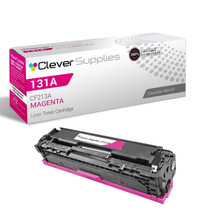
Compatible HP PRO 200 COLOR PRINTER M276 (CF213A) Toner Cartridge Magenta

Amazon Price:

- Page Yield:
- Color: 1800
- Availability:
- In Stock
- Shipping:
- Calculated at Checkout
- Compatible Printers
- LaserJet 200 Color M251n
- LaserJet 200 Color M276n
- LaserJet 200 M251nw
- LaserJet 200 M276nw
- LaserJet Pro 200 Color M251n
- LaserJet Pro 200 Color M276n
- LaserJet Pro 200 M251nw
- LaserJet Pro 200 M276nwi>
- Specifications
- SKU:
- CS-HP-PRO 200 COLOR PRINTER M276-M-1
- Printer Brand:
- Hewlett Packard
- OEM Number:
- CF213A
- Ink Color:
- Magenta
- Page Yield:
- Color: 1800
- Printer Type:
- Laser Cartridge
- Condition:
- New Compatible
- Description
- Reviews



The HP 131A Color Series offers a comprehensive lineup of printers, including the PRO 200 M251, PRO 200 M251N, PRO 200 M251NW, PRO 200 M276, PRO 200 M276N, PRO 200 M276NW, M251, M251NW, M276, and M276NW models. These printers are designed to meet various printing needs, from personal to professional, providing efficient and reliable performance. Among the compatible cartridges are the CF210A Black, CF211A Cyan, CF213A Magenta, and CF212A Yellow, known as the HP 131A toner cartridge and toner cartridge. These cartridges ensure consistent and high-quality prints, whether it's documents, photos, or marketing materials. The PRO 200 COLOR M251 and PRO 200 COLOR M276 series printers offer advanced features such as wireless connectivity and mobile printing capabilities, making them suitable for modern printing environments. Whether it's printing from a smartphone, tablet, or computer, these printers provide convenient and seamless printing solutions. With the HP 131A cartridges, users can expect vibrant and true-to-life colors, along with crisp and sharp text output. The CF210A Black cartridge delivers deep blacks for professional-looking documents, while the CF211A Cyan, CF213A Magenta, and CF212A Yellow cartridges ensure accurate color reproduction for graphics and images. Investing in the HP 131A Color Series printers and cartridges ensures efficient and reliable printing solutions that meet the demands of today's fast-paced work environments. Whether it's for home, small office, or corporate use, these printers deliver exceptional performance and quality prints every time.
Cross-reference: HP CF213A, the 131A magenta toner cartridge (1,800 pages), is the same cartridge Canon sells as Canon Cartridge 131 (black 6272B001AA, high-capacity black 6273B001AA, cyan 6271B001AA, yellow 6269B001AA, magenta 6270B001AA) for the Canon Color imageCLASS MF624Cw, MF628Cw and MF8280Cw and the Color imageCLASS LBP7110Cw printers. Canon rates Cartridge 131 black at 1,800 pages, the high-capacity black at 2,400 pages and each color at 1,800 pages (ISO/IEC standard); HP sells the same cartridge across two generations as the 131A and 312A families.
Frequently Asked Questions
How do I confirm this is the magenta my printer wants?
Pull the spent cartridge and read its label: if it says CF213A, this is the same cartridge — the magenta of the HP 131A family, sold singly at $32.03. Color names repeat across printer lines, but codes do not, so the code is the confirmation that counts.
What does magenta contribute that I would actually notice?
Portraits are where it shows first. Skin is built largely from magenta and its warm partner, so a fading CF213A makes faces look waxy and green-gray before anything else looks wrong. Reds, burgundies and purples follow, losing depth and turning rusty.
Our M276 mostly copies forms. Is magenta even used?
More than you would think. Red stamps, logos, highlighted fields and colored paper originals all ask for magenta in the copy, and the machine meters it whether the page came from the glass or from a computer. Pure text copies and faxes, on the other hand, run on black alone and leave this cartridge untouched.
What yield should we budget for?
The standard rating is 1,800 pages at light coverage. A forms-heavy office will land near or beyond it; an office copying photographs will land well short. Either way, the percentage readout on the machine is your live budget figure.
Is storage a concern if we buy ahead?
Hardly. Sealed, cool, dry and out of sunlight, a spare keeps for a long time. Write the arrival month on the carton, install the oldest spare first, and rock the cartridge gently before fitting it so the toner inside is evenly spread.
What happens if I have a problem after fitting it?
You are covered by a 1-year warranty and a 1-year free returns period. We ship from warehouses in IL, PA, GA and CA, with support staffed Monday through Friday, 9 AM to 5 PM CST. The shipping and returns page explains how everything works.
What does this cartridge work out to per page?
At $32.03 against a 1,800-page rating, the CF213A costs just under two cents per page at the standard light coverage. Offices copying forms will usually land at or beyond the rating, because forms are mostly black work with small color accents; offices copying photographs will land short of it. Either way the percentage readout on the machine converts that estimate into your real per-page figure as the cartridge works.
We run both an M276 and an M251nw. Can one spare serve both machines?
Yes — the two machines share this cartridge family, and the CF213A that fits the multifunction fits the single-purpose printer as well. One sealed spare on the shelf therefore covers whichever machine calls for magenta first, which simplifies stocking for a small office: one code to remember, one box to keep, and the code on the shelf label should read CF213A so there is no hesitation at fitting time.
Our form copying spends magenta quietly. How do we catch it before it runs out?
Red stamps, logos, highlighted fields and colored originals all draw on magenta in small amounts that never announce themselves page by page — the level simply steps down in the background while text copies look unchanged. A monthly glance at the percentage readout is enough to catch the trend; order at the first low warning rather than the first washed-out copy, and the quiet drain never turns into a stopped morning.
What do we do with the spent cartridge on a forms-heavy machine?
It leaves the same way it arrived: boxed in the replacement's packaging, kept level so residue stays inside, and out through the office recycling or e-waste route. Because forms machines swap cartridges infrequently, it is worth writing the fitting date on the new box at the same time — months later, that date plus the readout tells you your true consumption rate.
About This CF213A Magenta Cartridge
The long name in this listing — Pro 200 Color Printer M276 — and the short name on the cartridge box — CF213A — describe the same purchase: one magenta cartridge, $32.03, rated at 1,800 pages, for the magenta slot of the LaserJet Pro 200 M276nw.
Magenta rewards a simple discipline: when faces in your copies start looking seasick, believe them. It is the earliest, most honest low-toner warning the machine gives you, and it arrives well before the panel warning does.
If your machine is the LaserJet Pro 200 M251nw rather than the multifunction, nothing changes - this is its cartridge as well. When the neighbouring slots run low, the matching supplies are the CF210A black cartridge, the CF211A cyan cartridge and the CF212A yellow cartridge - or the complete four-cartridge 131A set if the whole machine is due a refresh.
Related Items

Hewlett Packard
Compatible HP PRO 200 COLOR M276 (CF213A) Toner Cartridge Magenta



Hewlett Packard
Compatible HP M276 (CF213A) Toner Cartridge Magenta


Hewlett Packard
Compatible HP PRO 200 COLOR M251 (CF213A) Toner Cartridge Magenta


Hewlett Packard
Compatible HP PRO 200 COLOR PRINTER M276 (CF210 CF211A CF212A CF213A) Toner Cartridge 4 Color Set