




Color LaserJet Pro 200 M276NW
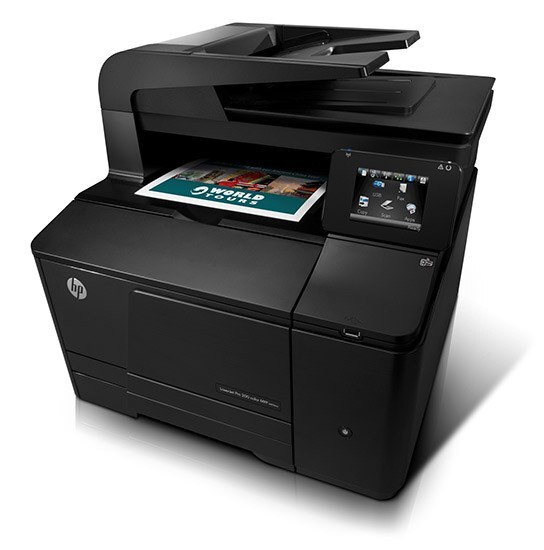
Share it wired, share it wireless — the Color LaserJet Pro 200 M276NW joins the office over Ethernet or Wi-Fi, so desktops, laptops and everything in between print to the same machine. This 2012-era color laser feeds on the same four cartridges as the rest of its family: standard CF210A black or high-yield CF210X (131X) black, with CF211A cyan, CF212A yellow and CF213A magenta for color work. The standard-yield set is HP's 131A line, and all four slots are refilled one cartridge at a time.
Wireless changes the buying rhythm. When anyone in the room can print, nobody owns the toner warning — the M276NW that serves a whole team tends to run a cartridge to empty before someone orders the next one. Keeping one black and one full color set in reserve is the practical answer, and this page stocks the family in depth: the same four cartridges appear under M276NW-specific listings, under the wider 131A name, and in multipacks up to eight cartridges, because this printer shares its supplies with the M251 line and several sibling models below.
Toner Cartridges for Color LaserJet Pro 200 M276NW
| Cartridge | Color | Yield |
|---|---|---|
| CF210A Black (M276NW listing) | Black | See product page |
| CF210X | Black, high yield | See product page |
| CF211A Cyan (M276NW listing) | Cyan | See product page |
| CF212A Yellow (M276NW listing) | Yellow | See product page |
| CF213A Magenta (M276NW listing) | Magenta | See product page |
| CF210A | Black | See product page |
| CF211A | Cyan | See product page |
| CF212A | Yellow | See product page |
| CF213A | Magenta | See product page |
| 131A Black, alternate listing | Black | See product page |
| 131A Cyan, alternate listing | Cyan | See product page |
| 131A Yellow, alternate listing | Yellow | See product page |
| Pro 200 M276nw 4 Color Set | Black, cyan, yellow, magenta | See product page |
| M276NW 4 Color Set (CF210 group) | Black, cyan, yellow, magenta | See product page |
| 131A 4 Color Set | Black, cyan, yellow, magenta | See product page |
| 131X and 131A 5 Color Set | 2 high-yield black plus colors | See product page |
The shelf also carries these multipacks and spares for the same four cartridges: 131A 2 Black, 131A 5 Black, 131A 3 Color Set, M276NW 3 Color Set, Pro 200 Color M276NW 2 Black, Pro 200 Color M276NW 4 Color Set, Pro 200 M276NW 2 Black, Pro 200 M276NW 3 Color Set, Pro 200 M276NW 5 Black, Pro 200 M276NW 5 Color Set, Pro 200 M276NW 6 Color Set, Pro 200 M276NW 8 Color Set, Pro 200 Color M276NW 5 Black, Pro 200 Color Printer M276NW Cyan and Pro 200 Color Printer M276NW Yellow, plus a second 131A 4 Color Set (CF210 listing).
Which cartridge should you buy?
For a wireless workgroup printer, the deciding factor is how often you want to think about toner at all. The standard CF210A suits a machine that prints a few documents a day, and the 2 Black and 5 Black packs cut the reorder frequency for document-heavy teams. The high-yield CF210X is the set-and-forget black: it costs more up front, prints considerably longer, and drops straight into the same slot. Colors come only as standard-yield singles and sets, and they deplete unevenly — presentations drain cyan and magenta long before yellow — so replacing one color at a time beats swapping a whole set early. A full 4 Color Set makes sense when several cartridges flag low together or when a new team inherits the printer and wants a known starting point.
Chip, toner and everyday use
The M276NW reads a chip on each cartridge to confirm the code and estimate the remaining toner, so a cartridge that stops short of its slot can look like a wrong cartridge to the printer. Push each one in until it clicks, and remove the shipping seal and any protective clips before it goes in. Yield figures assume light, standard test coverage; real offices printing logos, charts and photos will see fewer pages, especially from the color cartridges. If output fades on one side of the page, take that cartridge out and rock it gently side to side to redistribute the toner — it buys extra pages while the replacement ships. Store spares sealed, flat and out of direct sunlight.
Frequently Asked Questions
What toner does the Color LaserJet Pro 200 M276NW take?
Four cartridges: CF210A black (or the high-yield CF210X), CF211A cyan, CF212A yellow and CF213A magenta — the HP 131A family, with the high-yield black sold as the 131X. Read the code off the cartridge you remove and order the same code.
Can every computer in the office print to the M276NW?
Yes. The M276NW connects over Ethernet or Wi-Fi, so any computer or laptop on the same network can send it work once the driver is installed. That shared access is exactly why this page stocks multipacks — a printer everyone uses empties cartridges faster than a personal one.
Only one color is out. Do I have to replace all three?
No. The cyan, yellow and magenta cartridges are independent, and the printer keeps printing with the colors that remain. Replace just the empty one — single CF211A, CF212A and CF213A cartridges are on this page for exactly that situation — and save the color sets for a full refresh.
The printer says a new cartridge is not recognized. What now?
Remove the cartridge and check three things: the seal and clips are fully off, the code matches the CF210A family, and the chip contacts are clean. Reseat it firmly until it clicks. A cartridge from a different HP family will never register in this printer, no matter how similar it looks.
More printers that use the same cartridges
Everything in this list runs on the same 131A cartridges as the M276NW: LaserJet Pro 200 color Printer M276NW, LaserJet Pro 200 color Printer M276, LaserJet Pro 200 color Printer M251NW, LaserJet Pro 200 color Printer M251, LaserJet Pro 200 color M276NW, LaserJet Pro 200 color M276, LaserJet Pro 200 color M251NW, LaserJet Pro 200 color M251, HP 131A, Color LaserJet Pro 200 M276N, Color LaserJet Pro 200 M276, Color LaserJet Pro 200 M251NW, Color LaserJet Pro 200 M251N, Color LaserJet Pro 200 M251, Color LaserJet M276NW, Color LaserJet M276, Color LaserJet M251NW, Color LaserJet M251.