




Color LaserJet Pro 200 M251N
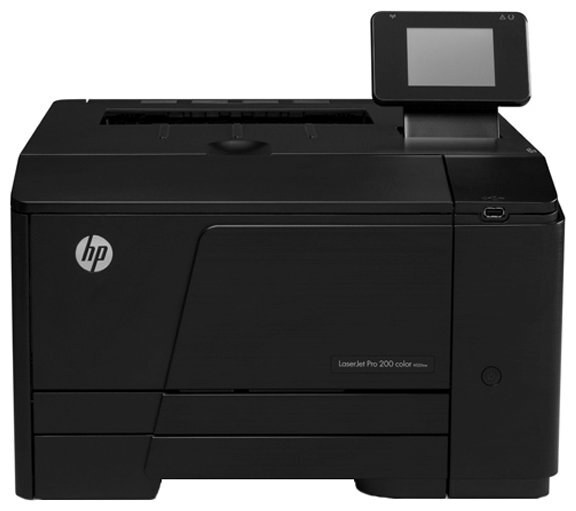
The N suffix puts this one on the network. Where the base M251 serves a single desk, the Color LaserJet Pro 200 M251N serves the whole small team over Ethernet — a 2012-era color workgroup printer that turns one machine into everyone's printer. It feeds on HP's two-tier toner family: black is the CF210A cartridge, with the high-yield 131X black (CF210X) as the longer-running alternative, and color from the 131A cyan (CF211A), CF212A yellow and CF213A magenta cartridges.
A shared printer changes the toner arithmetic. Several people's output flows through the same four cartridges, nobody watches levels out of habit, and the first sign of trouble is somebody else's faded deadline document. The M251N's supplies page therefore carries the full 131A range — standard and high-yield blacks, the three colors, and the multi-packs — so a small team's restock is one decision instead of four.
Toner Cartridges for Color LaserJet Pro 200 M251N
Single cartridges stocked for the M251N:
- CF210A Toner Cartridge Black/ HP 131A Toner
- CF210X Toner Cartridge High Yield Black/ HP 131X Toner
- CF211A Toner Cartridge Cyan/ HP 131A Toner
- CF212A Toner Cartridge Yellow/ HP 131A Toner
- CF213A Toner Cartridge Magenta/ HP 131A Toner
- 131A (CF210A) Toner Cartridge 2 Black
- 131A (CF210A) Toner Cartridge 5 Black
- PRO 200 M251N (CF210A) Toner Cartridge 2 Black
- 131A (CF210A) Toner Cartridge Black
- 131A (CF211A) Toner Cartridge Cyan
- 131A (CF212A) Toner Cartridge Yellow
Multi-packs and sets stocked alongside them:
- 131A Toner Cartridge 4 Color Set (CF210A/ CF211A/ CF212A/ CF213A)
- 131X and HP 131A Toner Cartridge color laserjet 5 Color Set (2 x CF210X/ CF211A/ CF212A/ CF213A)
- Pro 200 M251n Toner Cartridge Color Laserjet 4 Color Set
- 131A (CF211A CF212A CF213A) Toner Cartridge 3 Color Set
- PRO 200 M251N (CF211A CF212A CF213A) Toner Cartridge 3 Color Set
- PRO 200 M251N (CF210 CF211A CF212A CF213A) Toner Cartridge 5 Color Set
- PRO 200 M251N (CF210 CF211A CF212A CF213A) Toner Cartridge 8 Color Set
- 131A (CF210 CF211A CF212A CF213A) Toner Cartridge 4 Color Set
Which cartridge should you buy?
For a networked machine, the high-yield CF210X black is the sensible default: shared printers burn black fastest, and the X cartridge stretches the interval between changes. The standard CF210A remains the pick for teams whose printing is occasional or mostly color. Colors follow the usual rule — buy the one that empties, when it empties. Offices that restock on a schedule should look at the four, five and eight color sets, which put a full round of cartridges in the cabinet at once; the black multi-packs do the same job for the cartridge that actually runs out. Every listing named for a Pro 200 variant on this page carries these same codes.
Chip, toner and everyday use
Because the M251N is shared, its supplies status is worth checking from the printer software rather than at the machine — levels for all four cartridges are reported per cartridge by their chips. When a cartridge is changed, seat it firmly and let the printer recognize it before the next job is sent; a shared queue forgives nothing. Store spare cartridges sealed, flat and away from heat, and label the cabinet shelf by color so the person restocking at 8 a.m. grabs the right box. Remember that yield ratings assume standard coverage — a team's real mix of documents, charts and photos will land somewhere below the headline number.
Frequently Asked Questions
Which toner does the Color LaserJet Pro 200 M251N use?
The HP 131A/131X line: CF210A black, CF210X high-yield black, CF211A cyan, CF212A yellow and CF213A magenta. The code on the cartridge coming out is the code to order.
What does the N add over the base M251?
Networking. The M251N connects over Ethernet so a whole small team shares one printer, instead of the machine belonging to a single desk.
Which black suits a shared team printer better, CF210A or CF210X?
For most teams, the CF210X. Shared volume is black-heavy, and the high-yield cartridge means fewer interruptions and a lower cost per page across the year.
Can I check toner levels without going to the printer?
Yes — view the supplies status in the printer software on your computer, or print a supplies-status page from the control panel. Each cartridge reports its own level.
More printers that use the same cartridges
The rest of the Pro 200 color family on this toner line:
LaserJet Pro 200 color Printer M276NW, LaserJet Pro 200 color Printer M276, LaserJet Pro 200 color Printer M251NW, LaserJet Pro 200 color Printer M251, LaserJet Pro 200 color M276NW, LaserJet Pro 200 color M276, LaserJet Pro 200 color M251NW, LaserJet Pro 200 color M251, HP 131A, Color LaserJet Pro 200 M276NW, Color LaserJet Pro 200 M276N, Color LaserJet Pro 200 M276, Color LaserJet Pro 200 M251NW, Color LaserJet Pro 200 M251, Color LaserJet M276NW, Color LaserJet M276, Color LaserJet M251NW, Color LaserJet M251.