




LaserJet Pro 200 color Printer M276NW
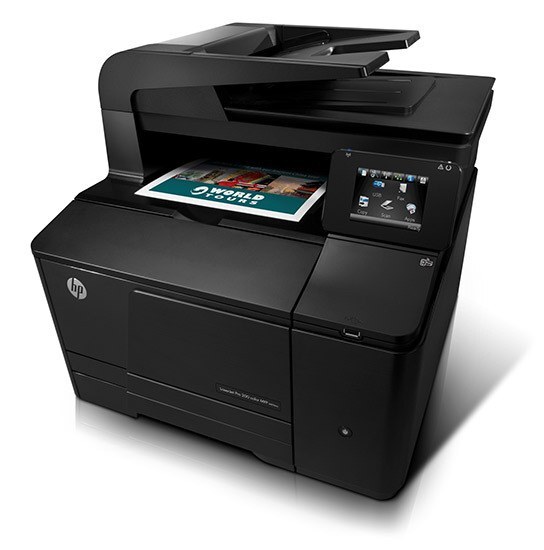
One printer, every device: the LaserJet Pro 200 Color Printer M276NW connects over Ethernet or Wi-Fi, so a whole small team shares one 2012-era color machine — wired desktops and wireless laptops printing to the same queue. Keeping it fed is a four-cartridge line: black as the CF210A (the standard 131A fill) or the longer-running CF210X (131X), with CF211A cyan, CF212A yellow and CF213A magenta in the color slots. The cartridges here are the compatible builds of those codes.
A shared printer lives a harder life than a personal one — more users, more varied jobs, and nobody feeling personally responsible for the toner shelf. The M276NW's saving grace is that it needs so little: four cartridges, each changed in seconds by whoever happens to be standing nearby when the warning appears. Offices that keep one full spare set within reach of a shared machine like this rarely lose printing time to an empty slot.
Toner Cartridges for LaserJet Pro 200 color Printer M276NW
| Cartridge | Color | Page Yield |
|---|---|---|
| HP Pro 200 color Printer M276nw Color Laserjet 4 Color Set | Full color set | See product page |
| HP 131X and HP 131A color laserjet 5 Color Set (2 x CF210X, CF211A, CF212A, CF213A) | Full color set | See product page |
| HP 131A 4 Color Set (CF210A, CF211A, CF212A, CF213A) | Full color set | See product page |
| HP CF213A Magenta, HP 131A Toner | Magenta | See product page |
| HP CF212A Yellow, HP 131A Toner | Yellow | See product page |
| HP CF211A Cyan, HP 131A Toner | Cyan | See product page |
| HP CF210X High Yield Black, HP 131X Toner | Black | See product page |
| HP CF210A Black, HP 131A Toner | Black | See product page |
Also stocked for this printer — the same four codes under M276nw and shared-family listings:
131A listings: HP 131A (CF210A) 2 Black, HP 131A (CF211A CF212A CF213A) 3 Color Set, HP 131A (CF210A) 5 Black, HP 131A (CF210A) Black, HP 131A (CF211A) Cyan, HP 131A (CF212A) Yellow, HP 131A (CF210 CF211A CF212A CF213A) 4 Color Set
CF210 listings: HP PRO 200 COLOR M276NW (CF210 CF211A CF212A CF213A) 4 Color Set, HP PRO 200 M276NW (CF210 CF211A CF212A CF213A) 5 Color Set, HP PRO 200 M276NW (CF210 CF211A CF212A CF213A) 8 Color Set, HP M276NW (CF210 CF211A CF212A CF213A) 4 Color Set
CF210A listings: HP PRO 200 COLOR M276NW (CF210A) 2 Black, HP PRO 200 M276NW (CF210A) 2 Black, HP PRO 200 M276NW (CF210A) 5 Black, HP PRO 200 M276NW (CF210A) Black, HP PRO 200 COLOR M276NW (CF210A) 5 Black
CF211A listings: HP M276NW (CF211A CF212A CF213A) 3 Color Set, HP PRO 200 M276NW (CF211A CF212A CF213A) 3 Color Set, HP PRO 200 M276NW (CF211A CF212A CF213A) 6 Color Set, HP PRO 200 M276NW (CF211A) Cyan, HP PRO 200 COLOR PRINTER M276NW (CF211A) Cyan
CF212A listings: HP PRO 200 M276NW (CF212A) Yellow, HP PRO 200 COLOR PRINTER M276NW (CF212A) Yellow
CF213A listings: HP PRO 200 M276NW (CF213A) Magenta
Which cartridge should you buy?
On a shared machine, black almost always empties first, because everyday office printing is mostly black text. That is the argument for the CF210X: its deeper fill stretches the interval between swaps on the slot that turns over fastest, and fewer interruptions suit a printer the whole team depends on. The standard CF210A remains the thrifty pick if volumes are light. Colors CF211A, CF212A and CF213A should be bought one at a time as they deplete — usage across colors is rarely even, so a set bought early often leaves two cartridges aging on the shelf. Reserve the set purchase for restocking a spare kit.
Chip, toner and everyday use
Because several people use this printer, the chip-based toner gauge matters: anyone can glance at the panel or the embedded status page and see exactly which cartridge is running down, and the compatible cartridges here report through the same chip system. A cartridge that has just been fitted may need one short calibration cycle before levels read true. For storage, a shared office does best with a labeled drawer: one spare per code, kept sealed and upright, so the person who finds a cartridge empty can also be the person who fixes it. The 1-year warranty and 1-year returns cover every compatible on this page.
Frequently Asked Questions
What toner does the shared M276NW take?
The HP 131A/131X family: CF210A or CF210X black, CF211A cyan, CF212A yellow and CF213A magenta. Whoever changes the cartridge only needs to match the code on the empty one — no other specification matters.
Everyone prints to this machine. Which black cartridge makes more sense?
The CF210X. Shared printers chew through black fastest, and the high-yield fill means fewer empty-black interruptions for the whole team. The color cartridges can stay standard, since color volume on a shared office machine is usually far lower.
Can the M276NW print over Wi-Fi while a cartridge is being changed?
The queue keeps accepting jobs — they simply wait until the new cartridge is seated and the printer finishes its calibration. Swaps take under a minute, so in practice the shared queue barely notices.
A color ran out but the team only needs black printing today. Will it run?
Usually for a while, but an exhausted color cartridge left in place can eventually block printing altogether. The safer habit on a shared machine is to replace the empty color promptly so the next user's color job does not fail.
More printers that use the same cartridges
The same 131A/131X cartridges serve this Pro 200 family: Color LaserJet M251, Color LaserJet M251NW, Color LaserJet M276, Color LaserJet M276NW, Color LaserJet Pro 200 M251, Color LaserJet Pro 200 M251N, Color LaserJet Pro 200 M251NW, Color LaserJet Pro 200 M276, Color LaserJet Pro 200 M276N, Color LaserJet Pro 200 M276NW, HP 131A, LaserJet Pro 200 color M251, LaserJet Pro 200 color M251NW, LaserJet Pro 200 color M276, LaserJet Pro 200 color M276NW, LaserJet Pro 200 color Printer M251, LaserJet Pro 200 color Printer M251NW, LaserJet Pro 200 color Printer M276.