




Color LaserJet M251
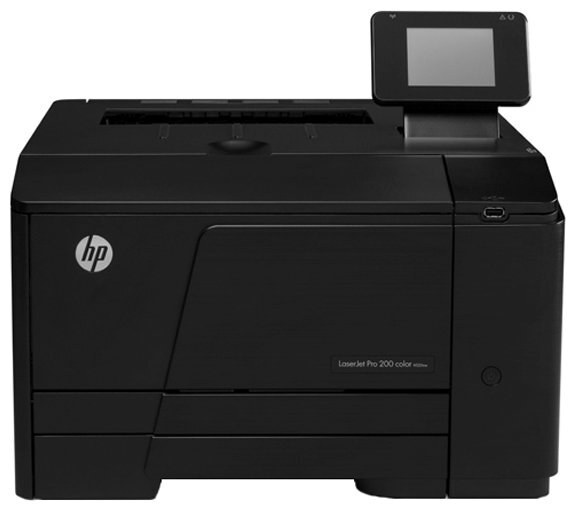
The Color LaserJet M251 arrived as a 2012-era color workgroup printer built for small teams — a machine for teams that just need pages on paper, delivered without ceremony. It runs on one cartridge family: standard black CF210A, high-yield black CF210X, and for color work CF211A cyan, CF212A yellow and CF213A magenta. Every cartridge on this page is a compatible replacement for those codes.
Small teams keep this printer because it asks for nothing but toner. There is no ceremony to its running costs either: two black yields to choose from, three colors that empty one at a time, and a spare black in the cupboard. Offices that print client-facing pages and everyday drafts through the same machine will find both jobs covered by the same five codes.
Toner Cartridges for Color LaserJet M251
| Cartridge | Color | Page Yield |
|---|---|---|
| CF210A Black | Black | See product page |
| CF210X High Yield Black | Black | See product page |
| CF210A Black (131A) | Black | See product page |
| CF210X High Yield Black (131X) | Black | See product page |
| CF211A Cyan (131A) | Cyan | See product page |
| CF212A Yellow (131A) | Yellow | See product page |
| CF213A Magenta (131A) | Magenta | See product page |
| 131A Black (CF210A) | Black | See product page |
| 131A Cyan (CF211A) | Cyan | See product page |
| 131A Yellow (CF212A) | Yellow | See product page |
| 131A 4 Color Set (CF210A, CF211A, CF212A, CF213A) | Black / Cyan / Magenta / Yellow | See product page |
| M251 4 Color Set | Black / Cyan / Magenta / Yellow | See product page |
Black multi-packs, the five color set and further 131A listings for this printer:
- 131X and HP 131A Toner color laserjet 5 Color Set (2 x CF210X/ CF211A/ CF212A/ CF213A)
- 131A (CF210A) Toner 2 Black
- 131A (CF211A CF212A CF213A) Toner 3 Color Set
- 131A (CF210A) Toner 5 Black
- PRO 200 M251 (CF213A) Toner Magenta
- M251 (CF213A) Toner Magenta
- M251 (CF212A) Toner Yellow
- PRO 200 COLOR M251 (CF210A) Toner 3 Black
- PRO 200 COLOR M251 (CF211A) Toner Cyan
- PRO 200 COLOR M251 (CF213A) Toner Magenta
- 131A (CF210 CF211A CF212A CF213A) Toner 4 Color Set
Which cartridge should you buy?
Two blacks, one decision. The standard CF210A suits a team that prints lightly; the high-yield CF210X earns its place when black pages are a daily habit, and it fits the same slot. Colors are singles work — replace the one that is empty. For a full refresh, the whole CF210 family comes in one four color set, and a five color set with two high-yield blacks covers a heavier reset.
Chip, toner and everyday use
Each cartridge carries a chip the M251 reads for identity and level. A new cartridge that is not recognized usually needs reseating: pull it out, check that the seal strip is fully removed, and slide it back until it clicks. Keep spares sealed, upright and out of direct light, and rock a long-stored cartridge gently before install so its first pages print evenly.
Frequently Asked Questions
What toner does the Color LaserJet M251 use?
The M251 takes CF210A or CF210X black and CF211A cyan, CF212A yellow and CF213A magenta — the HP 131A/131X family. Match the code on the cartridge you are replacing.
What is the difference between CF210A and CF210X?
CF210X is the high-yield version of the standard CF210A black cartridge — the 131X beside the 131A. Both fit the same slot; the high-yield cartridge simply runs longer before it empties.
Only the magenta has run out. What do I buy?
Just the magenta single, CF213A. Each color sits in its own slot, and there is no need to touch black, cyan or yellow until they are low themselves.
Does the M251NW use the same cartridges as the M251?
Yes — the M251NW is in the same family list on this page and uses the same 131A/131X codes. The cartridges do not change between the two variants.
More printers that use the same cartridges
The same 131A/131X cartridges serve this family: Color LaserJet M251NW, Color LaserJet M276, Color LaserJet M276NW, Color LaserJet Pro 200 M251, Color LaserJet Pro 200 M251N, Color LaserJet Pro 200 M251NW, Color LaserJet Pro 200 M276, Color LaserJet Pro 200 M276N, Color LaserJet Pro 200 M276NW, HP 131A, LaserJet Pro 200 color M251, LaserJet Pro 200 color M251NW, LaserJet Pro 200 color M276, LaserJet Pro 200 color M276NW, LaserJet Pro 200 color Printer M251, LaserJet Pro 200 color Printer M251NW, LaserJet Pro 200 color Printer M276, LaserJet Pro 200 color Printer M276NW.