




LaserJet Pro 200 color Printer M251
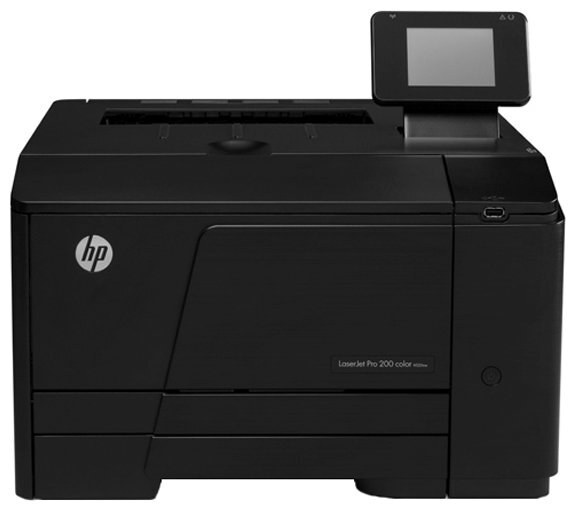
Small teams that print from a single workstation made the LaserJet Pro 200 color Printer M251 a staple: this 2012-era color printer keeps the feature set lean so the running costs stay lean too. Feed it the CF210A black cartridge or the high-yield CF210X (131X), plus the CF211A cyan, the CF212A yellow and the CF213A magenta. Those are the HP 131A cartridges, and this page lists them as compatibles in singles, multipacks and full sets.
There is a particular kind of office equipment that never gets discussed because it never causes a problem, and this printer was built to be that kind. One workstation drives it, the jobs are ordinary — letters, spreadsheets, the color page when a document needs to persuade — and the machine’s whole maintenance story is four cartridges and the occasional dusting. Longevity like that is really a supply story: as long as the 131A shelf stays this deep, the printer has no reason to leave.
Toner Cartridges for LaserJet Pro 200 color Printer M251
Sets lead this table, with the singles after them in reverse order:
| Cartridge | Color | Page Yield |
|---|---|---|
| Pro 200 color Printer M251 4 Color Set | Black + 3 colors | See product page |
| 131X & 131A 5 Color Set (2 x CF210X CF211A CF212A CF213A) | 2 Black + 3 colors | See product page |
| 131A 4 Color Set (CF210A CF211A CF212A CF213A) | Black + 3 colors | See product page |
| CF213A Magenta | Magenta | See product page |
| CF212A Yellow | Yellow | See product page |
| CF211A Cyan | Cyan | See product page |
| CF210X High Yield Black | Black | See product page |
| CF210A Black | Black | See product page |
Further listings for the same family — extra black multipacks, M251-named color singles and the alternate set builds:
131A (CF210A) — 2 Black; 131A (CF211A CF212A CF213A) — 3 Color Set; 131A (CF210A) — 5 Black; PRO 200 M251 (CF213A) — Magenta; 131A (CF210A) — Black; 131A (CF211A) — Cyan; 131A (CF212A) — Yellow; M251 (CF213A) — Magenta; M251 (CF212A) — Yellow; PRO 200 COLOR M251 (CF210A) — 3 Black; PRO 200 COLOR M251 (CF211A) — Cyan; PRO 200 COLOR M251 (CF213A) — Magenta; 131A (CF210 CF211A CF212A CF213A) — 4 Color Set.
Which cartridge should you buy?
Match the purchase to the desk’s habits. A single workstation with ordinary volume is well served by the standard CF210A and color singles bought as they fade — the CF211A, CF212A and CF213A each on its own schedule. The high-yield CF210X enters the picture when black pages pile up — a billing run, a reporting season — and the five-color set with its doubled black is the choice for a desk that restocks twice a year and wants both moments covered. A full four-color set suits a fresh start or a machine whose four slots have aged together. Every compatible cartridge on this page is covered by a 1-year warranty and 1-year returns.
Chip, toner and everyday use
Software is part of this printer’s upkeep: firmware from HP’s official support page can fix bugs and improve reliability, installed calmly between jobs rather than in the middle of an urgent run. On the toner side, the habits are plain. Fit cartridges with the power on so the chip registers cleanly, give a freshly installed cartridge a few pages to settle before judging its density, and judge a fading cartridge by a test page rather than by the level estimate alone — estimates drift, print does not lie.
Frequently Asked Questions
Which toner cartridges work with the LaserJet Pro 200 color Printer M251?
The CF210A or CF210X in black and the CF211A, CF212A and CF213A in the color slots. Use these codes and any cartridge carrying one of them is the right type for this printer.
Should I update the firmware on my Printer M251?
Firmware updates from HP’s official support page can fix bugs and improve the printer’s reliability. Install them only from HP, and avoid updating in the middle of an urgent print run so a half-finished job is never stranded.
Does the Printer M251 use the same cartridges as the networked M251NW?
Yes. The base and networked versions of this model draw on the same 131A family — both appear in the family list below — so the singles and sets on this page serve either configuration.
Standard or high-yield black for a single-workstation desk?
Standard, for most desks — the CF210A matches a modest page count and keeps the spend per cartridge low. Step up to the CF210X when the desk’s black volume grows and the swaps start to annoy.
More printers that use the same cartridges
Every sibling model on this cartridge family:
Color LaserJet M251; Color LaserJet M251NW; Color LaserJet M276; Color LaserJet M276NW; Color LaserJet Pro 200 M251; Color LaserJet Pro 200 M251N; Color LaserJet Pro 200 M251NW; Color LaserJet Pro 200 M276; Color LaserJet Pro 200 M276N; Color LaserJet Pro 200 M276NW; HP 131A; LaserJet Pro 200 color M251; LaserJet Pro 200 color M251NW; LaserJet Pro 200 color M276; LaserJet Pro 200 color M276NW; LaserJet Pro 200 color Printer M251NW; LaserJet Pro 200 color Printer M276; LaserJet Pro 200 color Printer M276NW.