




Color LaserJet Pro 200 M251NW
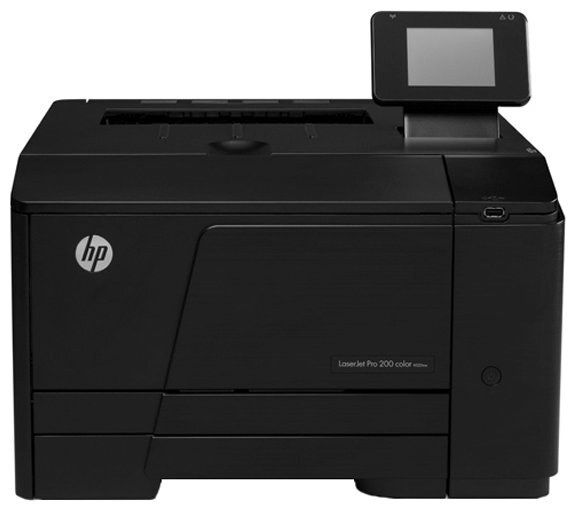
The Color LaserJet Pro 200 M251NW was HP's 2012-era answer for small teams that wanted a dependable color laser without a cable dictating where it lived. The NW suffix adds built-in networking and wireless, so placement follows the room instead of the wiring. It feeds on HP's two-tier toner family: black is the CF210A cartridge, with the high-yield 131X black (CF210X) as the longer-running alternative, and color from the 131A cyan (CF211A), CF212A yellow and CF213A magenta cartridges.
Wireless placement has one supply consequence: the printer is rarely next to the person who notices it is fading. M251NW owners tend to standardize their restock — one black they always buy, colors ordered as flagged — because the machine may sit across the office from the supply cabinet. This page gathers the complete 131A/131X range stocked for the model, from single cartridges to the largest color sets, so the routine never has to change.
Toner Cartridges for Color LaserJet Pro 200 M251NW
| Color | Cartridge | Listing | Page Yield |
|---|---|---|---|
| Black | CF210A | CF210A Toner Cartridge Black/ HP 131A Toner | See product page |
| Black | CF210X | CF210X Toner Cartridge High Yield Black/ HP 131X Toner | See product page |
| Cyan | CF211A | CF211A Toner Cartridge Cyan/ HP 131A Toner | See product page |
| Yellow | CF212A | CF212A Toner Cartridge Yellow/ HP 131A Toner | See product page |
| Magenta | CF213A | CF213A Toner Cartridge Magenta/ HP 131A Toner | See product page |
| Black | CF210A | 131A (CF210A) Toner Cartridge 2 Black | See product page |
| Black | CF210A | 131A (CF210A) Toner Cartridge 5 Black | See product page |
| Black | CF210A | M251NW (CF210A) Toner Cartridge 2 Black | See product page |
| Black | CF210A | M251NW (CF210A) Toner Cartridge Black | See product page |
| Black | CF210A | 131A (CF210A) Toner Cartridge Black | See product page |
| Cyan | CF211A | 131A (CF211A) Toner Cartridge Cyan | See product page |
| Yellow | CF212A | 131A (CF212A) Toner Cartridge Yellow | See product page |
| Black | CF210A | PRO 200 CLR PRINTER M251NW (CF210A) Toner Cartridge Black | See product page |
| Black | CF210A | PRO 200 COLOR M251NW (CF210A) Toner Cartridge 3 Black | See product page |
| Yellow | CF212A | PRO 200 COLOR PRINTER M251NW (CF212A) Toner Cartridge Yellow | See product page |
Sets and black multi-packs stocked for the M251NW:
- 131A Toner Cartridge 4 Color Set (CF210A/ CF211A/ CF212A/ CF213A)
- 131X and HP 131A Toner Cartridge color laserjet 5 Color Set (2 x CF210X/ CF211A/ CF212A/ CF213A)
- Pro 200 M251nw Toner Cartridge Color Laserjet 4 Color Set
- 131A (CF211A CF212A CF213A) Toner Cartridge 3 Color Set
- M251NW (CF210 CF211A CF212A CF213A) Toner Cartridge 5 Color Set
- M251NW (CF210 CF211A CF212A CF213A) Toner Cartridge 8 Color Set
- PRO 200 COLOR M251NW (CF211A CF212A CF213A) Toner Cartridge 3 Color Set
- PRO 200 M251NW (CF211A CF212A CF213A) Toner Cartridge 3 Color Set
- PRO 200 CLR P M251NW (CF210 CF211A CF212A CF213A) Toner Cartridge 5 Color Set
- 131A (CF210 CF211A CF212A CF213A) Toner Cartridge 4 Color Set
Which cartridge should you buy?
Decide by volume. A wireless team printer typically prints more black than anything else, which makes the high-yield CF210X the economical anchor — one cartridge covering long stretches of document work. The standard CF210A fits lighter use. For colors, resist the set reflex: cyan, yellow and magenta empty at different times, and single replacements match spending to actual use. Sets — four, five, six or eight cartridges — make sense when the office restocks the cabinet wholesale or when several cartridges genuinely run low together. Whichever listing you open, from the family-named 131A line to the M251NW-named one, the five codes underneath do not change.
Chip, toner and everyday use
Each cartridge announces itself to the printer through its chip, and levels can be checked from the computer over the network — the practical way to manage a printer that lives across the room. When a cartridge does get changed, a firm, straight push until it seats prevents most recognition errors. Keep the spare black with the paper supply rather than at someone's desk, store all spares sealed and flat away from heat, and give a fresh cartridge a slow rock end to end before fitting it. Yields are rated at standard coverage, so presentation pages and photo work will always pull the real number down.
Frequently Asked Questions
What toner cartridges does the Color LaserJet Pro 200 M251NW take?
CF210A black and its high-yield partner CF210X, plus CF211A cyan, CF212A yellow and CF213A magenta — the HP 131A family and its 131X black. Match the code on the label of the cartridge you remove.
Is 131A the same thing as 131X?
They are two tiers of one family. 131A covers the standard cartridges including the black CF210A and the three colors; the 131X name belongs to the high-yield black, CF210X. This printer accepts both tiers.
The printer sits across the office. How do I know when toner is low?
Check the supplies status from your computer through the printer software, or print a status page at the machine. Each of the four cartridges reports its own level, so you can see which color to order before it runs dry.
One color ran out in the middle of a job. What now?
Swap only that color and reprint the affected pages. The other cartridges are unaffected, and there is no need to touch them until their own toner is gone.
More printers that use the same cartridges
Every Pro 200 color model sharing the 131A line:
Color LaserJet M251, Color LaserJet M251NW, Color LaserJet M276, Color LaserJet M276NW, Color LaserJet Pro 200 M251, Color LaserJet Pro 200 M251N, Color LaserJet Pro 200 M276, Color LaserJet Pro 200 M276N, Color LaserJet Pro 200 M276NW.
HP 131A, LaserJet Pro 200 color M251, LaserJet Pro 200 color M251NW, LaserJet Pro 200 color M276, LaserJet Pro 200 color M276NW, LaserJet Pro 200 color Printer M251, LaserJet Pro 200 color Printer M251NW, LaserJet Pro 200 color Printer M276, LaserJet Pro 200 color Printer M276NW.