







 See Compatible Printers
 Read more about our ink!
Hewlett Packard
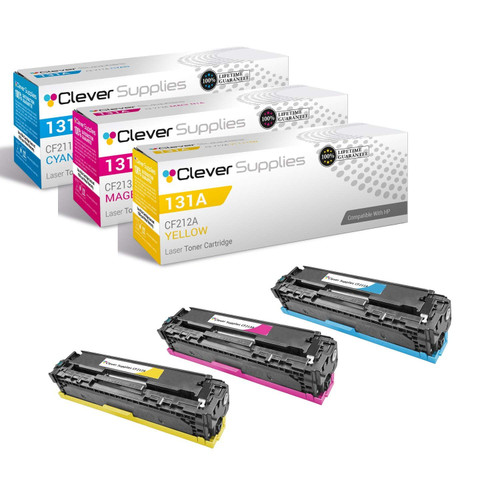
Compatible HP PRO 200 CLR PRINTER M276 (CF211A CF212A CF213A) Toner Cartridge 3 Color Set

Amazon Price:

- Page Yield:
- Color: 1800
- Availability:
- In Stock
- Shipping:
- Free Shipping
- Compatible Printers
- LaserJet 200 Color M251n
- LaserJet 200 Color M276n
- LaserJet 200 M251nw
- LaserJet 200 M276nw
- LaserJet Pro 200 Color M251n
- LaserJet Pro 200 Color M276n
- LaserJet Pro 200 M251nw
- LaserJet Pro 200 M276nwi>
- Specifications
- SKU:
- CS-HP-PRO 200 CLR PRINTER M276-3Set-1
- Printer Brand:
- Hewlett Packard
- OEM Number:
- CF211A CF212A CF213A
- Ink Color:
- Cyan, Magenta, Yellow
- Page Yield:
- Color: 1800
- Printer Type:
- Laser Cartridge
- Condition:
- New Compatible
- Description
- Reviews



The HP 131A Color Series offers a comprehensive lineup of printers, including the PRO 200 M251, PRO 200 M251N, PRO 200 M251NW, PRO 200 M276, PRO 200 M276N, PRO 200 M276NW, M251, M251NW, M276, and M276NW models. These printers are designed to meet various printing needs, from personal to professional, providing efficient and reliable performance. Among the compatible cartridges are the CF210A Black, CF211A Cyan, CF213A Magenta, and CF212A Yellow, known as the HP 131A toner cartridge and toner cartridge. These cartridges ensure consistent and high-quality prints, whether it's documents, photos, or marketing materials. The PRO 200 COLOR M251 and PRO 200 COLOR M276 series printers offer advanced features such as wireless connectivity and mobile printing capabilities, making them suitable for modern printing environments. Whether it's printing from a smartphone, tablet, or computer, these printers provide convenient and seamless printing solutions. With the HP 131A cartridges, users can expect vibrant and true-to-life colors, along with crisp and sharp text output. The CF210A Black cartridge delivers deep blacks for professional-looking documents, while the CF211A Cyan, CF213A Magenta, and CF212A Yellow cartridges ensure accurate color reproduction for graphics and images. Investing in the HP 131A Color Series printers and cartridges ensures efficient and reliable printing solutions that meet the demands of today's fast-paced work environments. Whether it's for home, small office, or corporate use, these printers deliver exceptional performance and quality prints every time.
Cross-reference: HP CF211A, the 131A cyan toner cartridge (1,800 pages), is the same cartridge Canon sells as Canon Cartridge 131 (black 6272B001AA, high-capacity black 6273B001AA, cyan 6271B001AA, yellow 6269B001AA, magenta 6270B001AA) for the Canon Color imageCLASS MF624Cw, MF628Cw and MF8280Cw and the Color imageCLASS LBP7110Cw printers. Canon rates Cartridge 131 black at 1,800 pages, the high-capacity black at 2,400 pages and each color at 1,800 pages (ISO/IEC standard); HP sells the same cartridge across two generations as the 131A and 312A families.
Frequently Asked Questions
The name says 3 Color Set — what does that mean in practice?
It means the box holds color only: CF211A cyan, CF212A yellow and CF213A magenta from the HP 131A family, sized for the Color LaserJet Pro 200 M276 multifunction (the networked Color LaserJet Pro 200 M276nw category is linked here). No black cartridge is inside, and none is implied — black is a separate cartridge with its own part number and its own schedule.
Why would the colors run out while the black still has pages left?
Because color work is thirstier than it looks. Every color page blends some of all three cartridges, and on this MFP every color copy does the same. An office printing letterhead, charts and copied handouts can drain the color trio while a black cartridge — sipping only on text — still shows a third of its life.
What is each color rated for?
Approximately 1,800 pages apiece for CF211A, CF212A and CF213A. Fax pages do not touch them — received faxes print in black only — and scanning touches no toner at all, so this set’s life is spent entirely on the color printing and copying you can see.
If only my cyan is empty, is buying the trio wasteful?
Not necessarily. Install the cyan, shelf the yellow and magenta sealed, and you have converted two future emergencies into stock you already own. The three colors were installed together in most machines, so the other two are seldom far behind the first.
How do I confirm these are the right codes before ordering?
Open the toner drawer or print a supplies status page: the M276 lists its cartridges by part number. If the color slots show the CF211A, CF212A and CF213A codes, this set matches them exactly.
What does it cost and what protection applies?
The set is $59.10, with a 1-year warranty and a 1-year free returns window on each cartridge. We ship from warehouses in Illinois, Pennsylvania, Georgia and California, and support is available Monday through Friday, 9 AM to 5 PM CST. Delivery and returns details are on our shipping and returns page.
Can this one set be split across two different printers?
Yes. The M251nw belongs to the same cartridge family, as the notes above point out, so the set does not have to live or die in a single machine. The CF211A could refresh the M276's cyan while the CF212A tops up the print-only sibling across the room. Each cartridge is a standard single that seats in its color slot in either model; whatever stays sealed simply waits as stock.
What does this set cost per color page?
The arithmetic is friendly: $59.10 buys three cartridges rated at roughly 1,800 pages each, about 5,400 color pages in total, which works out to a little over one cent per page for the color side of the machine. Black is not part of that figure — it runs on its own cartridge and its own schedule, and it is the text pages, not the color ones, that spend it.
How do we learn which color our office always empties first?
When this set goes in, note the three levels from the supplies page, and check them again at the next change. The cartridge sitting lowest is your office's pattern — for most teams it is the same color every cycle, driven by the charts, logos and handouts they print. Time the next set order to that color's pace rather than to the average of the three.
How should a partly used set carton be kept?
Keep the remaining cartridges sealed inside the original carton and write on the outside which slots are still stocked and when the box was first opened. Stored flat in the supply cabinet, that one note prevents the classic waste: a second set opened while a perfectly good cartridge from the first is still sitting in an unmarked box underneath it.
About This 131A Three-Color Set for the Pro 200 M276
A colors-only renewal for the Color LaserJet Pro 200 M276 multifunction: CF211A cyan, CF212A yellow and CF213A magenta at roughly 1,800 pages each, replacing the trio that produces every blended color the machine prints or copies.
The honest shape of this set is its virtue: it does not pretend to be a full changeover. It targets the side of the machine that actually ran dry, leaves a healthy black cartridge undisturbed, and keeps the MFP’s color work — proposals, charts, copied flyers — looking the way it did when the machine was new.
One more machine belongs on the list: the LaserJet Pro 200 M251nw runs on this cartridge, handy in offices that keep one of each. For one-color top-ups, the CF211A cyan cartridge, the CF212A yellow cartridge and the CF213A magenta cartridge are listed individually; the CF210A black cartridge is the black partner this color set is designed to sit alongside.
Related Items


Hewlett Packard
Compatible HP PRO 200 CLR PRINTER M276 (CF210 CF211A CF212A CF213A) Toner Cartridge 5 Color Set



Hewlett Packard
Compatible HP M276 (CF211A CF212A CF213A) Toner Cartridge 3 Color Set


Hewlett Packard
Compatible HP PRO 200 COLOR PRINTER M276 (CF210 CF211A CF212A CF213A) Toner Cartridge 4 Color Set


Hewlett Packard
Compatible HP M276 (CF210 CF211A CF212A CF213A) Toner Cartridge 4 Color Set