





 See Compatible Printers
 Read more about our ink!
Dell
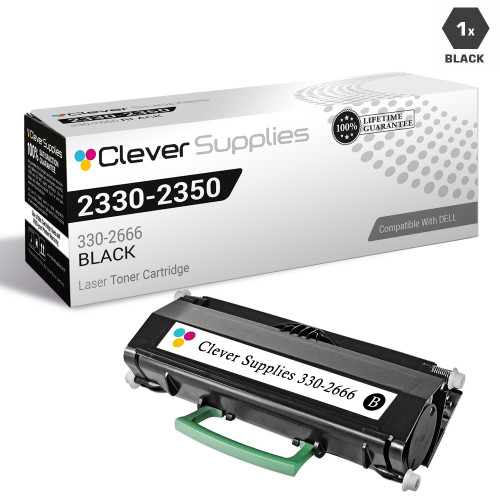
Compatible Dell 2330D Toner Cartridge High Yield Black
- Page Yield:
- 6,000 Pages
- Availability:
- In Stock
- Shipping:
- Free Shipping

Amazon Price:

- Page Yield:
- 6,000 Pages
- Availability:
- In Stock
- Shipping:
- Free Shipping
- Compatible Printers
- Laser 2330d
- Laser 2330dn
- Laser 2350d
- Laser 2350dni>
- Color Laser Laser 2230D
- Color Laser Laser 2330
- Color Laser Laser 2330D
- Color Laser Laser 2330DN
- Color Laser Laser 2350
- Color Laser Laser 2350D
- Color Laser Laser 2350DN
- Color Laser Laser 3333dn
- Color Laser Laser 3335
- Color Laser Laser 3335dn
- Color Laser Laser 2230
- Color Laser Laser 3333
- Dell 330-2650
- Dell 330-4130
- Dell 330-5207
- Dell 330-8985
- Laser 2230
- Laser 2230D
- Laser 2230DN
- Laser 2330
- Laser 2350
- Laser 2350DN
- Laser 2350dn
- Laser 3330
- Laser 3330DN
- Laser 3333
- Laser 3333DN
- Laser 3335
- Laser 3335DN
- Multifunction 3333dn
- Multifunction 3335dn
- Specifications
- SKU:
- Dell-2330d
- Printer Brand:
- Dell
- OEM Number:
- 330-2650
- Ink Color:
- High Yield Black
- Page Yield:
- 6,000 Pages
- Printer Type:
- Laser Cartridge
- Condition:
- New Compatible
- Description
- Yields up to 6000 pages
- Compatible Dell 2330d Toner Cartridge High Yield Black consistently produces high-resolution printouts with enhanced graphics and sharp text
- Unlike bargain brand toners Dell 2330d Toner Compatible Cartridge High Yield Black is specifically engineered to work in Dell printers for optimum quality and performance
- Compatible with: Dell 2330 2330dn 2350 2350d and 2350dn laser printer
- Replaces the Following Manufacturer Numbers: 330-2625 330-2665 DM254 PK941 330-2647 330-2666 GT163 RR700 330-2648 330-2667 PK492 XN009 330-2650 DM253 PK937
- Reviews

/> 

Compatible Dell 2330d Toner Cartridge High Yield Black delivers consistent quality with high-resolution printouts sharper images and text.
This Dell toner cartridge delivers high-quality black ink to pages producing sharply defined text and images. This long-lasting cartridge will yield up to 6000 pages of printed materials. It's specifically engineered for use with Dell laser printers which significantly reduces the likelihood of incompatibility errors that can occur with generic cartridges.
Features:
High-Quality Printing
The toner cartridge distributes a consistent flow of black ink to pages producing high-quality text and striking images. Impress coworkers bosses and customers with beautifully printed reports memos receipts and other materials.
Made for Dell Printers
This Dell toner cartridge is made for use in Dell laser printer models 2330 2330dn 2350 2350d and 2350dn. Using printer cartridges designed specifically for Dell machines ensures you will receive the high-quality printing you expect and significantly reduces the risk of compatibility errors that can occur when using generic toner cartridges.
Affordable and Long Lasting
One Dell toner cartridge will produce up to 6000 pages based on 5 percent page coverage. Designed to keep up with fast-paced environments In addition to saving your office money you will help keep toner cartridges out of landfills by returning them directly to the manufacturer.
Frequently Asked Questions
How long is 6,000 pages, measured in months?
On a Dell 2330D doing ordinary office work, translate it like this: 300 pages a month gives you about 20 months from one 330-2650; 600 pages a month gives you about 10 months; 1,200 pages a month, about five months. Most single-desk and small-team machines land in the first two bands, which is the point of a high-yield cartridge — toner changes become a once-or-twice-a-year event instead of a recurring chore.
What does that work out to per page?
About 1.51 cents. The cartridge is $90.57 against a 6,000-page rating. We state it openly because it frames the buying decision properly: this is not the cheapest per-page class in Dell's catalogue — the very large departmental cartridges beat it — but for the 2330D's size of machine it is a sensible, predictable running cost, and the multi-packs in this family pull it down further if you buy ahead.
How do you know the cartridge is nearly finished?
The usual sequence is prints gradually lightening, then faint streaks or uneven density down the page, before output becomes unreadable. Those are toner-exhaustion signs, not printer faults. When they appear on a 2330D that has been running the same cartridge for a long stretch, the 330-2650 is almost certainly at the end of its fill — have the replacement ready rather than waiting for completely blank pages in the middle of a job.
Why do two offices get different yields from the same cartridge?
Because the 6,000-page rating assumes 5% coverage — a standard text page. An office printing dense reports, forms with solid headers or image-heavy pages lays down more toner per sheet and finishes the cartridge sooner. An office printing light memos in toner-save mode can pass the rating. Neither office has a faulty cartridge; yield is a function of what is on the page, which is why the rating exists as a common yardstick rather than a guarantee.
Where does the 2330D sit in this cartridge family?
The 2330D is one of three machines built around the 330-2650 supply: the Laser 2330d, Laser 2330dn and Laser 2350d all run on it. This listing carries the 2330D's name, but the cartridge inside is the same unit its two platform-mates use. Offices running a mix of those models keep one code on the shelf and never have to ask which machine a spare belongs to.
What if the cartridge disappoints?
Then the terms do the talking. This compatible 330-2650 carries a 1-year warranty and 1-year free returns, detailed on our shipping and returns page. If a cartridge prints badly from the start or fails early, that is exactly what those terms exist for. Support is staffed Monday to Friday, 9 AM to 5 PM CST, and orders ship from our warehouses in Illinois, Pennsylvania, Georgia or California.
What should you check when a replacement cartridge arrives?
Read the code before you open anything: the unit you receive should say 330-2650, the same code printed on the cartridge you are about to replace. Model names across the 2330 family look alike on an invoice, but the supply code is exact, and a two-minute check at delivery is easier than discovering a mismatch with the machine standing open. The packaging seal should also be intact — a spare only stores well if it has stayed sealed.
Can a gentle shake stretch a fading cartridge to the end of a job?
Usually, yes — for a while. When output first lightens, take the 330-2650 out and rock it gently from side to side a few times; that redistributes the toner still inside and often restores even density for the remaining pages of a run. Treat it as a bridge, not a repair: the cartridge really is near the end of its fill, so the replacement should be ordered or set beside the 2330D the same day.
How do you measure the yield your own office actually gets?
Write the page counter reading on the carton when a cartridge goes in, and read the counter again when it comes out. The difference is your office's real yield for a 330-2650, measured in your documents rather than a test page. Do it twice and you have a reliable average to plan orders around — far more useful than the headline rating, because it already includes your coverage, your mix of jobs and your habits.
Why keep the old cartridge for a few days after fitting the new one?
Because it makes fault-finding simple if the new unit prints badly. Put the old 330-2650 back in: if the fault disappears, the problem travels with the new cartridge; if it stays, the printer itself needs attention. Without the old unit kept aside, that two-minute test is impossible and a straightforward question turns into guesswork. Once the new cartridge has a few clean days behind it, the old one can go.
About This Dell 2330D Cartridge (330-2650)
The 330-2650 high-yield black cartridge for the Dell 2330D is rated at 6,000 pages and priced at $90.57 — about 1.51 cents a page from a compatible unit, with 1-year warranty and 1-year free returns cover. It also serves the Laser 2330dn and 2350d, which share the same supply platform. The full compatible Dell range is on our Dell toner page.
Related Items

Dell
Compatible Dell 2330D Toner Cartridge High Yield Black 5 Pack
/>


Dell
Compatible Dell S2500n Toner Cartridge High Yield Black
/>
Dell
Compatible Dell 2355DN Toner Cartridge High Yield Black
/>
Dell
Compatible Dell 2350 Toner Cartridge High Yield Black
/>