







 See Compatible Printers
 Read more about our ink!
Hewlett Packard
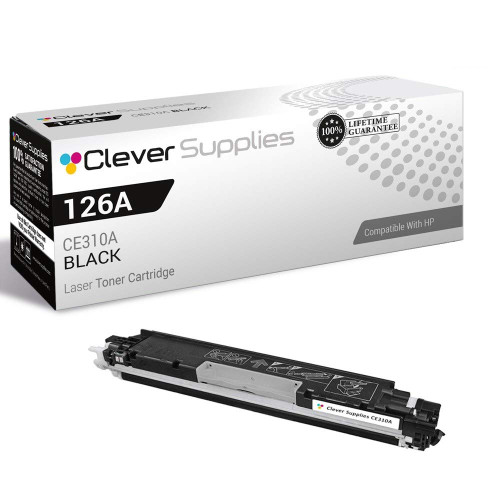
Compatible HP PRO M175 MFP (CE310A) Toner Cartridge Black

Amazon Price:

- Page Yield:
- Black: 1200
- Availability:
- In Stock
- Shipping:
- Calculated at Checkout
- Compatible Printers
- Color LaserJet 100 MFP M175a
- Color LaserJet 100 MFP M175nw
- Color LaserJet CP1025nw
- Color LaserJet TopShot Pro M275
- LaserJet 100 MFP M175a
- LaserJet 100 MFP M175nw
- LaserJet Pro 100 MFP M175a
- LaserJet Pro 100 MFP M175nw
- LaserJet Pro CP1025nw
- LaserJet Pro TopShot Pro M275i>
- Color CP1020
- Color CP1025
- Color CP1025NW
- Color LaserJet CP1020
- Color LaserJet CP1025
- Color LaserJet M175nw
- Color LaserJet M476
- Color LaserJet M476DN
- Color LaserJet M476DW
- Color LaserJet M476NW
- Color LaserJet Pro 100
- Color LaserJet Pro 100 Color MFP M175A
- Color LaserJet Pro 100 Color MFP M175NW
- Color LaserJet Pro 200 M275NW
- Color LaserJet Pro CP1025
- Color LaserJet Pro M175
- Color LaserJet Pro M175 MFP
- Color LaserJet Pro M175A
- Color LaserJet Pro M175nw
- Color LaserJet Pro M476
- Color LaserJet Pro M476DN
- Color LaserJet Pro M476DW
- Color LaserJet Pro M476NW
- Color LaserJet Pro MFP M476
- Color LaserJet Pro MFP M476dn
- Color LaserJet Pro MFP M476dw
- Color LaserJet Pro MFP M476nw
- Color LaserJet TopShot LaserJet Pro M275
- Color LaserJet TopShot LaserJet Pro M275NW
- Color MFP M175A
- HP 126A
- HP 312A & 312X
- LaserJet Pro 100 Color M175A
- LaserJet Pro 100 Color M175N
- LaserJet Pro 100 Color M175W
- LaserJet Pro 100 color MFP M175NW
- TopShot LaserJet Pro M275 MFP
- Specifications
- SKU:
- CLS-HP-PRO M175 MFP-BK-1
- Printer Brand:
- Hewlett Packard
- OEM Number:
- CE310A
- Ink Color:
- Black
- Page Yield:
- Black: 1200
- Printer Type:
- Laser Cartridge
- Condition:
- New Compatible
- Description
- Reviews



The HP 126A Color LaserJet Series encompasses a range of printers designed to meet various printing needs, including the PRO 100 Color MFP M175A, PRO 100 Color MFP M175NW, CP1020, CP1025, CP1025NW, PRO 100, PRO M175, PRO M175A, PRO M175NW, PRO M175 MFP, TOPSHOT LASERJET PRO M275, TOPSHOT LASERJET PRO M275NW, LASERJET PRO 100 COLOR M175A, LASERJET PRO 100 COLOR M175N, and LASERJET PRO 100 COLOR M175W. Among the compatible cartridges are the CE310A Black, CE311A Cyan, CE313A Magenta, and CE312A Yellow, known collectively as the HP 126A toner cartridge or toner cartridge. These printers offer efficient printing solutions for both personal and professional use. The PRO 100 Color MFP M175A and M175NW models provide multifunction capabilities, including printing, scanning, and copying, while the CP1020 and CP1025 series deliver high-quality color printing for small office environments. The TOPSHOT LASERJET PRO M275 and M275NW models stand out with their innovative top shot scanning feature, ideal for capturing 3D objects and documents. With the HP 126A cartridges, users can expect reliable performance and vibrant color output for their printing tasks. The CE310A Black cartridge ensures crisp and sharp text, while the CE311A Cyan, CE313A Magenta, and CE312A Yellow cartridges deliver vivid hues and accurate color reproduction for graphics and images. Whether you're printing documents, presentations, or photos, the HP 126A Color LaserJet Series printers and cartridges provide the versatility and quality needed to produce professional results. Invest in these reliable printing solutions to streamline your workflow and achieve outstanding printouts with every use.
Frequently Asked Questions
The printer is badged 'Pro M175 MFP' — which black does it use?
The CE310A, the black cartridge of the 126A family. This is the single unit at $38.66, rated at 1,200 pages. 'Pro M175 MFP' describes the machine; CE310A, printed on the cartridge itself, is the part to match.
What work does the black cartridge do in an MFP that prints in color?
Nearly all of the routine work: documents, forms and the black content of copies. The M175 MFP's color capability serves graphics and the occasional photo page, but its daily bread — text — is printed by this cartridge alone. That is the simple reason black empties first on a color MFP.
Does copying count against the same 1,200 pages?
Yes, page for page. A copied document is printed output, and the rating treats it identically. Owners who copy heavily should expect to meet this replacement sooner than owners who mostly print from a computer — and far sooner than owners who mostly scan.
How do I verify the need before ordering?
Print or view the supplies status and look at the black line specifically; then compare a text page against a color one. Gray text beside healthy color is the textbook picture of an exhausted black cartridge.
Is installation different on the MFP version?
No. The M175 MFP uses the family's standard cartridge bay: lift the old black unit out from the top access, prepare the new CE310A with a gentle rock and a clean seal pull, and seat it in the black position.
What happens to the empty cartridge?
Into the new cartridge's box and on to a recycling program. Empties have value as remanufacturing cores, and every office supplies channel accepts them — far better than landfill.
Text has faded but the replacement has not arrived — any stopgap?
Yes: take the CE310A out, rock it gently from side to side several times, and refit it. Toner that has settled toward one end of the cartridge redistributes, and the MFP usually finds enough for a final stretch of readable pages. Treat it as a bridge, not a cure — the cartridge is genuinely at its end, and the rock simply spends what was stranded.
Copies look pale but prints from the computer are dark — is the cartridge guilty?
Probably not. Prints and copies share the same CE310A, so a fault that appears on only one path points away from toner. Pale copies beside dark prints usually mean the scan glass needs cleaning — a fingerprint or film on the glass washes out everything the copier sees. Wipe the glass and copy again; if copies and prints are both pale, then the cartridge is the cause.
How should I judge the new cartridge — on prints or on copies?
On both, since the MFP works both ways. Run a text page from the computer and then copy that same page; the two should match in darkness within a page or two of fitting, once the fresh CE310A's toner has settled into distribution. A copy that matches its original is the simplest proof that the black station is healthy again and the machine is back to full duty.
I bought this single ahead of need — how should it wait?
Sealed, in its box, somewhere cool, dry and out of direct sun — a drawer near the MFP is ideal, close enough to fit the moment the old cartridge fades. Do not open the bag to check it; the seal is doing the preserving. Looked after that way, the spare will deliver its full 1,200-page rating whenever the CE310A in the machine finally gives out.
About This CE310A Black Cartridge for the Pro M175 MFP
The Pro M175 MFP is the all-in-one member of HP's compact color line — print, scan and copy in a small footprint — and like the rest of its family it runs its document work on the CE310A black cartridge. This single listing is that cartridge: a standard 1,200-page unit, 126A family, at $38.66. On an MFP the black cartridge quietly serves two masters, the printer and the copier, which is why it is the supply this machine asks for by name.
The cartridge comes with a 1-year warranty and 1-year free returns. Stock is sent from warehouses in IL, PA, GA and CA, and the shipping & returns page lays out delivery and returns. Support is staffed Monday–Friday, 9 AM–5 PM CST. The same CE310A black fits the family's other machines, including the Color LaserJet CP1025nw, and everything else is gathered under HP.
Related Items


Hewlett Packard
Compatible HP PRO M175 MFP (CE310A) Toner Cartridge Black

Hewlett Packard
Compatible HP PRO M175 MFP (CE310A) Toner Cartridge 2 Black


Hewlett Packard
Compatible HP PRO M175 MFP (CE310A) Toner Cartridge 5 Black
Hewlett Packard
Compatible HP PRO M175 (CE310A) Toner Cartridge Black