






 See Compatible Printers
 Read more about our ink!
Hewlett Packard
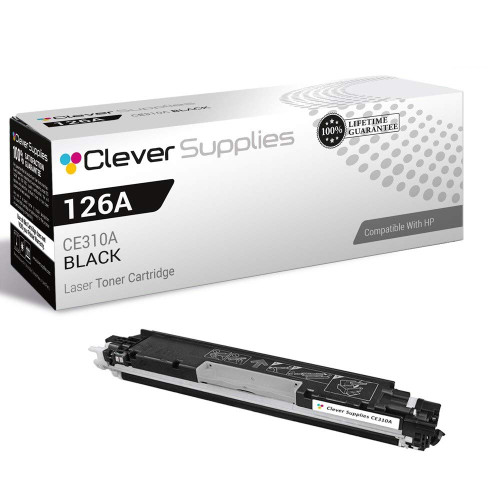
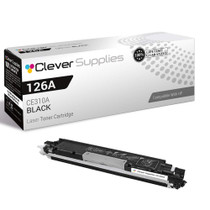
Compatible HP PRO M175 MFP (CE310A) Toner Cartridge Black

Amazon Price:

- Page Yield:
- Black: 1200
- Availability:
- In Stock
- Shipping:
- Calculated at Checkout
- Compatible Printers
- Color LaserJet 100 MFP M175a
- Color LaserJet 100 MFP M175nw
- Color LaserJet CP1025nw
- Color LaserJet TopShot Pro M275
- LaserJet 100 MFP M175a
- LaserJet 100 MFP M175nw
- LaserJet Pro 100 MFP M175a
- LaserJet Pro 100 MFP M175nw
- LaserJet Pro CP1025nw
- LaserJet Pro TopShot Pro M275i>
- Color CP1020
- Color CP1025
- Color CP1025NW
- Color LaserJet CP1020
- Color LaserJet CP1025
- Color LaserJet M175nw
- Color LaserJet M476
- Color LaserJet M476DN
- Color LaserJet M476DW
- Color LaserJet M476NW
- Color LaserJet Pro 100
- Color LaserJet Pro 100 Color MFP M175A
- Color LaserJet Pro 100 Color MFP M175NW
- Color LaserJet Pro 200 M275NW
- Color LaserJet Pro CP1025
- Color LaserJet Pro M175
- Color LaserJet Pro M175 MFP
- Color LaserJet Pro M175A
- Color LaserJet Pro M175nw
- Color LaserJet Pro M476
- Color LaserJet Pro M476DN
- Color LaserJet Pro M476DW
- Color LaserJet Pro M476NW
- Color LaserJet Pro MFP M476
- Color LaserJet Pro MFP M476dn
- Color LaserJet Pro MFP M476dw
- Color LaserJet Pro MFP M476nw
- Color LaserJet TopShot LaserJet Pro M275
- Color LaserJet TopShot LaserJet Pro M275NW
- Color MFP M175A
- HP 126A
- HP 312A & 312X
- LaserJet Pro 100 Color M175A
- LaserJet Pro 100 Color M175N
- LaserJet Pro 100 Color M175W
- LaserJet Pro 100 color MFP M175NW
- TopShot LaserJet Pro M275 MFP
- Specifications
- SKU:
- CS-HP-PRO M175 MFP-BK
- Printer Brand:
- Hewlett Packard
- OEM Number:
- CE310A
- Ink Color:
- Black
- Page Yield:
- Black: 1200
- Printer Type:
- Laser Cartridge
- Condition:
- New Compatible
- Description
- Reviews



The HP 126A Color LaserJet Series encompasses a range of printers designed to meet various printing needs, including the PRO 100 Color MFP M175A, PRO 100 Color MFP M175NW, CP1020, CP1025, CP1025NW, PRO 100, PRO M175, PRO M175A, PRO M175NW, PRO M175 MFP, TOPSHOT LASERJET PRO M275, TOPSHOT LASERJET PRO M275NW, LASERJET PRO 100 COLOR M175A, LASERJET PRO 100 COLOR M175N, and LASERJET PRO 100 COLOR M175W. Among the compatible cartridges are the CE310A Black, CE311A Cyan, CE313A Magenta, and CE312A Yellow, known collectively as the HP 126A toner cartridge or toner cartridge. These printers offer efficient printing solutions for both personal and professional use. The PRO 100 Color MFP M175A and M175NW models provide multifunction capabilities, including printing, scanning, and copying, while the CP1020 and CP1025 series deliver high-quality color printing for small office environments. The TOPSHOT LASERJET PRO M275 and M275NW models stand out with their innovative top shot scanning feature, ideal for capturing 3D objects and documents. With the HP 126A cartridges, users can expect reliable performance and vibrant color output for their printing tasks. The CE310A Black cartridge ensures crisp and sharp text, while the CE311A Cyan, CE313A Magenta, and CE312A Yellow cartridges deliver vivid hues and accurate color reproduction for graphics and images. Whether you're printing documents, presentations, or photos, the HP 126A Color LaserJet Series printers and cartridges provide the versatility and quality needed to produce professional results. Invest in these reliable printing solutions to streamline your workflow and achieve outstanding printouts with every use.
Frequently Asked Questions
The copy job stopped halfway — what does the M175 MFP need?
Almost always, this: a fresh black cartridge. When the CE310A runs dry mid-run, the Pro M175 MFP pauses the job rather than producing ghost pages. This single CE310A at $38.66 — the black of the 126A family, rated at 1,200 pages — is the unit that gets the run moving again.
Does the machine remember the job while you change the cartridge?
In practice, yes — a paused job waits while the swap happens, and the remaining copies continue once the new cartridge is seated. The change takes about two minutes: spent unit out, seal off the new one, in it goes. Keep the originals on the glass and the run resumes where it stopped.
Why does an MFP's black so often die in the middle of something?
Because nobody watches the gauge on a machine that just sits there working. Prints nibble at the CE310A daily, copies take bites, and the low-toner stage passes unnoticed until a long job finds the bottom. A single kept in reserve is the entire cure.
How do you confirm the black, not a jam or the colors, stopped the job?
The machine's message names the supply it wants, and the supplies screen shows the black level at or near empty. A paper jam announces itself differently — with a location. When the complaint is toner, it is this cartridge.
What should happen to the empty unit?
Into the new cartridge's packaging, so any residual toner stays sealed away, and then to a recycling collection point. Never leave a spent cartridge open on a desk; the bag it came in is its traveling container in both directions.
What backing does this get-you-running cartridge carry?
A 1-year warranty, plus 1-year free returns. If the replacement itself misbehaves, the coverage converts a second problem into a simple exchange.
After one mid-job stoppage, is keeping a reserve actually worth it?
That stoppage is the argument. The Pro M175 MFP gives little ceremony when the CE310A runs dry — it simply pauses, usually mid-run, because prints and copies have been nibbling at the supply unnoticed for weeks. One sealed cartridge kept beside the machine turns the next pause into the same two-minute swap you just performed, instead of a wait for delivery.
Why do long copy runs find the bottom of the cartridge so reliably?
Arithmetic. The rating is 1,200 pages, and a serious copy run is several hundred pages in a single sitting. Weeks of ordinary printing bring the CE310A quietly down to its last stretch; the long run is merely the first job big enough to reach the bottom. The cartridge did not fail suddenly — the run simply finished what the calendar started.
How do you judge the first copies from the replacement cartridge?
Let the paused run resume and compare its first fresh copies against the last good ones produced before the fade began. Depth should be even across the page and match those earlier copies exactly. If it does, the episode is closed; if the new output is still pale, the problem was never only toner, and you have learned that in one run instead of three.
Where should a reserve live so the next pause stays short?
Within arm's reach of the machine, sealed in its carton, flat and dry. The value of the spare CE310A is measured in the minutes between the pause and the resumed run, and a cartridge stored in another room — or another building — spends those minutes being fetched. Kept beside the MFP, it is simply the second half of the swap you already know.
About This CE310A Black Cartridge for the Pro M175 MFP
Every Pro M175 MFP eventually pauses mid-job and asks for the same thing: the CE310A, the black cartridge of the 126A family, offered here as a single unit at $38.66 and rated at 1,200 pages. It feeds the copier and the printer from one supply, and fitting it is the work of two minutes — which is why experienced owners keep exactly this cartridge within reach of the machine.
We ship from warehouses in IL, PA, GA and CA, and the shipping & returns page details delivery and returns. Support is on hand Monday–Friday, 9 AM–5 PM CST. The identical unit serves relatives including the Color LaserJet CP1025nw, and the wider family shelf is under HP.
Related Items

Hewlett Packard
Compatible HP PRO M175 MFP (CE310A) Toner Cartridge Black

Hewlett Packard
Compatible HP PRO M175 MFP (CE310A) Toner Cartridge 2 Black


Hewlett Packard
Compatible HP PRO M175 MFP (CE310A) Toner Cartridge 5 Black

Hewlett Packard
Compatible HP PRO M175 (CE310A) Toner Cartridge Black