






 See Compatible Printers
 Read more about our ink!
Hewlett Packard
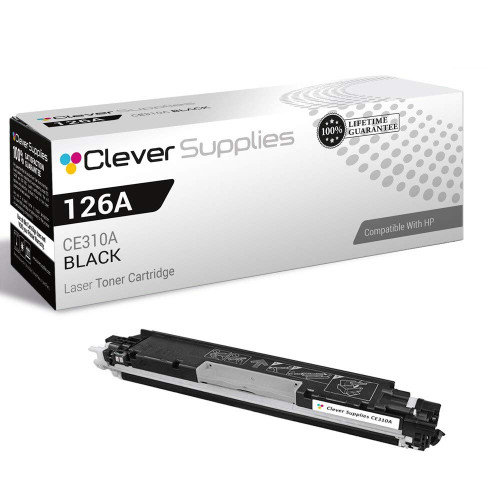
Compatible HP PRO M175 (CE310A) Toner Cartridge Black
- Page Yield:
- Black: 1200
- Availability:
- In Stock
- Shipping:
- Calculated at Checkout

Amazon Price:

- Page Yield:
- Black: 1200
- Availability:
- In Stock
- Shipping:
- Calculated at Checkout
- Compatible Printers
- Color LaserJet 100 MFP M175a
- Color LaserJet 100 MFP M175nw
- Color LaserJet CP1025nw
- Color LaserJet TopShot Pro M275
- LaserJet 100 MFP M175a
- LaserJet 100 MFP M175nw
- LaserJet Pro 100 MFP M175a
- LaserJet Pro 100 MFP M175nw
- LaserJet Pro CP1025nw
- LaserJet Pro TopShot Pro M275i>
- Color CP1020
- Color CP1025
- Color CP1025NW
- Color LaserJet CP1020
- Color LaserJet CP1025
- Color LaserJet M175nw
- Color LaserJet M476
- Color LaserJet M476DN
- Color LaserJet M476DW
- Color LaserJet M476NW
- Color LaserJet Pro 100
- Color LaserJet Pro 100 Color MFP M175A
- Color LaserJet Pro 100 Color MFP M175NW
- Color LaserJet Pro 200 M275NW
- Color LaserJet Pro CP1025
- Color LaserJet Pro M175
- Color LaserJet Pro M175 MFP
- Color LaserJet Pro M175A
- Color LaserJet Pro M175nw
- Color LaserJet Pro M476
- Color LaserJet Pro M476DN
- Color LaserJet Pro M476DW
- Color LaserJet Pro M476NW
- Color LaserJet Pro MFP M476
- Color LaserJet Pro MFP M476dn
- Color LaserJet Pro MFP M476dw
- Color LaserJet Pro MFP M476nw
- Color LaserJet TopShot LaserJet Pro M275
- Color LaserJet TopShot LaserJet Pro M275NW
- Color MFP M175A
- HP 126A
- HP 312A & 312X
- LaserJet Pro 100 Color M175A
- LaserJet Pro 100 Color M175N
- LaserJet Pro 100 Color M175W
- LaserJet Pro 100 color MFP M175NW
- TopShot LaserJet Pro M275 MFP
- Specifications
- SKU:
- CS-HP-PRO M175-BK-1
- Printer Brand:
- Hewlett Packard
- OEM Number:
- CE310A
- Ink Color:
- Black
- Page Yield:
- Black: 1200
- Printer Type:
- Laser Cartridge
- Condition:
- New Compatible
- Description
- Reviews



The HP 126A Color LaserJet Series encompasses a range of printers designed to meet various printing needs, including the PRO 100 Color MFP M175A, PRO 100 Color MFP M175NW, CP1020, CP1025, CP1025NW, PRO 100, PRO M175, PRO M175A, PRO M175NW, PRO M175 MFP, TOPSHOT LASERJET PRO M275, TOPSHOT LASERJET PRO M275NW, LASERJET PRO 100 COLOR M175A, LASERJET PRO 100 COLOR M175N, and LASERJET PRO 100 COLOR M175W. Among the compatible cartridges are the CE310A Black, CE311A Cyan, CE313A Magenta, and CE312A Yellow, known collectively as the HP 126A toner cartridge or toner cartridge. These printers offer efficient printing solutions for both personal and professional use. The PRO 100 Color MFP M175A and M175NW models provide multifunction capabilities, including printing, scanning, and copying, while the CP1020 and CP1025 series deliver high-quality color printing for small office environments. The TOPSHOT LASERJET PRO M275 and M275NW models stand out with their innovative top shot scanning feature, ideal for capturing 3D objects and documents. With the HP 126A cartridges, users can expect reliable performance and vibrant color output for their printing tasks. The CE310A Black cartridge ensures crisp and sharp text, while the CE311A Cyan, CE313A Magenta, and CE312A Yellow cartridges deliver vivid hues and accurate color reproduction for graphics and images. Whether you're printing documents, presentations, or photos, the HP 126A Color LaserJet Series printers and cartridges provide the versatility and quality needed to produce professional results. Invest in these reliable printing solutions to streamline your workflow and achieve outstanding printouts with every use.
Frequently Asked Questions
Fitting this cartridge for the first time — what is the full sequence?
Start with the Pro M175 open and the old black removed. Take the new CE310A from its bag, hold it level, and rock it gently five or six times so the toner inside settles evenly. Pull the sealing strip straight out until it comes away completely, then lower the cartridge into the black position until it seats with a click. Close the machine and print a test page. The whole sequence takes about two minutes.
What is the most common first-timer mistake?
Leaving part of the seal behind. A partly removed strip leaves the cartridge printing faint or blank, and it is the first thing to check if a brand-new CE310A disappoints. The strip should come out in one piece, roughly the length of the cartridge itself.
Why the rocking step — can it be skipped?
It settles toner that has compacted in transit so the first pages print evenly from edge to edge. Skipping it rarely causes lasting harm, but a page or two of uneven density at the start is the usual price. Six gentle rocks cost five seconds.
The first pages look slightly uneven — panic?
Not yet. Print a few more sheets; a freshly installed cartridge distributes its toner as it works, and output typically evens out within a handful of pages. Persistent stripes or a blank band after a dozen pages is a genuine issue, not settling.
Does the Pro M175 need anything done in its menus after the swap?
No resets, no codes, no calibration ritual from you. Close the cover and the machine registers the fresh supply itself. Its black — this CE310A, the 126A family's black, $38.66, rated at 1,200 pages — simply resumes work.
How is a first installation protected if the cartridge is a dud?
Behind it stand a 1-year warranty and 1-year free returns. If a correctly installed unit still will not print cleanly, the coverage, not your wallet, handles it.
The new cartridge has arrived — what is worth checking before the bag is opened?
Two things. First, the label: it should read CE310A, the black of the 126A family — the family's color cartridges sit in similar boxes under different numbers, and a ten-second read prevents the classic wrong-color fitting. Second, the bag's seal: it should be intact, since that seal is what has kept light and dust off the unit since packing. A broken seal on arrival is worth a call to support before the cartridge goes in.
Can the paper itself make a fresh CE310A look weak?
Yes, and it is a common false alarm. Damp paper, rough recycled stock or a heavy textured sheet can print pale and uneven even with a perfect cartridge, because toner bonds differently to each surface. If the first pages disappoint, run the same document on fresh, dry, plain paper before judging the cartridge. Output that sharpens on plain stock was a paper problem all along; output that stays pale on good paper points back at the supply.
Midway through a cartridge's life, one side of the page starts to fade. What comes first?
A reseat, before any verdict. Lift the CE310A out, rock it gently a few times to redistribute toner that has settled toward one end, and seat it firmly again. Fading that clears was simply uneven distribution, which happens as a cartridge empties unevenly. Fading that survives the reseat and follows the same edge page after page is genuine wear, and the honest answer then is the replacement you were going to need soon anyway.
If the household later adds a second small HP, does this cartridge still serve?
Quite possibly — the CE310A is common to the whole compact family, and this same unit also serves the Color LaserJet CP1025nw and its kin. That shared fit is worth knowing before you stock up or give a spare away: one sealed black on the shelf can cover two machines, and a cartridge left over from a retired printer is not wasted if its replacement in the house belongs to the same 126A family.
About This CE310A Black Cartridge for the Pro M175
Some cartridges are bought by people who have changed a hundred; this one is often fitted by someone changing their first. The CE310A — the black of the 126A family, a single unit at $38.66 rated at 1,200 pages — is the Pro M175's document and copy supply, designed so that its replacement is a short, tool-free sequence anyone can complete on the first attempt.
Parcels leave our warehouses in IL, PA, GA and CA, and the shipping & returns page covers delivery and returns in plain terms. Support operates Monday–Friday, 9 AM–5 PM CST. The unit also serves the Color LaserJet CP1025nw and its kin, all filed under HP.
Related Items

Hewlett Packard
Compatible HP PRO M175 (CE310A) Toner Cartridge Black


Hewlett Packard
Compatible HP PRO M175 MFP (CE310A) Toner Cartridge Black


Hewlett Packard
Compatible HP PRO M175 (CE310A) Toner Cartridge 2 Black


Hewlett Packard
Compatible HP PRO M175 MFP (CE310A) Toner Cartridge Black