







 See Compatible Printers
 Read more about our ink!
Hewlett Packard
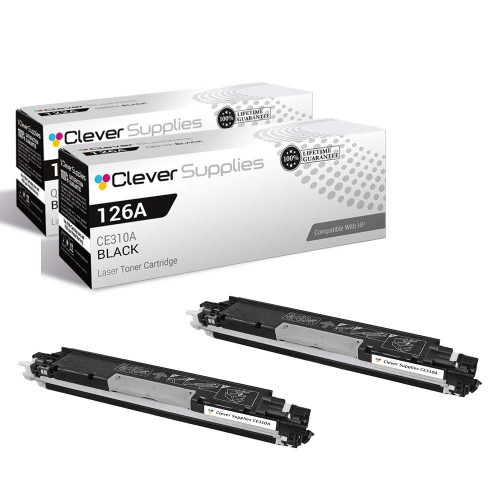
Compatible HP PRO M175 MFP (CE310A) Toner Cartridge 2 Black

Amazon Price:

- Page Yield:
- Black: 1200
- Availability:
- In Stock
- Shipping:
- Free Shipping
- Compatible Printers
- Color LaserJet 100 MFP M175a
- Color LaserJet 100 MFP M175nw
- Color LaserJet CP1025nw
- Color LaserJet TopShot Pro M275
- LaserJet 100 MFP M175a
- LaserJet 100 MFP M175nw
- LaserJet Pro 100 MFP M175a
- LaserJet Pro 100 MFP M175nw
- LaserJet Pro CP1025nw
- LaserJet Pro TopShot Pro M275i>
- Color CP1020
- Color CP1025
- Color CP1025NW
- Color LaserJet CP1020
- Color LaserJet CP1025
- Color LaserJet M175nw
- Color LaserJet M476
- Color LaserJet M476DN
- Color LaserJet M476DW
- Color LaserJet M476NW
- Color LaserJet Pro 100
- Color LaserJet Pro 100 Color MFP M175A
- Color LaserJet Pro 100 Color MFP M175NW
- Color LaserJet Pro 200 M275NW
- Color LaserJet Pro CP1025
- Color LaserJet Pro M175
- Color LaserJet Pro M175 MFP
- Color LaserJet Pro M175A
- Color LaserJet Pro M175nw
- Color LaserJet Pro M476
- Color LaserJet Pro M476DN
- Color LaserJet Pro M476DW
- Color LaserJet Pro M476NW
- Color LaserJet Pro MFP M476
- Color LaserJet Pro MFP M476dn
- Color LaserJet Pro MFP M476dw
- Color LaserJet Pro MFP M476nw
- Color LaserJet TopShot LaserJet Pro M275
- Color LaserJet TopShot LaserJet Pro M275NW
- Color MFP M175A
- HP 126A
- HP 312A & 312X
- LaserJet Pro 100 Color M175A
- LaserJet Pro 100 Color M175N
- LaserJet Pro 100 Color M175W
- LaserJet Pro 100 color MFP M175NW
- TopShot LaserJet Pro M275 MFP
- Specifications
- SKU:
- CS-HP-PRO M175 MFP-2BK
- Printer Brand:
- Hewlett Packard
- OEM Number:
- CE310A
- Ink Color:
- Black
- Page Yield:
- Black: 1200
- Printer Type:
- Laser Cartridge
- Condition:
- New Compatible
- Description
- Reviews



The HP 126A Color LaserJet Series encompasses a range of printers designed to meet various printing needs, including the PRO 100 Color MFP M175A, PRO 100 Color MFP M175NW, CP1020, CP1025, CP1025NW, PRO 100, PRO M175, PRO M175A, PRO M175NW, PRO M175 MFP, TOPSHOT LASERJET PRO M275, TOPSHOT LASERJET PRO M275NW, LASERJET PRO 100 COLOR M175A, LASERJET PRO 100 COLOR M175N, and LASERJET PRO 100 COLOR M175W. Among the compatible cartridges are the CE310A Black, CE311A Cyan, CE313A Magenta, and CE312A Yellow, known collectively as the HP 126A toner cartridge or toner cartridge. These printers offer efficient printing solutions for both personal and professional use. The PRO 100 Color MFP M175A and M175NW models provide multifunction capabilities, including printing, scanning, and copying, while the CP1020 and CP1025 series deliver high-quality color printing for small office environments. The TOPSHOT LASERJET PRO M275 and M275NW models stand out with their innovative top shot scanning feature, ideal for capturing 3D objects and documents. With the HP 126A cartridges, users can expect reliable performance and vibrant color output for their printing tasks. The CE310A Black cartridge ensures crisp and sharp text, while the CE311A Cyan, CE313A Magenta, and CE312A Yellow cartridges deliver vivid hues and accurate color reproduction for graphics and images. Whether you're printing documents, presentations, or photos, the HP 126A Color LaserJet Series printers and cartridges provide the versatility and quality needed to produce professional results. Invest in these reliable printing solutions to streamline your workflow and achieve outstanding printouts with every use.
Frequently Asked Questions
Why sell the M175 MFP's black in pairs?
Because a multifunction's black cartridge empties from two directions — the print queue and the copy glass — and a machine shared by a household or a small team rarely warns anyone in time. This two-pack of CE310A cartridges at $58.82 places one unit in the Pro M175 MFP and one in the cupboard; each is the 126A black, rated at 1,200 pages.
Can the two cartridges be split between home and office machines?
Yes. Many owners run the same compact MFP in two places and divide a two-pack between them — the cartridges are standard CE310A units with no allegiance to any single machine. Splitting or consolidating is purely a matter of where empties happen fastest.
What drains the installed cartridge between changes?
Documents from computers, and copies made at the glass. Both are black-toner work; only scanning is free. A week of heavy copying can outpace a month of light printing, which is why MFP owners learn to judge this cartridge by the copy count as much as the page count.
How do you tell the black is nearly done on the M175 MFP?
The supplies levels in the software tell the plain story, and the pages confirm it: copies and prints fading together is the shared-supply signature. When both functions pale at once, it is never the scanner and rarely the printer — it is this cartridge.
What is involved in the actual change?
Access the cartridge bay, remove the spent black, rock the fresh CE310A gently from side to side, pull its seal away in one motion, and seat it. The MFP stirs, calibrates, and both printing and copying return to full strength.
Are both cartridges in the pair independently covered?
Yes — a 1-year warranty and 1-year free returns attach to each unit. The spare installed next season carries the same protection as the one fitted today.
Copies of dense forms fill the whole page — how does that sit with the 1,200-page rating?
The rating is struck at standard text coverage, and a typical form is close to that, so the CE310A's figure holds up well at the copy glass. Full-page, heavily inked copies draw more per sheet, and a household or team that copies such pages daily will cycle this pair faster than the arithmetic suggests. Judge the pack by your copy mix, not just the number.
When should the next pair be ordered?
The day the reserve is fitted. From that moment the M175 MFP is running on its last CE310A, with nothing behind it; ordering then gives the new pair a full cartridge's lifetime to arrive. Waiting for visible fading before ordering repeats the exact gap the two-pack was bought to close — the reserve is the trigger, not the emergency.
Where does the reserve belong in a busy household or small team?
In a cupboard by the machine, sealed, where anyone can find it. On a shared MFP the person who meets the faded page is often not the person who ordered the pair, so the spare's location has to be obvious rather than remembered. Flat, dry and out of sunlight, it waits there in the same condition it arrived in.
How should the two empties be handled across the pair's life?
Each spent unit goes into the fresh cartridge's packaging at the moment of the swap — never onto a shelf loose. That single habit keeps residual toner contained, keeps empties from being mistaken for spares, and means that when the pair is done, both old CE310A units are already bagged and ready to go to a recycling point together.
About This CE310A Two-Pack for the Pro M175 MFP
The Pro M175 MFP is the compact multifunction at the center of this family, and its black supply is the hardest-worked consumable it owns: the CE310A, the black cartridge of the 126A line. Two units at $58.82, each rated at 1,200 pages, give the machine a working cartridge and a understudy — a sensible arrangement for equipment that prints and copies all week.
We send stock from warehouses in IL, PA, GA and CA; the shipping & returns page explains delivery and returns. Our support desk is staffed Monday–Friday, 9 AM–5 PM CST. The identical cartridge serves siblings such as the Color LaserJet CP1025nw, and the whole family range is under HP.
Related Items

Hewlett Packard
Compatible HP PRO M175 MFP (CE310A) Toner Cartridge Black



Hewlett Packard
Compatible HP PRO M175 MFP (CE310A) Toner Cartridge Black


Hewlett Packard
Compatible HP PRO M175 MFP (CE310A) Toner Cartridge 5 Black


Hewlett Packard
Compatible HP PRO M175 (CE310A) Toner Cartridge 2 Black