






 See Compatible Printers
 Read more about our ink!
Hewlett Packard
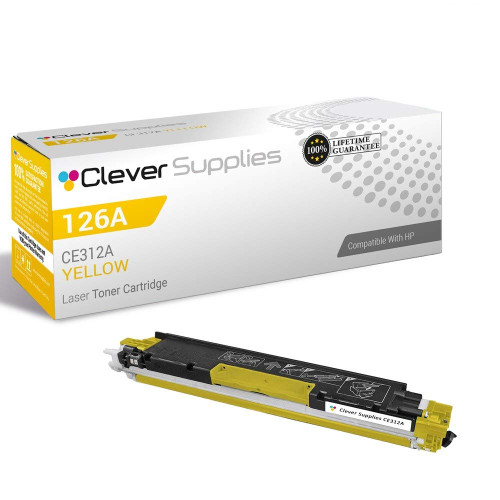
Compatible HP PRO M175 (CE312A) Toner Cartridge Yellow

Amazon Price:

- Page Yield:
- Color: 1000
- Availability:
- In Stock
- Shipping:
- Calculated at Checkout
- Compatible Printers
- Color LaserJet 100 MFP M175a
- Color LaserJet 100 MFP M175nw
- Color LaserJet CP1025nw
- Color LaserJet TopShot Pro M275
- LaserJet 100 MFP M175a
- LaserJet 100 MFP M175nw
- LaserJet Pro 100 MFP M175a
- LaserJet Pro 100 MFP M175nw
- LaserJet Pro CP1025nw
- LaserJet Pro TopShot Pro M275i>
- Color CP1020
- Color CP1025
- Color CP1025NW
- Color LaserJet CP1020
- Color LaserJet CP1025
- Color LaserJet M175nw
- Color LaserJet M476
- Color LaserJet M476DN
- Color LaserJet M476DW
- Color LaserJet M476NW
- Color LaserJet Pro 100
- Color LaserJet Pro 100 Color MFP M175A
- Color LaserJet Pro 100 Color MFP M175NW
- Color LaserJet Pro 200 M275NW
- Color LaserJet Pro CP1025
- Color LaserJet Pro M175
- Color LaserJet Pro M175 MFP
- Color LaserJet Pro M175A
- Color LaserJet Pro M175nw
- Color LaserJet Pro M476
- Color LaserJet Pro M476DN
- Color LaserJet Pro M476DW
- Color LaserJet Pro M476NW
- Color LaserJet Pro MFP M476
- Color LaserJet Pro MFP M476dn
- Color LaserJet Pro MFP M476dw
- Color LaserJet Pro MFP M476nw
- Color LaserJet TopShot LaserJet Pro M275
- Color LaserJet TopShot LaserJet Pro M275NW
- Color MFP M175A
- HP 126A
- HP 312A & 312X
- LaserJet Pro 100 Color M175A
- LaserJet Pro 100 Color M175N
- LaserJet Pro 100 Color M175W
- LaserJet Pro 100 color MFP M175NW
- TopShot LaserJet Pro M275 MFP
- Specifications
- SKU:
- CS-HP-PRO M175-Y
- Printer Brand:
- Hewlett Packard
- OEM Number:
- CE312A
- Ink Color:
- Yellow
- Page Yield:
- Color: 1000
- Printer Type:
- Laser Cartridge
- Condition:
- New Compatible
- Description
- Reviews



The HP 126A Color LaserJet Series encompasses a range of printers designed to meet various printing needs, including the PRO 100 Color MFP M175A, PRO 100 Color MFP M175NW, CP1020, CP1025, CP1025NW, PRO 100, PRO M175, PRO M175A, PRO M175NW, PRO M175 MFP, TOPSHOT LASERJET PRO M275, TOPSHOT LASERJET PRO M275NW, LASERJET PRO 100 COLOR M175A, LASERJET PRO 100 COLOR M175N, and LASERJET PRO 100 COLOR M175W. Among the compatible cartridges are the CE310A Black, CE311A Cyan, CE313A Magenta, and CE312A Yellow, known collectively as the HP 126A toner cartridge or toner cartridge. These printers offer efficient printing solutions for both personal and professional use. The PRO 100 Color MFP M175A and M175NW models provide multifunction capabilities, including printing, scanning, and copying, while the CP1020 and CP1025 series deliver high-quality color printing for small office environments. The TOPSHOT LASERJET PRO M275 and M275NW models stand out with their innovative top shot scanning feature, ideal for capturing 3D objects and documents. With the HP 126A cartridges, users can expect reliable performance and vibrant color output for their printing tasks. The CE310A Black cartridge ensures crisp and sharp text, while the CE311A Cyan, CE313A Magenta, and CE312A Yellow cartridges deliver vivid hues and accurate color reproduction for graphics and images. Whether you're printing documents, presentations, or photos, the HP 126A Color LaserJet Series printers and cartridges provide the versatility and quality needed to produce professional results. Invest in these reliable printing solutions to streamline your workflow and achieve outstanding printouts with every use.
Frequently Asked Questions
What does this listing supply for a Pro M175?
The yellow cartridge: CE312A from HP's 126A family, one unit at $38.12. It fills the yellow position in the LaserJet Pro M175 and is sold on its own, so you restock only the color that has finished.
Our newsletter run is monthly and color-heavy. How does yellow hold up?
Newsletter pages are dense — photographs, banners, highlighted boxes — so they draw yellow at well above text-page rates. Against the 1,000-page standard-coverage rating, treat a color-heavy monthly run as real consumption: check the gauge before each issue, not after it.
Why did the flyers lose their punch before the text pages changed?
Flyers interrogate yellow. Highlight panels, warm backgrounds and green graphics all spend it; plain text spends none. So the color work degrades first and loudest — that ordering is diagnostic, not coincidence.
Can I change the cartridge between batches of the same run?
Yes. Pause, swap the CE312A, and resume; pages printed after the change will carry the restored palette. For consistency across a single batch, though, starting the run on a healthy cartridge is the cleaner practice.
Does the Pro M175 take the same yellow as the rest of its platform?
Yes — the 126A family is shared across these compact color machines, the Color LaserJet CP1025nw included. The code CE312A is the constant; verify it on the empty unit and ordering stays simple.
What stands behind the cartridge?
A 1-year warranty and 1-year free returns — a cartridge that fails within the year goes back free of charge.
Should a newsletter office keep one sealed spare of this cartridge on the shelf?
For a dated publication, yes. A monthly issue has a hard deadline, and yellow gives its warning quietly, in faded banners rather than in stopped pages. One sealed CE312A beside the printer converts a mid-run discovery into a two-minute pause. Buy the spare when the installed cartridge is healthy, not when the gauge is already low — a spare bought late is just the next cartridge arriving by a more anxious route.
The yellow fades near the end of a long issue run. Can rocking the old cartridge rescue it?
Often, for a while. Removing the CE312A and rocking it gently from side to side redistributes the toner that remains, and the pages that follow commonly recover enough density to finish a batch respectably. Treat the trick as a bridge, not a cure: it borrows against an empty cartridge, and the fade will return within a modest number of pages. The rescued run buys time for the replacement to arrive, nothing more.
Between issues the printer sits idle for weeks. How should the spare be kept meanwhile?
Sealed in its carton, lying flat, in the same cupboard as the paper stock is a good pattern — room temperature, away from radiators, windows and damp. A toner cartridge asks for none of the care ink does; it does not dry out in storage. What matters is that the spare stays sealed until the day it is fitted, because an opened cartridge stored loose collects dust and light for no benefit.
What happens to a year of empties from a monthly publication?
Collect them rather than binning them one at a time. Each spent CE312A goes back into the carton its replacement arrived in; a small stack accumulates beside the printer across the year and can go to a recycling point in a single trip. Keeping the empties boxed also keeps the office honest about consumption — twelve cartons a year is the visible arithmetic of how hard the newsletter works its yellow.
About This CE312A for the Pro M175 — Yellow for the Monthly Color Run
Some printers sip color; a Pro M175 on newsletter duty drinks it on a schedule. This CE312A (126A, rated 1,000 pages, $38.12) is the yellow behind every banner and highlighted box in that run, and its slow fade is the difference between an issue that looks produced and one that looks tired. Rhythm is the defense: gauge before the run, this cartridge on the shelf, and the palette stays where the layout put it.
Orders leave IL, PA, GA and CA warehouses; delivery and return terms appear on the shipping & returns page. Support is available Monday–Friday, 9 AM–5 PM CST, and the balance of the platform's supplies is listed under HP.
Related Items


Hewlett Packard
Compatible HP PRO M175 (CE312A) Toner Cartridge Yellow



Hewlett Packard
Compatible HP PRO M175 MFP (CE312A) Toner Cartridge Yellow

Hewlett Packard
Compatible HP PRO 100 (CE312A) Toner Cartridge Yellow


Hewlett Packard
Compatible HP PRO M175NW (CE312A) Toner Cartridge Yellow