






 See Compatible Printers
 Read more about our ink!
Hewlett Packard
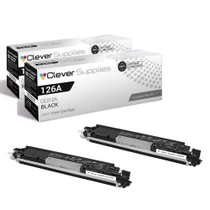
Compatible HP PRO 200 M275NW (CE310A) Toner Cartridge 2 Black

Amazon Price:

- Page Yield:
- Black: 1200
- Availability:
- In Stock
- Shipping:
- Free Shipping
- Compatible Printers
- Color LaserJet 100 MFP M175a
- Color LaserJet 100 MFP M175nw
- Color LaserJet CP1025nw
- Color LaserJet TopShot Pro M275
- LaserJet 100 MFP M175a
- LaserJet 100 MFP M175nw
- LaserJet Pro 100 MFP M175a
- LaserJet Pro 100 MFP M175nw
- LaserJet Pro CP1025nw
- LaserJet Pro TopShot Pro M275i>
- Color CP1020
- Color CP1025
- Color CP1025NW
- Color LaserJet CP1020
- Color LaserJet CP1025
- Color LaserJet M175nw
- Color LaserJet M476
- Color LaserJet M476DN
- Color LaserJet M476DW
- Color LaserJet M476NW
- Color LaserJet Pro 100
- Color LaserJet Pro 100 Color MFP M175A
- Color LaserJet Pro 100 Color MFP M175NW
- Color LaserJet Pro 200 M275NW
- Color LaserJet Pro CP1025
- Color LaserJet Pro M175
- Color LaserJet Pro M175 MFP
- Color LaserJet Pro M175A
- Color LaserJet Pro M175nw
- Color LaserJet Pro M476
- Color LaserJet Pro M476DN
- Color LaserJet Pro M476DW
- Color LaserJet Pro M476NW
- Color LaserJet Pro MFP M476
- Color LaserJet Pro MFP M476dn
- Color LaserJet Pro MFP M476dw
- Color LaserJet Pro MFP M476nw
- Color LaserJet TopShot LaserJet Pro M275
- Color LaserJet TopShot LaserJet Pro M275NW
- Color MFP M175A
- HP 126A
- HP 312A & 312X
- LaserJet Pro 100 Color M175A
- LaserJet Pro 100 Color M175N
- LaserJet Pro 100 Color M175W
- LaserJet Pro 100 color MFP M175NW
- TopShot LaserJet Pro M275 MFP
- Specifications
- SKU:
- CLS-HP-PRO 200 M275NW-2BK
- Printer Brand:
- Hewlett Packard
- OEM Number:
- CE310A
- Ink Color:
- Black
- Page Yield:
- Black: 1200
- Printer Type:
- Laser Cartridge
- Condition:
- New Compatible
- Description
- Reviews



The HP 126A Color LaserJet Series encompasses a range of printers designed to meet various printing needs, including the PRO 100 Color MFP M175A, PRO 100 Color MFP M175NW, CP1020, CP1025, CP1025NW, PRO 100, PRO M175, PRO M175A, PRO M175NW, PRO M175 MFP, TOPSHOT LASERJET PRO M275, TOPSHOT LASERJET PRO M275NW, LASERJET PRO 100 COLOR M175A, LASERJET PRO 100 COLOR M175N, and LASERJET PRO 100 COLOR M175W. Among the compatible cartridges are the CE310A Black, CE311A Cyan, CE313A Magenta, and CE312A Yellow, known collectively as the HP 126A toner cartridge or toner cartridge. These printers offer efficient printing solutions for both personal and professional use. The PRO 100 Color MFP M175A and M175NW models provide multifunction capabilities, including printing, scanning, and copying, while the CP1020 and CP1025 series deliver high-quality color printing for small office environments. The TOPSHOT LASERJET PRO M275 and M275NW models stand out with their innovative top shot scanning feature, ideal for capturing 3D objects and documents. With the HP 126A cartridges, users can expect reliable performance and vibrant color output for their printing tasks. The CE310A Black cartridge ensures crisp and sharp text, while the CE311A Cyan, CE313A Magenta, and CE312A Yellow cartridges deliver vivid hues and accurate color reproduction for graphics and images. Whether you're printing documents, presentations, or photos, the HP 126A Color LaserJet Series printers and cartridges provide the versatility and quality needed to produce professional results. Invest in these reliable printing solutions to streamline your workflow and achieve outstanding printouts with every use.
Frequently Asked Questions
Our Pro 200 M275nw needs black — is a 2-pack the sensible size?
For most M275nw owners, yes. The Pro 200 machine is a small-office MFP with a party trick — its TopShot scanner — but its printing runs on the same CE310A black as the rest of the 126A family. This pair at $58.82 covers the working cartridge and the inevitable next one, because black is what its documents and copies consume.
Scanning objects with TopShot — does that use up the black?
Not a drop. TopShot captures images of objects placed on its bed and sends them to a computer; no toner is involved. Only when you print or copy does the CE310A come into play — which is why a scanning-heavy desk can still be surprised by print volume.
Are both cartridges full standard units?
Both are standard CE310A cartridges rated at 1,200 pages each, sealed and complete. The 2-pack is a stocking choice, identical in substance to buying the single twice.
The M275nw is wireless — anything special about the swap?
Nothing at all. Cartridge changes do not disturb the wireless setup, and the machine returns to the network on its own. Open the access, exchange the black unit, close it — two minutes.
When do I order the following pair?
When the reserve cartridge is fitted. At that point the printer holds a full cartridge and the clock starts on the next order; a pair arriving any time within that cartridge's life keeps the cycle unbroken.
Can this pair serve our reception M175 too?
If that machine is in the 126A family, yes — the CE310A is the shared black across these compact lines. Stock bought for the M275nw can rescue an M175 in a pinch, and vice versa.
How should the spare cartridge be stored while the first one works?
Keep it sealed in its box, lying flat in a cool, dark drawer or cupboard. Heat, sunlight and humidity are the enemies of a waiting cartridge, and a CE310A kept away from all three will print exactly as rated whenever its turn comes. Do not open the bag early — the seal is what keeps the toner fresh, and it only needs to come off on fitting day.
Is there any preparation before a fresh cartridge goes in?
A small ritual makes the first pages clean ones. Rock the new CE310A gently from side to side a few times to loosen and level the toner inside, then pull the sealing strip out in one steady motion and seat the cartridge. A seal left half-pulled or toner left settled at one end shows up as pale or streaky first pages, so the thirty seconds of preparation are worth it.
Will heavy paperwork shorten the 1,200-page rating?
The rating assumes an average text page with roughly five percent of its surface covered. Dense invoice runs, bold forms and full-page letters draw more toner per sheet and will land below 1,200 pages; light memos and short notes draw less and can pass it. Most M275nw desks print a mix, and the CE310A's real life lands in that honest middle — plan the reorder by the low warning, not by a page count.
What should happen to the empty cartridge?
Put it straight into the box the new cartridge came out of and send it to a recycling program. A spent CE310A is a remanufacturing core — its shell and drum have a second life — and office supply channels accept them routinely. Boxing it immediately also keeps toner dust off the desk and makes the next reorder obvious: an empty box on the shelf is a cartridge that needs replacing in the stock cycle.
About This CE310A 2-Pack for the Pro 200 M275nw
The Pro 200 M275nw is remembered for its overhead TopShot camera, but day to day it is a wireless color MFP whose paperwork runs on black toner. Its black cartridge is the CE310A, and this 2-pack supplies the working unit plus its successor — a pragmatic quantity for a machine that prints invoices and copies documents between scanning sessions. Each cartridge carries the standard 1,200-page rating.
The pack is backed by a 1-year warranty with 1-year free returns. Shipments come from warehouses in IL, PA, GA and CA, and the shipping & returns page has the delivery and returns details. Support hours are Monday–Friday, 9 AM–5 PM CST. This same CE310A black covers the rest of the compact family, the Color LaserJet Pro 200 M275nw included, and the full range is under HP.
This cartridge is shared across the family — Color LaserJet Pro 200 M275nw, Color LaserJet CP1025nw, LaserJet Pro CP1025nw, Color LaserJet M175nw, LaserJet Pro 100 Color MFP M175nw, Color LaserJet CP1020, Color LaserJet CP1025 and Color LaserJet Pro CP1025. Shoppers comparing pack sizes will also find the CE310A black single (126A). A full set builds from the CE311A cyan (126A).
Related Items


Hewlett Packard
Compatible HP PRO 200 M275NW (CE310A) Toner Cartridge 2 Black



Hewlett Packard
Compatible HP PRO 200 M275NW (CE310A) Toner Cartridge Black


Hewlett Packard
Compatible HP PRO 200 M275NW (CE310A) Toner Cartridge Black

Hewlett Packard
Compatible HP TP PRO M275NW (CE310A) Toner Cartridge 2 Black