






 See Compatible Printers
 Read more about our ink!
Hewlett Packard
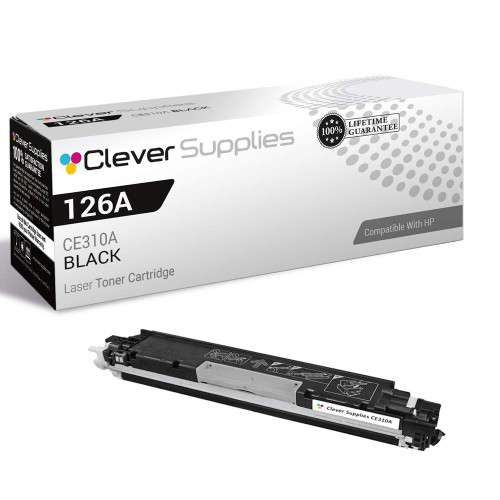
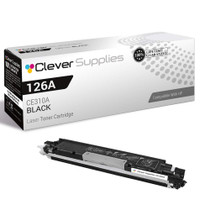
Compatible HP PRO 200 M275NW (CE310A) Toner Cartridge Black

Amazon Price:

- Page Yield:
- Black: 1200
- Availability:
- In Stock
- Shipping:
- Calculated at Checkout
- Compatible Printers
- Color LaserJet 100 MFP M175a
- Color LaserJet 100 MFP M175nw
- Color LaserJet CP1025nw
- Color LaserJet TopShot Pro M275
- LaserJet 100 MFP M175a
- LaserJet 100 MFP M175nw
- LaserJet Pro 100 MFP M175a
- LaserJet Pro 100 MFP M175nw
- LaserJet Pro CP1025nw
- LaserJet Pro TopShot Pro M275i>
- Color CP1020
- Color CP1025
- Color CP1025NW
- Color LaserJet CP1020
- Color LaserJet CP1025
- Color LaserJet M175nw
- Color LaserJet M476
- Color LaserJet M476DN
- Color LaserJet M476DW
- Color LaserJet M476NW
- Color LaserJet Pro 100
- Color LaserJet Pro 100 Color MFP M175A
- Color LaserJet Pro 100 Color MFP M175NW
- Color LaserJet Pro 200 M275NW
- Color LaserJet Pro CP1025
- Color LaserJet Pro M175
- Color LaserJet Pro M175 MFP
- Color LaserJet Pro M175A
- Color LaserJet Pro M175nw
- Color LaserJet Pro M476
- Color LaserJet Pro M476DN
- Color LaserJet Pro M476DW
- Color LaserJet Pro M476NW
- Color LaserJet Pro MFP M476
- Color LaserJet Pro MFP M476dn
- Color LaserJet Pro MFP M476dw
- Color LaserJet Pro MFP M476nw
- Color LaserJet TopShot LaserJet Pro M275
- Color LaserJet TopShot LaserJet Pro M275NW
- Color MFP M175A
- HP 126A
- HP 312A & 312X
- LaserJet Pro 100 Color M175A
- LaserJet Pro 100 Color M175N
- LaserJet Pro 100 Color M175W
- LaserJet Pro 100 color MFP M175NW
- TopShot LaserJet Pro M275 MFP
- Specifications
- SKU:
- CS-HP-PRO 200 M275NW-BK-1
- Printer Brand:
- Hewlett Packard
- OEM Number:
- CE310A
- Ink Color:
- Black
- Page Yield:
- Black: 1200
- Printer Type:
- Laser Cartridge
- Condition:
- New Compatible
- Description
- Reviews



The HP 126A Color LaserJet Series encompasses a range of printers designed to meet various printing needs, including the PRO 100 Color MFP M175A, PRO 100 Color MFP M175NW, CP1020, CP1025, CP1025NW, PRO 100, PRO M175, PRO M175A, PRO M175NW, PRO M175 MFP, TOPSHOT LASERJET PRO M275, TOPSHOT LASERJET PRO M275NW, LASERJET PRO 100 COLOR M175A, LASERJET PRO 100 COLOR M175N, and LASERJET PRO 100 COLOR M175W. Among the compatible cartridges are the CE310A Black, CE311A Cyan, CE313A Magenta, and CE312A Yellow, known collectively as the HP 126A toner cartridge or toner cartridge. These printers offer efficient printing solutions for both personal and professional use. The PRO 100 Color MFP M175A and M175NW models provide multifunction capabilities, including printing, scanning, and copying, while the CP1020 and CP1025 series deliver high-quality color printing for small office environments. The TOPSHOT LASERJET PRO M275 and M275NW models stand out with their innovative top shot scanning feature, ideal for capturing 3D objects and documents. With the HP 126A cartridges, users can expect reliable performance and vibrant color output for their printing tasks. The CE310A Black cartridge ensures crisp and sharp text, while the CE311A Cyan, CE313A Magenta, and CE312A Yellow cartridges deliver vivid hues and accurate color reproduction for graphics and images. Whether you're printing documents, presentations, or photos, the HP 126A Color LaserJet Series printers and cartridges provide the versatility and quality needed to produce professional results. Invest in these reliable printing solutions to streamline your workflow and achieve outstanding printouts with every use.
Frequently Asked Questions
Read the number off the old cartridge — what should it say?
CE310A. That is the black cartridge for the Color LaserJet Pro 200 M275nw, the black member of the 126A family, and it is printed on the label of the unit you remove. This listing is that single cartridge at $38.66, rated at 1,200 pages.
Which work on this machine uses the black, and which does not?
Printing and copying spend it; the overhead TopShot scanning spends nothing, since capturing an object or page is a photographic act. Owners who scan heavily and print lightly are often surprised how long a single CE310A stretches — the rating only counts printed pages.
How does the swap proceed on the M275nw?
Open the cartridge door, draw the spent black out, then ready the new unit with a gentle rocking motion and a complete pull of its sealing strip before sliding it home. The machine takes a moment to calibrate, and the first document out confirms the fix.
Text faded but the colors still look bright — is that consistent with a tired black?
Perfectly consistent. Documents are printed from the black cartridge alone, so it can be exhausted while the color units sit comparatively full. Pale letters beside a vivid test graphic is the CE310A asking to be replaced, and this is its replacement.
Is a single cartridge enough for a light-use M275nw?
For scan-led use, comfortably — a 1,200-page rating covers months of labels and occasional documents. Heavier print routines simply reorder more often; there is no penalty for buying this supply one at a time if your desk's pattern is gentle.
What stands behind the cartridge after purchase?
A 1-year warranty and 1-year free returns. Should the unit streak or underperform early, exchange it under that cover instead of tolerating it.
For a scan-led desk, is keeping one spare still sensible?
Yes, because the printing an M275nw does is rarely optional — it is the label for a parcel already packed, the invoice a customer is waiting on. Usage may be light for months, but when the CE310A fades it fades on the day something must ship. One sealed spare in the drawer converts that small crisis into a two-minute interruption.
Which pages draw hardest on the 1,200-page rating?
Ordinary text documents — letters, slips, invoices — sit right at the standard coverage the rating assumes. Pages carrying large graphics, bold panels or photographs draw considerably more toner each. Scanned pages draw nothing at all. So two M275nw owners can honestly report very different lives from the same CE310A: the rating is fixed, the page mix is what moves.
How do you confirm the new cartridge actually fixed the pale text?
Reprint the very document that exposed the problem, and lay the fresh copy beside the faded one. The colors were never in question on this machine — documents print from the black alone — so black text returning to full, even depth across the page is the complete verdict. If the reprint matches your older good copies, the fix is proven.
What do you do with the spent unit once the new one is in?
It goes into the carton the replacement arrived in and on to a recycling point. Keep it bagged from the moment it leaves the machine: a spent CE310A still holds residual toner that will mark a desk or a car seat if the unit rides around loose. The two minutes of tidiness are the whole disposal routine.
About This CE310A Black Cartridge for the Color LaserJet Pro 200 M275nw
Half of the Color LaserJet Pro 200 M275nw's fame is its scanner; the other half is plain document work, and that half runs on the CE310A — the black cartridge of the 126A family, a single unit at $38.66 rated at 1,200 pages. Packing slips, invoices and reports all come out of this one supply, which is why it is the cartridge this machine asks for most.
Orders are dispatched from IL, PA, GA and CA warehouses, with the details on the shipping & returns page. Support hours are Monday–Friday, 9 AM–5 PM CST. Everything else stocked for the family lives under HP.
The rest of the color set is here too: the CE311A cyan (126A), the CE313A magenta (126A) and the CE312A yellow (126A). The same cartridge drops into Color LaserJet CP1025, Color LaserJet Pro CP1025, Color LaserJet Pro 200 M275nw, Color LaserJet CP1025nw, LaserJet Pro CP1025nw, Color LaserJet M175nw, LaserJet Pro 100 Color MFP M175nw and Color LaserJet CP1020 as well.
Related Items

Hewlett Packard
Compatible HP PRO 200 M275NW (CE310A) Toner Cartridge Black


Hewlett Packard
Compatible HP PRO 200 M275NW (CE310A) Toner Cartridge 2 Black

Hewlett Packard
Compatible HP PRO 200 M275NW (CE310A) Toner Cartridge 2 Black

Hewlett Packard
Compatible HP TOPSHOT LASERJET PRO M275NW (CE310A) Toner Cartridge Black