







 See Compatible Printers
 Read more about our ink!
Hewlett Packard
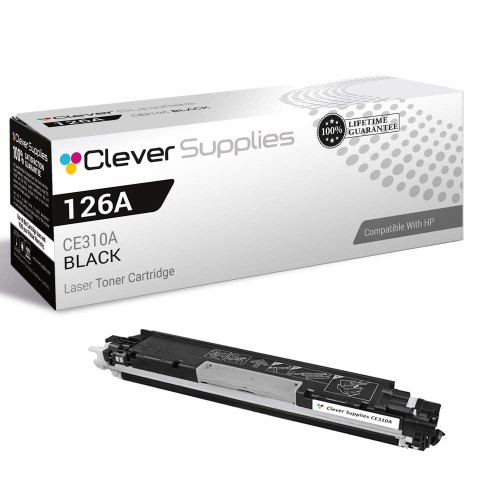
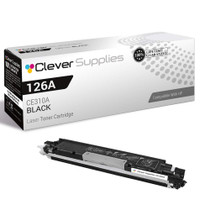
Compatible HP PRO 200 M275NW (CE310A) Toner Cartridge Black

Amazon Price:

- Page Yield:
- Black: 1200
- Availability:
- In Stock
- Shipping:
- Calculated at Checkout
- Compatible Printers
- Color LaserJet 100 MFP M175a
- Color LaserJet 100 MFP M175nw
- Color LaserJet CP1025nw
- Color LaserJet TopShot Pro M275
- LaserJet 100 MFP M175a
- LaserJet 100 MFP M175nw
- LaserJet Pro 100 MFP M175a
- LaserJet Pro 100 MFP M175nw
- LaserJet Pro CP1025nw
- LaserJet Pro TopShot Pro M275i>
- Color CP1020
- Color CP1025
- Color CP1025NW
- Color LaserJet CP1020
- Color LaserJet CP1025
- Color LaserJet M175nw
- Color LaserJet M476
- Color LaserJet M476DN
- Color LaserJet M476DW
- Color LaserJet M476NW
- Color LaserJet Pro 100
- Color LaserJet Pro 100 Color MFP M175A
- Color LaserJet Pro 100 Color MFP M175NW
- Color LaserJet Pro 200 M275NW
- Color LaserJet Pro CP1025
- Color LaserJet Pro M175
- Color LaserJet Pro M175 MFP
- Color LaserJet Pro M175A
- Color LaserJet Pro M175nw
- Color LaserJet Pro M476
- Color LaserJet Pro M476DN
- Color LaserJet Pro M476DW
- Color LaserJet Pro M476NW
- Color LaserJet Pro MFP M476
- Color LaserJet Pro MFP M476dn
- Color LaserJet Pro MFP M476dw
- Color LaserJet Pro MFP M476nw
- Color LaserJet TopShot LaserJet Pro M275
- Color LaserJet TopShot LaserJet Pro M275NW
- Color MFP M175A
- HP 126A
- HP 312A & 312X
- LaserJet Pro 100 Color M175A
- LaserJet Pro 100 Color M175N
- LaserJet Pro 100 Color M175W
- LaserJet Pro 100 color MFP M175NW
- TopShot LaserJet Pro M275 MFP
- Specifications
- SKU:
- CLS-HP-PRO 200 M275NW-BK
- Printer Brand:
- Hewlett Packard
- OEM Number:
- CE310A
- Ink Color:
- Black
- Page Yield:
- Black: 1200
- Printer Type:
- Laser Cartridge
- Condition:
- New Compatible
- Description
- Reviews



The HP 126A Color LaserJet Series encompasses a range of printers designed to meet various printing needs, including the PRO 100 Color MFP M175A, PRO 100 Color MFP M175NW, CP1020, CP1025, CP1025NW, PRO 100, PRO M175, PRO M175A, PRO M175NW, PRO M175 MFP, TOPSHOT LASERJET PRO M275, TOPSHOT LASERJET PRO M275NW, LASERJET PRO 100 COLOR M175A, LASERJET PRO 100 COLOR M175N, and LASERJET PRO 100 COLOR M175W. Among the compatible cartridges are the CE310A Black, CE311A Cyan, CE313A Magenta, and CE312A Yellow, known collectively as the HP 126A toner cartridge or toner cartridge. These printers offer efficient printing solutions for both personal and professional use. The PRO 100 Color MFP M175A and M175NW models provide multifunction capabilities, including printing, scanning, and copying, while the CP1020 and CP1025 series deliver high-quality color printing for small office environments. The TOPSHOT LASERJET PRO M275 and M275NW models stand out with their innovative top shot scanning feature, ideal for capturing 3D objects and documents. With the HP 126A cartridges, users can expect reliable performance and vibrant color output for their printing tasks. The CE310A Black cartridge ensures crisp and sharp text, while the CE311A Cyan, CE313A Magenta, and CE312A Yellow cartridges deliver vivid hues and accurate color reproduction for graphics and images. Whether you're printing documents, presentations, or photos, the HP 126A Color LaserJet Series printers and cartridges provide the versatility and quality needed to produce professional results. Invest in these reliable printing solutions to streamline your workflow and achieve outstanding printouts with every use.
Frequently Asked Questions
Which black cartridge does the Pro 200 M275nw take?
The CE310A — this single cartridge at $38.66, rated at 1,200 pages under the 126A family name. Whatever the M275nw's scanner can do, its print engine is the family's standard one, and its black unit is this one. The label on the cartridge you remove will confirm CE310A.
Does all that TopShot scanning shorten the cartridge's life?
No. Scanning — whether flat documents or objects under the TopShot camera — is a camera operation; it consumes no toner. The black cartridge's life is spent entirely on printed and copied pages, so a scan-heavy workflow leaves it almost untouched.
How do I tell the black is low on this machine?
By the usual pair of signals: the supplies status reporting a falling black level, and text output turning gray while any color work still looks saturated. When both appear together, the diagnosis is settled.
Is the swap on the M275nw any more involved than on other models?
No — the TopShot hardware sits above the scanner bed and plays no part in a toner change. The cartridge access is the family's standard one: open, lift the black unit out, seat the prepared CE310A, close. A couple of minutes.
What does the first print after fitting tell me?
That the cartridge is seated and its seal is fully out. Expect ordinary-looking output immediately, settling to uniformly dark text within the first few pages as the toner distributes.
Should a single be enough, or will I regret not stocking more?
A single is the honest replacement for the cartridge that just emptied. Whether you stock deeper depends on who else uses the machine — if the M275nw prints for a whole desk cluster, a spare in the drawer is cheap insurance against the next empty.
How do I make sure I am reordering the right code?
Read the label on the cartridge you pull out. The M275nw's black is the CE310A, and the three color codes — CE311A, CE312A and CE313A — differ from it by a single digit, which makes them easy to grab by mistake from a list. The machine name tells you the family; the code on the old unit tells you the exact part, and CE310A is the string to match.
Prints have gone gray, but the paper is old stock — could that be it?
It could. Damp or rough paper makes even a healthy CE310A look weak, because toner bonds unevenly to a poor surface. Before blaming the cartridge, run the same page on fresh, dry paper from a newly opened ream. If the text comes back dark, the paper was the problem; if it stays gray beside saturated color work, the cartridge really is at its end.
The black faded halfway through a long document — can I swap mid-job?
Yes. Pause the run, change the cartridge, and the machine picks the job back up; nothing about the half-printed stack is harmed. If the fade is only slight, rocking the old CE310A gently from side to side and refitting it often coaxes out enough extra pages to finish the run, with the new cartridge then fitted at a calmer moment. Either way, the documents already printed stay printed.
Does walk-up copying draw on this cartridge too?
It does, page for page. A copy is printed output, so every document run through the M275nw's copier spends the same CE310A toner as a page sent from a computer. Desks that copy heavily — signed forms, ID pages, handouts — can find the black empties sooner than the print queue alone would suggest, and the supplies status counts both streams together.
About This CE310A Black Cartridge for the Pro 200 M275nw
Beneath the TopShot novelty, the Pro 200 M275nw is a compact wireless color MFP whose documents run on a very ordinary part: the CE310A black cartridge. This listing is that part, singly — one standard 1,200-page unit at $38.66 from the 126A family. It replaces the black in a machine whose scanning features never touch toner, which is why its black tends to last quietly and then matter all at once.
It carries a 1-year warranty and 1-year free returns. We dispatch from warehouses in IL, PA, GA and CA; the shipping & returns page explains delivery and returns. Our support team works Monday–Friday, 9 AM–5 PM CST. The CE310A is the shared black for this compact class — the Color LaserJet CP1025nw included — and the whole range is found under HP.
Related Items

Hewlett Packard
Compatible HP PRO 200 M275NW (CE310A) Toner Cartridge Black


Hewlett Packard
Compatible HP PRO 200 M275NW (CE310A) Toner Cartridge 2 Black

Hewlett Packard
Compatible HP PRO 200 M275NW (CE310A) Toner Cartridge 2 Black

Hewlett Packard
Compatible HP TOPSHOT LASERJET PRO M275NW (CE310A) Toner Cartridge Black