




SCX-4705ND
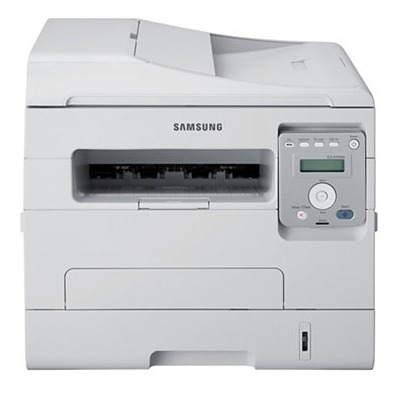
One rung up Samsung's multifunction ladder sits the SCX-4705ND: networked printing, scanning and copying with automatic two-sided output, in a sturdy unit that still belongs on a desktop rather than in a copy room. It shares the cartridge platform of its generation, running on the high-yield MLT-D103L or the standard MLT-D103S, and both yields sit on our shelves as compatibles and as genuine Samsung OEM cartridges.
The telling detail in this model's brief is balance: it was aimed at small teams that scan as much as they print. The scanner earns its keep digitizing paperwork, the duplexer earns its keep on every long report, and the network port means the whole arrangement serves the team rather than one desk. A machine pulled in that many directions needs its one consumable chosen well — toner is the only thing it ever runs out of.
Toner Cartridges for SCX-4705ND
- MLT-D103L — high-yield 3 pack, the restock choice for steady teams
- SCX-4705ND High Yield Laser Toner Cartridge Black — single listing carrying this model's name
- MLT-D103L — high-yield single cartridge
- SCX-4705ND High Yield Laser Toner Cartridge Black 5 Pack — five cartridges under this model's name
- MLT-D103L — premium-quality high-yield 5 pack
Which cartridge should you buy?
Match the cartridge to the machine's double life. A team scanning and printing all week will drain a standard MLT-D103S faster than the purchase price saving justifies; the high-yield MLT-D103L is the rational default, and buying it as a 3 pack or premium 5 pack trims the per-cartridge cost further while keeping the supply shelf stocked. The standard cartridge still makes sense for a genuinely occasional machine — a satellite office, a seasonal desk — where a cartridge might sit half-used for months. Whichever yield you choose, compatibles are backed by a 1-year warranty and 1-year returns, and the genuine OEM version is stocked alongside for offices that prefer it.
Chip, toner and everyday use
When output develops light and dark bands across the page, resist the urge to order parts immediately. Uneven toner distribution inside a tiring cartridge is the common cause, and removing the cartridge to rock it gently from side to side evens the toner out again — bands that vanish after a rock were never a hardware fault. Bands that survive a brand-new cartridge point deeper, toward the drum assembly. For storage, advance buying is safe within reason: a cartridge that stays sealed and climate-controlled for a year or two generally still performs, so long as you rock it before installing to wake the settled toner up.
Frequently Asked Questions
Why do my prints have alternating light and dark bands?
Banding usually means the toner inside the cartridge is distributed unevenly, or the developer roller is wearing. Pull the MLT-D103S or L out and rock it slowly side to side, then reprint the page that showed the problem. If clean bands return with a fresh cartridge installed, suspect the drum assembly next rather than a second bad cartridge.
Will eco printing change how my everyday documents look?
Yes, deliberately. The driver's toner-save setting prints text with less toner laid down per page, which is ideal for drafts, internal documents and anything destined to be recycled. Turn it off for final copies or anything a client will see, where full density matters more than the savings.
If I stock up on cartridges, does the toner expire on the shelf?
Not quickly, if storage is sensible. Keep spares sealed, upright, and away from heat swings and direct sun, and buy in quantities you realistically expect to use within about a year. A long-stored cartridge that opens with faded or streaky first pages has likely degraded; one stored well usually prints clean after a gentle rock.
How do I make sure I am ordering the right code?
Read the code off the cartridge you are replacing, not off the printer's badge — several SCX-4700 variants look alike but this one takes the MLT-D103 family in S or L form. Match the full code, including the yield letter, against the listings above before you check out.
More printers that use the same cartridges
Everything below drinks from the same MLT-D103 cartridge well, multifunctions first and single-function printers after: SCX-4701, SCX-4701ND, SCX-4705, SCX-4726, SCX-4726FD, SCX-4726FN, SCX-4727, SCX-4727FD, SCX-4728, SCX-4728FD, SCX-4729, SCX-4729FD, SCX-4729FW, ML-2950, ML-2950ND, ML-2950NDR, ML-2951, ML-2951NDR, ML-2955, ML-2955DW, ML-2955DW/XAA, ML-2955ND, Samsung-MLTD103.