




ML-2951NDR
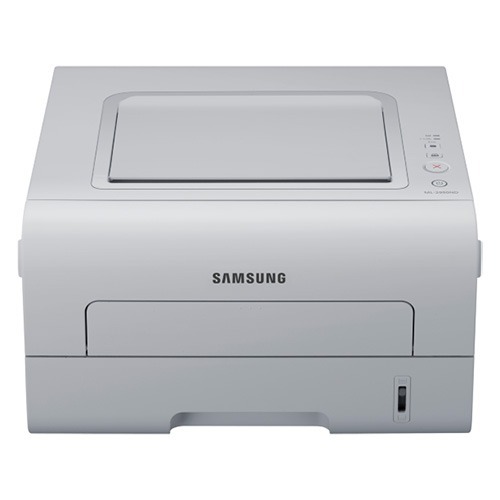
The ML-2951NDR is the regional-code member of Samsung's 2950 mono laser family: a networked printer with automatic duplexing, built to sit on a shared queue and serve a small workgroup rather than one person's desk. It runs on a single black cartridge line, the standard MLT-D103S or the longer-running MLT-D103L, and this page stocks the high-yield side of that family — the MLT-D103L in single and multi-pack form, alongside cartridges sold under the ML-2951NDR name itself.
The trailing letters on this model change with the market it was sold into, so the badge on the front panel is a poor shopping guide. The engine underneath is the familiar 2950-series unit: two-sided printing as a default habit, a network port so every desk can reach it, and a cartridge bay that only accepts the MLT-D103 family. Buy by the cartridge code, not by the badge, and the regional suffix stops mattering entirely.
Toner Cartridges for ML-2951NDR
| Cartridge | Color | Page Yield |
|---|---|---|
| MLT-D103L High Yield Toner Cartridge Black | Black | See product page |
| MLT-D103L High Yield Toner Cartridge Black — 3 Pack | Black | See product page |
| MLT-D103L Premium Quality High Yield Toner Cartridge Black — 5 Pack | Black | See product page |
| ML-2951NDR High Yield Toner Cartridge Black | Black | See product page |
| ML-2951NDR High Yield Toner Cartridge Black — 5 Pack | Black | See product page |
Which cartridge should you buy?
Samsung rates this printer for two versions of the same cartridge: the MLT-D103S for light duty and the MLT-D103L when the queue stays busy. Both seat identically and produce the same print quality; the L simply carries more toner, so a shared machine spends less of its life waiting on a swap. Because this printer serves several people, the multi-packs earn their keep — a three- or five-pack on the shelf means the workgroup never loses an afternoon to an empty cartridge and a rush order. The listings named for the ML-2951NDR and the ones named for the MLT-D103L code are the same cartridge family wearing two labels, so choose by pack size. Every compatible cartridge on this page is backed by a 1-year warranty and 1-year returns.
Chip, toner and everyday use
Each cartridge carries a chip the printer reads to track toner level, so push the cartridge home until it seats fully — a half-seated unit is the usual cause of a recognition complaint. If white areas of the page start taking on a faint gray veil, run the printer's cleaning page before blaming the cartridge; that routine wipes the drum surface the toner passes over. When output fades near the end of a cartridge's life, lift it out and rock it gently from side to side to level the remaining toner, then start planning the replacement rather than repeating the trick weekly.
Frequently Asked Questions
Which cartridge fits the ML-2951NDR, and do color cartridges exist for it?
Only the MLT-D103S and MLT-D103L are made for this printer, and both are black — the ML-2951NDR is a mono machine, so there is no color cartridge to buy. The same cartridge family also serves siblings such as the ML-2950ND, which is why code-based listings work across the whole range. Matching the exact code is the surest way to avoid a return.
Why is clean white paper coming out with a gray haze?
A uniform gray film across the sheet usually means the drum is no longer wiping itself clean between pages, so leftover toner transfers where nothing should print. Print the cleaning page first and look again; if the haze survives that routine, the imaging surface is reaching the end of its life and the backgrounding will only deepen with time.
My ML-2951NDR's text turned faded within a week. Is it the cartridge or the drum?
Fading sits at the crossroads of the two consumables. Try the cartridge side first: rock the installed unit to redistribute its toner, and if a fresh MLT-D103L does not restore density, inspect the drum for a worn, shiny surface or visible scoring. Keeping one spare cartridge on hand lets you run that test immediately instead of guessing while the workgroup waits.
Listings mention the ML-2950, but my badge says ML-2951NDR. Will the cartridge fit?
Yes — the badge difference is regional naming on the same 2950-series engine, and fit is decided by the cartridge code, not the badge. If the listing is built around the MLT-D103 family, it seats in your printer the same way it does in the better-known siblings. When in doubt, compare the code printed on the cartridge you are removing.
More printers that use the same cartridges
The MLT-D103 family also powers this wider group of Samsung mono machines: ML-2950, ML-2950ND, ML-2950NDR, ML-2951, ML-2955, ML-2955DW, ML-2955DW/XAA, ML-2955ND, SCX-4701, SCX-4701ND, SCX-4705, SCX-4705ND, SCX-4726, SCX-4726FD, SCX-4726FN, SCX-4727, SCX-4727FD, SCX-4728, SCX-4728FD, SCX-4729, SCX-4729FD, SCX-4729FW, Samsung-MLTD103.