




Color LaserJet Pro MFP M477FDW
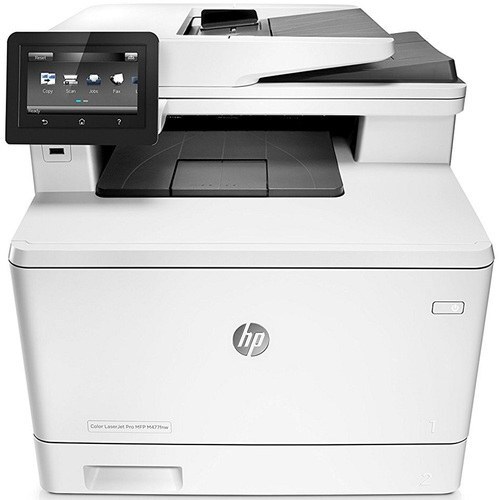
Wireless connectivity plus full fax capability set the Color LaserJet Pro MFP M477FDW apart in 2016, making it a natural fit for workgroups that needed color output without running Ethernet to every desk. Under the lid sits the HP 410 cartridge family in two tiers. The standard tier reads CF410A (410A) for black, CF411A for cyan, CF412A for yellow and CF413A for magenta; the high-yield tier answers with CF410X (410X), CF411X, CF412X and CF413X in the same four colors. No cables for the printer; no guesswork for its toner, either.
The FDW is the workgroup socialite of the line — it joins the Wi-Fi, takes jobs from every desk and still answers the fax line like a machine from another decade. Workgroups burn toner socially too: nobody owns the print queue, so cartridges empty on the group’s schedule, not on one person’s habits, and the buying plan has to absorb surprises.
Toner Cartridges for Color LaserJet Pro MFP M477FDW
| Cartridge | Color | Page Yield |
|---|---|---|
| 410A 4 Color Set | Black + all colors | See product page |
| 410A 3 Color Set (CMY) | Colors only | See product page |
| 410A 5 Color Set (2 Black + CMY) | Black + all colors | See product page |
| 410A 6 Color Set (2 x CMY) | Colors, doubled | See product page |
| 410A 8 Color Set (2 x BCMY) | Black + all colors, doubled | See product page |
| 410X 4 Color Set | Black + all colors | See product page |
| 410X 3 Color Set (CMY) | Colors only | See product page |
| 410X 5 Color Set (2 Black + CMY) | Black + all colors | See product page |
| 410X 6 Color Set (2 x CMY) | Colors, doubled | See product page |
| 410X 8 Color Set (2 x BCMY) | Black + all colors, doubled | See product page |
| CF410A | Black | See product page |
| CF411A | Cyan | See product page |
| CF412A | Yellow | See product page |
| CF413A | Magenta | See product page |
| CF410X | Black | See product page |
| CF411X | Cyan | See product page |
| CF412X | Yellow | See product page |
| CF413X | Magenta | See product page |
| CF410A Black 2 Pack | Black | See product page |
| CF410A Black 3 Pack | Black | See product page |
| CF410A Black 5 Pack | Black | See product page |
| CF410X Black 2 Pack | Black | See product page |
| CF410X Black 3 Pack | Black | See product page |
| CF410X Black 5 Pack | Black | See product page |
Which cartridge should you buy?
Workgroups should buy for the surprise, not the average. A four-color set on the shelf means the day two colors die together — always a deadline day — is a two-minute fix instead of a purchase order. Within the sets, the standard 410A versions suit groups whose color is mostly internal documents; the 410X sets earn their premium where client-facing color goes out weekly. Singles still rule for the one chronically hungry color, and black multipacks cover the mono tide that every workgroup produces between the color jobs. Everything listed is a compatible cartridge covered by a 1-year warranty and 1-year returns.
Chip, toner and everyday use
Wireless printing changes how jobs arrive, not how toner works — the chip in each cartridge still has to be read the old-fashioned way, by contact, when the cartridge seats. Seat each unit until it settles, and if the panel questions a cartridge after a swap, reseating beats restarting nine times out of ten. Because a shared machine sits where everyone can reach it, keep its spare set sealed in a cabinet rather than open on top of the printer, where toner and dust settle into everything. Yields are quoted at 5% coverage; a workgroup printing full-color agendas will land well under the headline figure, which is an argument for the X tier, not a defect in the cartridge.
Frequently Asked Questions
What toner does the Color LaserJet Pro MFP M477FDW take?
The standard-yield CF410A black, CF411A cyan, CF412A yellow and CF413A magenta, or the high-yield CF410X, CF411X, CF412X and CF413X equivalents. Both tiers are listed above with singles, black multipacks and full color sets.
Does connecting over Wi-Fi change which cartridges I order?
Not at all. The FDW drinks the same 410A and 410X cartridges however the job reaches it — Wi-Fi, wired network or a cable from one PC. Connectivity lives in the printer; compatibility lives in the cartridge codes.
One color always runs out first. What is the smart buy?
Feed that color as a high-yield single and leave the slower colors at standard yield. The slots are independent, so the thirsty color gets its bigger cartridge without forcing the whole set up a tier.
A new cartridge shows a supply message on the panel. Now what?
Open the front door, lift the cartridge out and reseat it with firm, even pressure, making sure the protective strip was fully removed first. If the message persists, power the printer down and back up so it re-reads the chip.
More printers that use the same cartridges
Every machine below runs on these same cartridges, which is why one workgroup stockroom can cover a whole floor: Color LaserJet Pro MFP M377, Color LaserJet Pro MFP M377DW, Color LaserJet Pro MFP M477, Color LaserJet Pro MFP M477FDN, Color LaserJet Pro MFP M477FNW, HP 410A, HP 410X, LaserJet M377dw, LaserJet M477fdw, LaserJet M477fnw, LaserJet Pro M452, LaserJet Pro M452, LaserJet Pro M452dn, LaserJet Pro M452dn, LaserJet Pro M452dw, LaserJet Pro M452nw, LaserJet Pro M477, LaserJet Pro M477fdn, LaserJet Pro M477fdw, LaserJet Pro M477fnw, LaserJet Pro MFP M377, LaserJet Pro MFP M377dw, LaserJet Pro MFP M477, LaserJet Pro MFP M477fdn, LaserJet Pro MFP M477fdw, LaserJet Pro MFP M477fnw, Color LaserJet M377DW, Color LaserJet M477FDW, Color LaserJet M477FNW, Color LaserJet Pro M377, Color LaserJet Pro M452, Color LaserJet Pro M452DN, Color LaserJet Pro M452DW, Color LaserJet Pro M452NW, Color LaserJet Pro M477, Color LaserJet Pro M477FDN, Color LaserJet Pro M477FDW, Color LaserJet Pro M477FNW.