




Color LaserJet Pro M452DW
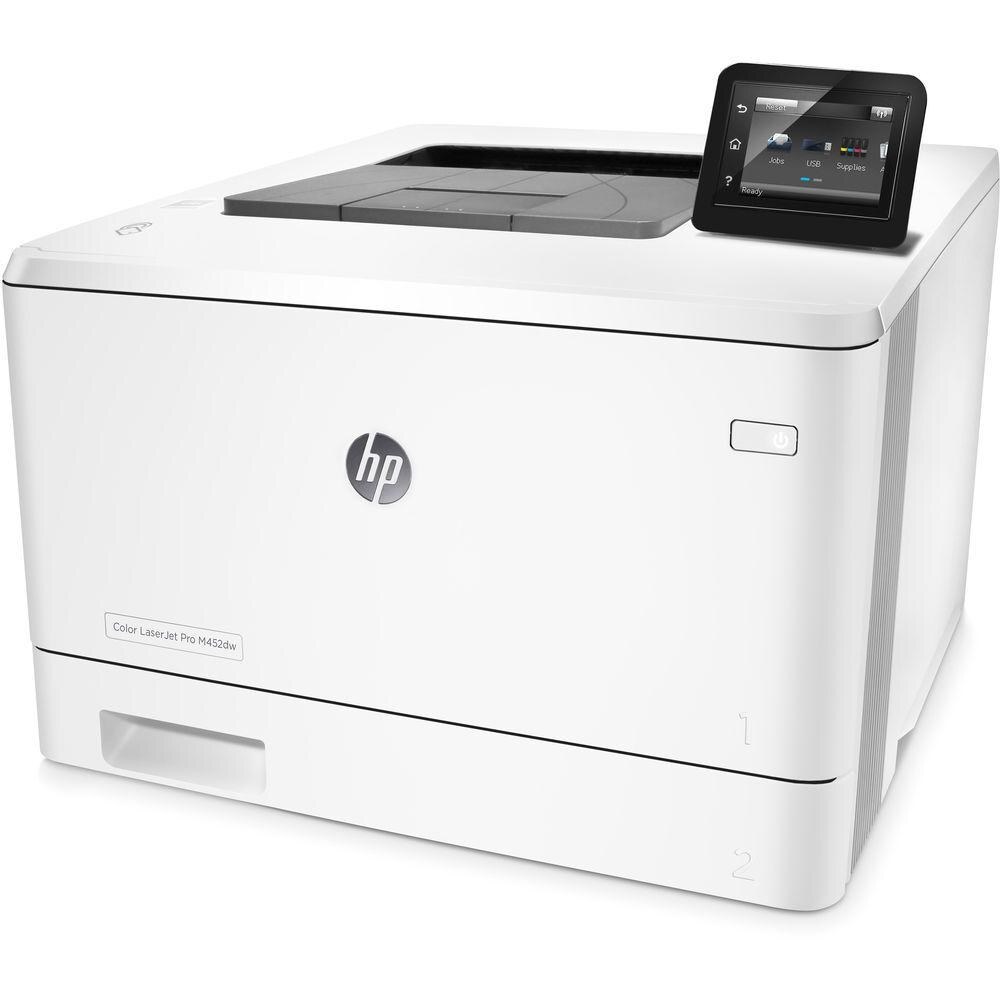
Workgroups whose color volume outgrew the smaller M252 and M277 tier are exactly who the Color LaserJet Pro M452DW was built for: a mid-2010s color printer with Wi-Fi and automatic duplexing, a class up in stamina while staying desk-friendly in size. It runs the HP 410A cartridge line — CF410A black, CF411A cyan, CF412A yellow, CF413A magenta — and a step up in printer brings a step up in cartridge capacity: the 410X editions, CF410X, CF411X, CF412X and CF413X, drop into the same slots for heavier months.
Moving up a printer class changes the toner conversation. On a workgroup machine, a cartridge swap is a pause in several people's day, so capacity stops being a specification and becomes a courtesy. The M452DW also frees the team from cabling — it joins the office wirelessly and duplexes by default — which tends to raise its page volume further, since the easiest printer to reach is the one everyone uses. Feeding it well is mostly a matter of respecting that volume honestly.
Toner Cartridges for Color LaserJet Pro M452DW
| Cartridge | Color | Page Yield |
|---|---|---|
| 410X five-piece set (BCMY plus spare black) | Set | See product page |
| 410A four-color set (BCMY) | Set | See product page |
| 410A color trio (CMY) | Set | See product page |
| 410X four-color set (BCMY) | Set | See product page |
| High-yield black 410X, five pack | Black | See product page |
| High-yield black 410X, triple pack | Black | See product page |
| High-yield black 410X, twin pack | Black | See product page |
| Black 410A, five pack | Black | See product page |
| Black 410A, triple pack | Black | See product page |
| Black 410A, twin pack | Black | See product page |
| High-yield 410X eight-piece set (BCMY, twice over) | Set | See product page |
| High-yield 410X six-piece set (CMY, twice over) | Set | See product page |
| High-yield 410X color trio (CMY) | Set | See product page |
| Eight-piece 410A set (full BCMY, twice over) | Set | See product page |
| Six-piece 410A set (CMY, twice over) | Set | See product page |
| Five-piece 410A set (two black, plus CMY) | Set | See product page |
| Cartridge | Color | Page Yield |
|---|---|---|
| Black — CF410A | Black | See product page |
| Black, high yield — CF410X | Black | See product page |
| Cyan — CF411A | Cyan | See product page |
| Cyan, high yield — CF411X | Cyan | See product page |
| Yellow — CF412A | Yellow | See product page |
| Yellow, high yield — CF412X | Yellow | See product page |
| Magenta — CF413A | Magenta | See product page |
| Magenta, high yield — CF413X | Magenta | See product page |
Which cartridge should you buy?
For this model, think in months, not cartridges. If the office prints color every day, default to the X line across the board and let single standard fills cover quieter colors only. If volume is real but bursty — a heavy proposal week, then silence — standard fills in the slow colors and high-yield black is the balanced shelf. The full sets below suit a synchronized refresh; otherwise replace each color as it empties, one slot at a time. Compatible cartridges here include a 1-year warranty and 1-year returns.
Chip, toner and everyday use
Wireless printers collect one extra piece of maintenance: the connection itself. If the machine drops off the network, restart it and the router before suspecting anything deeper, and rejoin from the wireless setup menu if needed. The cartridges ask less of you — the chip registers a fresh unit as soon as it clicks in, seal removed, and per-color levels show on the status screen. Store spares away from heat and sunlight, and rock a new cartridge gently before installing so the toner bed settles level after its journey.
Frequently Asked Questions
Which cartridge codes fit the Pro M452DW?
The eight codes of the 410 family: CF410A, CF411A, CF412A, CF413A in standard fill and CF410X, CF411X, CF412X, CF413X in high yield. The code printed on the box is what matters; matching it exactly is how returns get avoided.
When should I replace the toner in my Pro M452DW?
When that color's output fades or streaks, or the printer reports the slot empty. Low warnings arrive earlier by design, so use them to order the spare, and change the cartridge when quality visibly drops.
How do I get the Pro M452DW back on Wi-Fi after a dropout?
Restart the printer and your router first — most dropouts end there. If it persists, rejoin the network from the printer's wireless setup menu, try moving the printer closer to the router, and check HP's support site for newer firmware.
Can I mix standard and high-yield cartridges in this printer?
Yes. Every slot accepts either edition of its color, so a high-yield black beside standard colors is a normal setup. Upgrade the slots your volume justifies and leave the rest standard.
More printers that use the same cartridges
One shelf can feed an entire tier of workgroup printers — these models prove it:
- Color LaserJet Pro M477
- Color LaserJet Pro M477FDN
- Color LaserJet Pro M477FDW
- Color LaserJet Pro M477FNW
- Color LaserJet Pro MFP M377
- Color LaserJet Pro MFP M377DW
- Color LaserJet Pro MFP M477
- Color LaserJet Pro MFP M477FDN
- Color LaserJet Pro MFP M477FDW
- Color LaserJet Pro MFP M477FNW
- HP 410A
- HP 410X
- LaserJet M377dw
- LaserJet M477fdw
- LaserJet M477fnw
- LaserJet Pro M452
- LaserJet Pro M452
- LaserJet Pro M452dn
- LaserJet Pro M452dn
- LaserJet Pro M452dw
- LaserJet Pro M452nw
- LaserJet Pro M477
- LaserJet Pro M477fdn
- LaserJet Pro M477fdw
- LaserJet Pro M477fnw
- LaserJet Pro MFP M377
- LaserJet Pro MFP M377dw
- LaserJet Pro MFP M477
- LaserJet Pro MFP M477fdn
- LaserJet Pro MFP M477fdw
- LaserJet Pro MFP M477fnw
- Color LaserJet M377DW
- Color LaserJet M477FDW
- Color LaserJet M477FNW
- Color LaserJet Pro M377
- Color LaserJet Pro M452
- Color LaserJet Pro M452DN
- Color LaserJet Pro M452NW