







 See Compatible Printers
 Read more about our ink!
Hewlett Packard
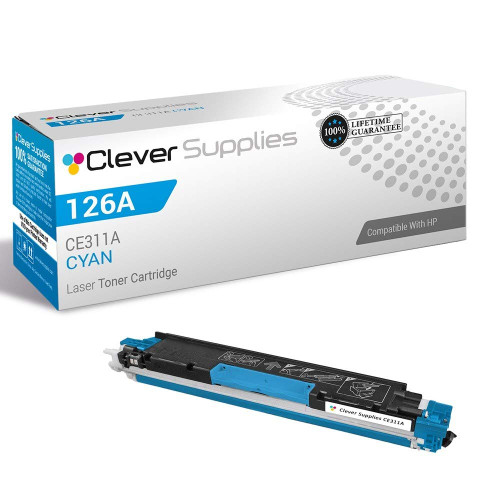
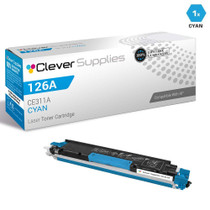
Compatible HP TOPSHOT LASERJET PRO M275NW (CE311A) Toner Cartridge Cyan

Amazon Price:

- Page Yield:
- Color: 1000
- Availability:
- In Stock
- Shipping:
- Calculated at Checkout
- Compatible Printers
- Color LaserJet 100 MFP M175a
- Color LaserJet 100 MFP M175nw
- Color LaserJet CP1025nw
- Color LaserJet TopShot Pro M275
- LaserJet 100 MFP M175a
- LaserJet 100 MFP M175nw
- LaserJet Pro 100 MFP M175a
- LaserJet Pro 100 MFP M175nw
- LaserJet Pro CP1025nw
- LaserJet Pro TopShot Pro M275i>
- Color CP1020
- Color CP1025
- Color CP1025NW
- Color LaserJet CP1020
- Color LaserJet CP1025
- Color LaserJet M175nw
- Color LaserJet M476
- Color LaserJet M476DN
- Color LaserJet M476DW
- Color LaserJet M476NW
- Color LaserJet Pro 100
- Color LaserJet Pro 100 Color MFP M175A
- Color LaserJet Pro 100 Color MFP M175NW
- Color LaserJet Pro 200 M275NW
- Color LaserJet Pro CP1025
- Color LaserJet Pro M175
- Color LaserJet Pro M175 MFP
- Color LaserJet Pro M175A
- Color LaserJet Pro M175nw
- Color LaserJet Pro M476
- Color LaserJet Pro M476DN
- Color LaserJet Pro M476DW
- Color LaserJet Pro M476NW
- Color LaserJet Pro MFP M476
- Color LaserJet Pro MFP M476dn
- Color LaserJet Pro MFP M476dw
- Color LaserJet Pro MFP M476nw
- Color LaserJet TopShot LaserJet Pro M275
- Color LaserJet TopShot LaserJet Pro M275NW
- Color MFP M175A
- HP 126A
- HP 312A & 312X
- LaserJet Pro 100 Color M175A
- LaserJet Pro 100 Color M175N
- LaserJet Pro 100 Color M175W
- LaserJet Pro 100 color MFP M175NW
- TopShot LaserJet Pro M275 MFP
- Specifications
- SKU:
- CS-HP-TOPSHOT LASERJET PRO M275NW-C
- Printer Brand:
- Hewlett Packard
- OEM Number:
- CE311A
- Ink Color:
- Cyan
- Page Yield:
- Color: 1000
- Printer Type:
- Laser Cartridge
- Condition:
- New Compatible
- Description
- Reviews



The HP 126A Color LaserJet Series encompasses a range of printers designed to meet various printing needs, including the PRO 100 Color MFP M175A, PRO 100 Color MFP M175NW, CP1020, CP1025, CP1025NW, PRO 100, PRO M175, PRO M175A, PRO M175NW, PRO M175 MFP, TOPSHOT LASERJET PRO M275, TOPSHOT LASERJET PRO M275NW, LASERJET PRO 100 COLOR M175A, LASERJET PRO 100 COLOR M175N, and LASERJET PRO 100 COLOR M175W. Among the compatible cartridges are the CE310A Black, CE311A Cyan, CE313A Magenta, and CE312A Yellow, known collectively as the HP 126A toner cartridge or toner cartridge. These printers offer efficient printing solutions for both personal and professional use. The PRO 100 Color MFP M175A and M175NW models provide multifunction capabilities, including printing, scanning, and copying, while the CP1020 and CP1025 series deliver high-quality color printing for small office environments. The TOPSHOT LASERJET PRO M275 and M275NW models stand out with their innovative top shot scanning feature, ideal for capturing 3D objects and documents. With the HP 126A cartridges, users can expect reliable performance and vibrant color output for their printing tasks. The CE310A Black cartridge ensures crisp and sharp text, while the CE311A Cyan, CE313A Magenta, and CE312A Yellow cartridges deliver vivid hues and accurate color reproduction for graphics and images. Whether you're printing documents, presentations, or photos, the HP 126A Color LaserJet Series printers and cartridges provide the versatility and quality needed to produce professional results. Invest in these reliable printing solutions to streamline your workflow and achieve outstanding printouts with every use.
Frequently Asked Questions
What does this cartridge supply on the TopShot Pro M275nw?
Cyan. The CE311A is the cyan cartridge of the 126A family — one unit at $38.12, rated at 1,000 pages — and it feeds every printed blue the Color LaserJet Pro 200 M275nw produces.
We scan constantly with the TopShot arm. Does scanning wear this cartridge?
Not at all. The overhead scanner works with light; it could digitise all day on an empty cyan. Toner is spent only when paper comes out — prints and copies — which is why a scan-heavy office is often surprised by how long its cartridges last.
Then why did our cyan still run out?
Because what follows scanning usually prints: the archived document gets a paper copy, the scanned form gets mailed as a printout. Print volume, not scan volume, writes the cartridge's biography — and printed pages lean blue.
How do we read the remaining cyan?
Through the supplies page in the printer's web interface — four gauges, cyan among them. Read it before a print-heavy day and the cartridge will never surprise you mid-batch.
Is the swap different on this model?
No. Same platform, same tool-free change: out with the spent cyan, in with the CE311A, calibration runs itself. The scanner arm stays parked throughout.
What cover stands behind it?
A 1-year warranty and 1-year free returns cover the cartridge for a year from delivery.
How can we tell the cyan is the station at fault, rather than another color?
Print the machine's test or supplies page and read the color blocks individually. Each station lays down its own patch: a pale or broken blue block names the CE311A, while healthy blocks beside it clear the yellow and magenta. Greens looking wrong can mislead the eye, because green is a blend — the test page separates what blended output hides, and it takes under a minute.
The same CE311A serves several machines in this family. Does that matter to us?
It can be quietly useful. The cartridge is the standard cyan for a whole row of compact HP color machines — the M175nw and CP1025 lines among them — so a workplace running two of them keeps one cyan stock for both. A spare drawn for one machine is never stranded if that machine is retired first; it simply serves the survivor, at the same 1,000-page rating.
Where should the spare cyan wait at a busy bench?
Flat in its sealed box, within reach of the machine but out of its heat and the day's sunlight — a shelf or drawer at the bench, not the top of the printer. Toner keeps well under ordinary room conditions; what shortens a spare's useful life is being cooked above a warm machine or faded in a sunny window. Kept sensibly, it is ready the moment the gauge calls for it.
What is the surest way to reorder the right cartridge next time?
Copy the code off the cartridge you remove. The 126A stations sit one digit apart, so ordering from memory invites the yellow or magenta by mistake; the spent unit's stamp — CE311A — is the one piece of information that cannot be wrong. A phone photo of the label at changeover time makes the next order a ten-second job with no guessing in it.
About This CE311A Cyan for the TopShot LaserJet Pro M275nw
The TopShot's famous overhead scanner can make owners forget the machine is also a printer — until its cyan gauge empties. This CE311A is that printer half's cyan supply: $38.12, 1,000 pages, the cartridge behind every blue in every page the M275nw puts on paper.
Orders leave warehouses in IL, PA, GA and CA; delivery and returns are detailed on the shipping & returns page. Support is available Monday–Friday, 9 AM–5 PM CST, and the catalog is gathered under HP.
A full set builds from the CE313A magenta (126A), the CE312A yellow (126A) and the CE310A black (126A). Beyond one model, the cartridge serves Color LaserJet Pro CP1025, Color LaserJet Pro 200 M275nw, Color LaserJet CP1025nw, LaserJet Pro CP1025nw, Color LaserJet M175nw, LaserJet Pro 100 Color MFP M175nw, Color LaserJet CP1020 and Color LaserJet CP1025.
Related Items


Hewlett Packard
Compatible HP TOPSHOT LASERJET PRO M275NW (CE311A) Toner Cartridge Cyan


Hewlett Packard
Compatible HP PRO 200 M275NW (CE311A) Toner Cartridge Cyan

Hewlett Packard
Compatible HP PRO 200 M275NW (CE311A) Toner Cartridge Cyan
Hewlett Packard
Compatible HP TOPSHOT LASERJET PRO M275NW (CE311A CE312A CE313A) Toner Cartridge 3 Color Set