






 See Compatible Printers
 Read more about our ink!
Hewlett Packard
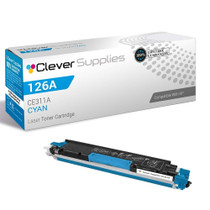
Compatible HP PRO 100 CLR MFP M175NW (CE311A) Toner Cartridge Cyan

Amazon Price:

- Page Yield:
- Color: 1000
- Availability:
- In Stock
- Shipping:
- Calculated at Checkout
- Compatible Printers
- Color LaserJet 100 MFP M175a
- Color LaserJet 100 MFP M175nw
- Color LaserJet CP1025nw
- Color LaserJet TopShot Pro M275
- LaserJet 100 MFP M175a
- LaserJet 100 MFP M175nw
- LaserJet Pro 100 MFP M175a
- LaserJet Pro 100 MFP M175nw
- LaserJet Pro CP1025nw
- LaserJet Pro TopShot Pro M275i>
- Color CP1020
- Color CP1025
- Color CP1025NW
- Color LaserJet CP1020
- Color LaserJet CP1025
- Color LaserJet M175nw
- Color LaserJet M476
- Color LaserJet M476DN
- Color LaserJet M476DW
- Color LaserJet M476NW
- Color LaserJet Pro 100
- Color LaserJet Pro 100 Color MFP M175A
- Color LaserJet Pro 100 Color MFP M175NW
- Color LaserJet Pro 200 M275NW
- Color LaserJet Pro CP1025
- Color LaserJet Pro M175
- Color LaserJet Pro M175 MFP
- Color LaserJet Pro M175A
- Color LaserJet Pro M175nw
- Color LaserJet Pro M476
- Color LaserJet Pro M476DN
- Color LaserJet Pro M476DW
- Color LaserJet Pro M476NW
- Color LaserJet Pro MFP M476
- Color LaserJet Pro MFP M476dn
- Color LaserJet Pro MFP M476dw
- Color LaserJet Pro MFP M476nw
- Color LaserJet TopShot LaserJet Pro M275
- Color LaserJet TopShot LaserJet Pro M275NW
- Color MFP M175A
- HP 126A
- HP 312A & 312X
- LaserJet Pro 100 Color M175A
- LaserJet Pro 100 Color M175N
- LaserJet Pro 100 Color M175W
- LaserJet Pro 100 color MFP M175NW
- TopShot LaserJet Pro M275 MFP
- Specifications
- SKU:
- CLS-HP-L PRO 100 CLR MFP M175NW-C
- Printer Brand:
- Hewlett Packard
- OEM Number:
- CE311A
- Ink Color:
- Cyan
- Page Yield:
- Color: 1000
- Printer Type:
- Laser Cartridge
- Condition:
- New Compatible
- Description
- Reviews



The HP 126A Color LaserJet Series encompasses a range of printers designed to meet various printing needs, including the PRO 100 Color MFP M175A, PRO 100 Color MFP M175NW, CP1020, CP1025, CP1025NW, PRO 100, PRO M175, PRO M175A, PRO M175NW, PRO M175 MFP, TOPSHOT LASERJET PRO M275, TOPSHOT LASERJET PRO M275NW, LASERJET PRO 100 COLOR M175A, LASERJET PRO 100 COLOR M175N, and LASERJET PRO 100 COLOR M175W. Among the compatible cartridges are the CE310A Black, CE311A Cyan, CE313A Magenta, and CE312A Yellow, known collectively as the HP 126A toner cartridge or toner cartridge. These printers offer efficient printing solutions for both personal and professional use. The PRO 100 Color MFP M175A and M175NW models provide multifunction capabilities, including printing, scanning, and copying, while the CP1020 and CP1025 series deliver high-quality color printing for small office environments. The TOPSHOT LASERJET PRO M275 and M275NW models stand out with their innovative top shot scanning feature, ideal for capturing 3D objects and documents. With the HP 126A cartridges, users can expect reliable performance and vibrant color output for their printing tasks. The CE310A Black cartridge ensures crisp and sharp text, while the CE311A Cyan, CE313A Magenta, and CE312A Yellow cartridges deliver vivid hues and accurate color reproduction for graphics and images. Whether you're printing documents, presentations, or photos, the HP 126A Color LaserJet Series printers and cartridges provide the versatility and quality needed to produce professional results. Invest in these reliable printing solutions to streamline your workflow and achieve outstanding printouts with every use.
Frequently Asked Questions
Does the copier on the M175nw drink from this same cyan cartridge?
Yes. On the LaserJet Pro 100 Color MFP M175nw, copies and prints draw on one set of supplies, so a week of copied worksheets spends the CE311A exactly as a week of printed ones would. One cyan cartridge at $38.12, rated at 1,000 pages, feeds both habits.
Why does a shared office MFP empty its cyan unevenly?
Because shared machines print shared documents — and office documents lean blue: links, headers, charts, logos. Cyan quietly becomes the hardest-working color in the building, which is why it so often needs replacing while its neighbours still show life.
What is the fastest way to confirm cyan is the low one?
Print the supplies status page from the control panel or the web interface. Four bars, one per cartridge; the shortest bar is your order. This listing exists precisely for that moment — a single CE311A, no set, no surplus.
How disruptive is the swap in a working office?
Barely. The change takes a couple of minutes, needs no tools, and the MFP recalibrates itself. Queue a color job right after and check the blues on the first page — that is the whole acceptance test.
Should the office keep one of these on the shelf?
For a machine several people depend on, yes. The cost of a shelf spare is $38.12; the cost of a stalled color job in front of a client is harder to invoice. Rotate stock — fit the older spare first when the time comes.
What cover does this cartridge carry?
A 1-year warranty and 1-year free returns. A spare fitted months later is protected on the same terms as one fitted today.
How should the shelf spare be kept so it is ready months from now?
Sealed in its bag and carton, lying flat in a cool spot away from sunlight and radiators — a cupboard shelf near the printer is ideal. Toner does not dry out the way ink does, so a CE311A stored that way simply waits. When the working cartridge finally fades, the spare goes straight in with no preparation beyond the fitting itself.
I am reordering from the cartridge I just took out. What do I read off it?
The code stamp on its label: CE311A. The three 126A colors differ by a single digit — CE311A cyan, CE312A yellow, CE313A magenta — and they share the same shell shape, so reading the stamp off the spent unit is the reliable way to order the same station again rather than guessing from the color you think you remember.
Our office prints mostly documents. What does the 1,000-page rating mean for us?
The rating is a standard-coverage yardstick, and office documents sit at the light end of it: blue headers, links, charts and logos sip at the cyan rather than drinking it. Text-led work with modest color accents stretches the cartridge a long way, while full-page graphics and photographs are what pull a rating down. Your mix, not the calendar, decides the weeks.
What do I do with the spent cyan once it is out?
Slide it into the packaging the new cartridge arrived in and send it to a toner recycling point. Bagging it immediately does two things: it keeps residual toner contained, and it keeps the spent unit off the supply shelf, where a lookalike empty has a way of being picked up and refitted by the next person in a hurry.
About This CE311A Cyan for the LaserJet Pro 100 Color MFP M175nw
The M175nw is the networked all-in-one of the 126A platform — printer, copier and scanner sharing one compact engine and one set of color supplies. This CE311A is its cyan: the station behind the machine's blues, working for every user on the network at once, rated at 1,000 pages.
Orders are dispatched from warehouses in IL, PA, GA and CA; see the shipping & returns page for delivery and returns. Support keeps Monday–Friday, 9 AM–5 PM CST hours, and the family catalog continues under HP.
Related Items


Hewlett Packard
Compatible HP PRO 100 CLR MFP M175NW (CE311A) Toner Cartridge Cyan



Hewlett Packard
Compatible HP PRO M175NW (CE311A) Toner Cartridge Cyan

Hewlett Packard
Compatible HP PRO M175NW (CE311A) Toner Cartridge Cyan


Hewlett Packard
Compatible HP PRO 100 CLR MFP M175NW (CE311A CE312A CE313A) Toner Cartridge 3 Color Set