






 See Compatible Printers
 Read more about our ink!
Hewlett Packard
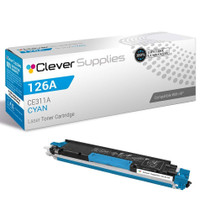
Compatible HP PRO 100 CLR MFP M175NW (CE311A) Toner Cartridge Cyan

Amazon Price:

- Page Yield:
- Color: 1000
- Availability:
- In Stock
- Shipping:
- Calculated at Checkout
- Compatible Printers
- Color LaserJet 100 MFP M175a
- Color LaserJet 100 MFP M175nw
- Color LaserJet CP1025nw
- Color LaserJet TopShot Pro M275
- LaserJet 100 MFP M175a
- LaserJet 100 MFP M175nw
- LaserJet Pro 100 MFP M175a
- LaserJet Pro 100 MFP M175nw
- LaserJet Pro CP1025nw
- LaserJet Pro TopShot Pro M275i>
- Color CP1020
- Color CP1025
- Color CP1025NW
- Color LaserJet CP1020
- Color LaserJet CP1025
- Color LaserJet M175nw
- Color LaserJet M476
- Color LaserJet M476DN
- Color LaserJet M476DW
- Color LaserJet M476NW
- Color LaserJet Pro 100
- Color LaserJet Pro 100 Color MFP M175A
- Color LaserJet Pro 100 Color MFP M175NW
- Color LaserJet Pro 200 M275NW
- Color LaserJet Pro CP1025
- Color LaserJet Pro M175
- Color LaserJet Pro M175 MFP
- Color LaserJet Pro M175A
- Color LaserJet Pro M175nw
- Color LaserJet Pro M476
- Color LaserJet Pro M476DN
- Color LaserJet Pro M476DW
- Color LaserJet Pro M476NW
- Color LaserJet Pro MFP M476
- Color LaserJet Pro MFP M476dn
- Color LaserJet Pro MFP M476dw
- Color LaserJet Pro MFP M476nw
- Color LaserJet TopShot LaserJet Pro M275
- Color LaserJet TopShot LaserJet Pro M275NW
- Color MFP M175A
- HP 126A
- HP 312A & 312X
- LaserJet Pro 100 Color M175A
- LaserJet Pro 100 Color M175N
- LaserJet Pro 100 Color M175W
- LaserJet Pro 100 color MFP M175NW
- TopShot LaserJet Pro M275 MFP
- Specifications
- SKU:
- CLS-HP-L PRO 100 CLR MFP M175NW-C-1
- Printer Brand:
- Hewlett Packard
- OEM Number:
- CE311A
- Ink Color:
- Cyan
- Page Yield:
- Color: 1000
- Printer Type:
- Laser Cartridge
- Condition:
- New Compatible
- Description
- Reviews



The HP 126A Color LaserJet Series encompasses a range of printers designed to meet various printing needs, including the PRO 100 Color MFP M175A, PRO 100 Color MFP M175NW, CP1020, CP1025, CP1025NW, PRO 100, PRO M175, PRO M175A, PRO M175NW, PRO M175 MFP, TOPSHOT LASERJET PRO M275, TOPSHOT LASERJET PRO M275NW, LASERJET PRO 100 COLOR M175A, LASERJET PRO 100 COLOR M175N, and LASERJET PRO 100 COLOR M175W. Among the compatible cartridges are the CE310A Black, CE311A Cyan, CE313A Magenta, and CE312A Yellow, known collectively as the HP 126A toner cartridge or toner cartridge. These printers offer efficient printing solutions for both personal and professional use. The PRO 100 Color MFP M175A and M175NW models provide multifunction capabilities, including printing, scanning, and copying, while the CP1020 and CP1025 series deliver high-quality color printing for small office environments. The TOPSHOT LASERJET PRO M275 and M275NW models stand out with their innovative top shot scanning feature, ideal for capturing 3D objects and documents. With the HP 126A cartridges, users can expect reliable performance and vibrant color output for their printing tasks. The CE310A Black cartridge ensures crisp and sharp text, while the CE311A Cyan, CE313A Magenta, and CE312A Yellow cartridges deliver vivid hues and accurate color reproduction for graphics and images. Whether you're printing documents, presentations, or photos, the HP 126A Color LaserJet Series printers and cartridges provide the versatility and quality needed to produce professional results. Invest in these reliable printing solutions to streamline your workflow and achieve outstanding printouts with every use.
Frequently Asked Questions
My greens have turned yellow and my skies look gray. What failed?
Almost certainly the cyan. Green is cyan plus yellow; sky is mostly cyan. When the CE311A runs dry, both lose their blue ingredient while text stays crisp. This cartridge — one cyan unit, $38.12, rated at 1,000 pages — is the direct remedy for the Color LaserJet M175nw.
Could it be a settings problem instead?
Settings can dull a print, but they rarely remove one color family while leaving the rest untouched. Print the demo or supplies page: if its blue panel is pale and streaky while other panels hold, the diagnosis is toner, not software.
Why did the color drift gradually instead of stopping?
Toner empties by degrees. The last stretch of a cartridge lays down thinner and thinner color, so photos lose their skies over a week or two before the machine finally flags the cartridge as empty. Catching the drift early is what a status-page habit is for.
After fitting the new cyan, what should I print first?
A page with a photograph or a full-color chart. Blues and greens should return in one pass; run the calibration routine from the printer software if edges still look soft, and the MFP settles.
Does scanning fade when cyan is empty?
No — scanning uses light, not toner. You can scan all day with an empty cyan. It is copies and prints, the pages the machine produces, that show the loss.
What protection stands behind this cartridge?
A 1-year warranty and 1-year free returns. If the replacement does not restore the blues, you are not stuck with it.
My colors have only just started to drift. Is that too early to order?
No — the drift is the early warning, and it is the cheapest moment to act on. Toner empties by degrees, so a CE311A ordered when the skies first go gray arrives while the old cartridge still has a thin stretch of life in it. Order at the empty warning instead, and the replacement becomes a rush purchase against a stopped machine.
The new cyan is fitted but the blues are still not right. What else could it be?
Another station aging alongside it. Cyan rarely fades alone on a machine of this age — print the demo or supplies page and compare all the color panels: if the yellow or magenta panel is also pale and streaky, that station is part of the problem. If the panels are solid, run the calibration routine from the printer software and reprint before suspecting the new cartridge.
Why do photographs show the cyan loss before ordinary letters do?
Because letters barely use cyan at all. Text is the black cartridge's work, while photographs lean on cyan for every sky, every body of water and half of every green. As the supply thins, the pages that spend it are the first to show it — which is why a photo-heavy week reveals a fading CE311A that a month of memos would have hidden.
Is it worth keeping a spare when replacements are bought by diagnosis like this?
Yes, and date it. Most cyan purchases on this machine are unplanned reactions to wrong-looking colors; a sealed spare on the shelf turns that reaction into a two-minute swap instead of a wait for delivery. Write the month on the carton when it arrives, fit the older spare first when the time comes, and the rotation looks after itself.
About This CE311A Cyan — the Color-Shift Cure for the M175nw
Most cyan purchases are not planned; they are diagnosed. A week of slightly wrong colors, a logo that no longer matches, a photo whose sky has gone — then the status page confirms it. This CE311A, the cyan of the 126A family at $38.12 with a 1,000-page rating, is the single-cartridge answer sized exactly to that diagnosis.
It ships from warehouses in IL, PA, GA and CA; the shipping & returns page carries delivery and returns detail. Support is available Monday–Friday, 9 AM–5 PM CST, and more of the range is gathered under HP.
Related Items

Hewlett Packard
Compatible HP PRO 100 CLR MFP M175NW (CE311A) Toner Cartridge Cyan



Hewlett Packard
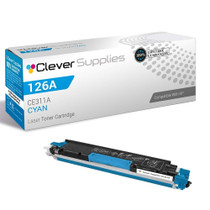
Compatible HP PRO M175NW (CE311A) Toner Cartridge Cyan

Hewlett Packard
Compatible HP PRO M175NW (CE311A) Toner Cartridge Cyan


Hewlett Packard
Compatible HP PRO 100 CLR MFP M175NW (CE311A CE312A CE313A) Toner Cartridge 3 Color Set