







 See Compatible Printers
 Read more about our ink!
Hewlett Packard
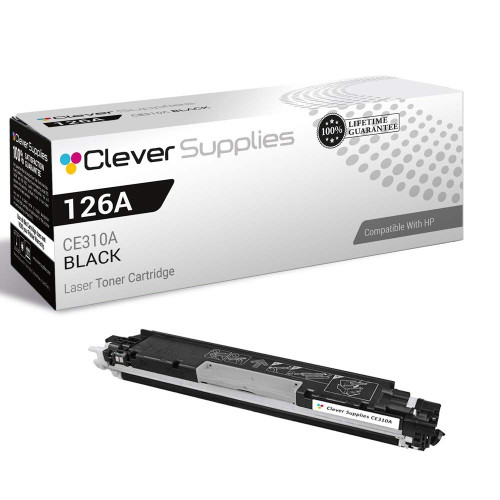
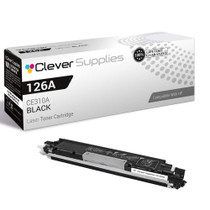
Compatible HP 100 COLOR MFP M175NW (CE310A) Toner Cartridge Black

Amazon Price:

- Page Yield:
- Black: 1200
- Availability:
- In Stock
- Shipping:
- Calculated at Checkout
- Compatible Printers
- Color LaserJet 100 MFP M175a
- Color LaserJet 100 MFP M175nw
- Color LaserJet CP1025nw
- Color LaserJet TopShot Pro M275
- LaserJet 100 MFP M175a
- LaserJet 100 MFP M175nw
- LaserJet Pro 100 MFP M175a
- LaserJet Pro 100 MFP M175nw
- LaserJet Pro CP1025nw
- LaserJet Pro TopShot Pro M275i>
- Color CP1020
- Color CP1025
- Color CP1025NW
- Color LaserJet CP1020
- Color LaserJet CP1025
- Color LaserJet M175nw
- Color LaserJet M476
- Color LaserJet M476DN
- Color LaserJet M476DW
- Color LaserJet M476NW
- Color LaserJet Pro 100
- Color LaserJet Pro 100 Color MFP M175A
- Color LaserJet Pro 100 Color MFP M175NW
- Color LaserJet Pro 200 M275NW
- Color LaserJet Pro CP1025
- Color LaserJet Pro M175
- Color LaserJet Pro M175 MFP
- Color LaserJet Pro M175A
- Color LaserJet Pro M175nw
- Color LaserJet Pro M476
- Color LaserJet Pro M476DN
- Color LaserJet Pro M476DW
- Color LaserJet Pro M476NW
- Color LaserJet Pro MFP M476
- Color LaserJet Pro MFP M476dn
- Color LaserJet Pro MFP M476dw
- Color LaserJet Pro MFP M476nw
- Color LaserJet TopShot LaserJet Pro M275
- Color LaserJet TopShot LaserJet Pro M275NW
- Color MFP M175A
- HP 126A
- HP 312A & 312X
- LaserJet Pro 100 Color M175A
- LaserJet Pro 100 Color M175N
- LaserJet Pro 100 Color M175W
- LaserJet Pro 100 color MFP M175NW
- TopShot LaserJet Pro M275 MFP
- Specifications
- SKU:
- CLS-HP-100 COLOR MFP M175NW-BK
- Printer Brand:
- Hewlett Packard
- OEM Number:
- CE310A
- Ink Color:
- Black
- Page Yield:
- Black: 1200
- Printer Type:
- Laser Cartridge
- Condition:
- New Compatible
- Description
- Reviews



The HP 126A Color LaserJet Series encompasses a range of printers designed to meet various printing needs, including the PRO 100 Color MFP M175A, PRO 100 Color MFP M175NW, CP1020, CP1025, CP1025NW, PRO 100, PRO M175, PRO M175A, PRO M175NW, PRO M175 MFP, TOPSHOT LASERJET PRO M275, TOPSHOT LASERJET PRO M275NW, LASERJET PRO 100 COLOR M175A, LASERJET PRO 100 COLOR M175N, and LASERJET PRO 100 COLOR M175W. Among the compatible cartridges are the CE310A Black, CE311A Cyan, CE313A Magenta, and CE312A Yellow, known collectively as the HP 126A toner cartridge or toner cartridge. These printers offer efficient printing solutions for both personal and professional use. The PRO 100 Color MFP M175A and M175NW models provide multifunction capabilities, including printing, scanning, and copying, while the CP1020 and CP1025 series deliver high-quality color printing for small office environments. The TOPSHOT LASERJET PRO M275 and M275NW models stand out with their innovative top shot scanning feature, ideal for capturing 3D objects and documents. With the HP 126A cartridges, users can expect reliable performance and vibrant color output for their printing tasks. The CE310A Black cartridge ensures crisp and sharp text, while the CE311A Cyan, CE313A Magenta, and CE312A Yellow cartridges deliver vivid hues and accurate color reproduction for graphics and images. Whether you're printing documents, presentations, or photos, the HP 126A Color LaserJet Series printers and cartridges provide the versatility and quality needed to produce professional results. Invest in these reliable printing solutions to streamline your workflow and achieve outstanding printouts with every use.
Frequently Asked Questions
Which black cartridge does the LaserJet Pro 100 M175nw take?
The CE310A — the same unit sold under the 126A family name. This listing is a single black cartridge at $38.66, rated at 1,200 pages. If the cartridge you removed is stamped CE310A, this is its replacement for the M175nw.
The printer is on Wi-Fi across the room — how do I check the black level before ordering?
You do not need to walk over. The printer's software status on any connected computer reports the black cartridge separately, and the machine will also print a supplies status page on request. Faded text on documents is the physical symptom that matches a low reading.
Does wireless printing change how fast black runs out?
No — a page costs the same toner whether it arrives by Wi-Fi, network cable or USB. What wireless does change is who prints: a shared M175nw tends to serve several people, so the black cartridge empties on the household's or team's combined volume.
What is a realistic life for 1,200 pages in a home office?
Think in months. A few letters, labels and school documents a week barely dents it; a work-from-home routine of daily reports will cycle it in a season. The rating is measured at 5% coverage, so text-heavy use tracks close to the number.
Is fitting it any different on the network model?
The swap is identical across the M175 family: open the top, lift the old black cartridge out, remove the new one's sealing tape after a gentle rock, and seat it in the black slot. Nobody needs to reconnect anything — the printer rejoins the network by itself.
My prints look fine but the software says low — who is right?
Both, at different moments. The warning appears with a reserve still in the cartridge, deliberately early. Keep printing while output stays dark; order when the warning appears so the replacement is on hand when pages actually start to fade.
Text faded halfway through a long document — what is the quick fix?
Pause the job, lift the CE310A out and rock it gently from side to side, then refit it. That redistributes the remaining toner and usually restores dark text long enough to finish the document cleanly. Treat the recovery as borrowed time rather than a cure: the cartridge has announced it is nearly done, and the next single should be ordered the same day.
How can I be sure the next cartridge I order is exactly this one?
Ask the printer. The supplies status page it prints names the installed black as CE310A, and the same code is stamped on the cartridge itself when you lift it out. Match that code — rather than the 126A family name, which covers the colors as well — and the cartridge that arrives will be the correct black for the M175nw.
Is it worth keeping a spare single for a shared printer like this?
Yes, because shared machines fail socially before they fail mechanically: the person who meets the empty warning is rarely the person who would have ordered. One sealed CE310A in a drawer near the printer means whoever finds the machine empty can fix it on the spot, and the fitting of that spare becomes the natural moment to order the next one.
What do I do with the spent CE310A?
Seal it into the bag and box the new cartridge arrived in and recycle it through an office-supply or municipal toner program. Boxing the empty immediately keeps residual toner contained, keeps it from being mistaken for the spare in a shared drawer, and keeps it out of general household waste.
About This Black Cartridge for the LaserJet Pro 100 M175nw
The M175nw is the wireless member of HP's Pro 100 color MFP line — the one that tends to sit in a corner serving a whole household or a small team over Wi-Fi. Its black cartridge is the CE310A, listed here at $38.66 under the 126A name. On a shared machine the black unit carries the collective document load — homework, invoices, return labels — and its honest 1,200-page rating is sized for exactly that rhythm of everyday printing.
Your purchase is protected by a 1-year warranty with 1-year free returns. We dispatch from warehouses in IL, PA, GA and CA, and everything about timing and sending a cartridge back is covered on the shipping & returns page. Real people answer questions Monday–Friday, 9 AM–5 PM CST. The same CE310A serves the rest of this compact family, the Color LaserJet M175nw included, and you can browse the complete range under HP.
Related Items

Hewlett Packard
Compatible HP 100 COLOR MFP M175NW (CE310A) Toner Cartridge Black

Hewlett Packard
Compatible HP 100 COLOR MFP M175NW (CE310A) Toner Cartridge 2 Black


Hewlett Packard
Compatible HP 100 COLOR MFP M175NW (CE310A) Toner Cartridge 3 Black

Hewlett Packard
Compatible HP PRO 100 CLR MFP M175NW (CE310A) Toner Cartridge Black