







 See Compatible Printers
 Read more about our ink!
Hewlett Packard
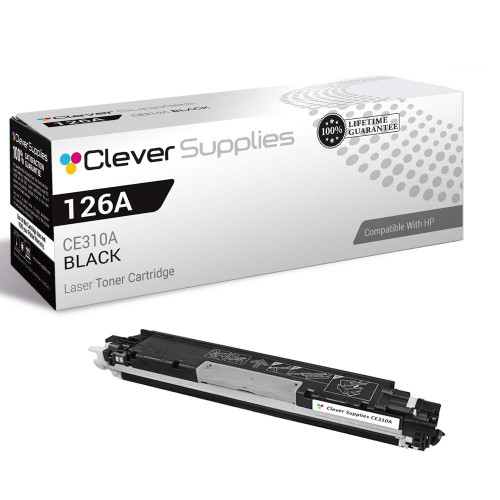
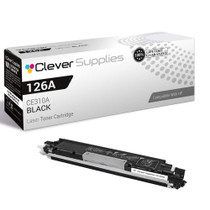
Compatible HP 100 COLOR MFP M175NW (CE310A) Toner Cartridge Black

Amazon Price:

- Page Yield:
- Black: 1200
- Availability:
- In Stock
- Shipping:
- Calculated at Checkout
- Compatible Printers
- Color LaserJet 100 MFP M175a
- Color LaserJet 100 MFP M175nw
- Color LaserJet CP1025nw
- Color LaserJet TopShot Pro M275
- LaserJet 100 MFP M175a
- LaserJet 100 MFP M175nw
- LaserJet Pro 100 MFP M175a
- LaserJet Pro 100 MFP M175nw
- LaserJet Pro CP1025nw
- LaserJet Pro TopShot Pro M275i>
- Color CP1020
- Color CP1025
- Color CP1025NW
- Color LaserJet CP1020
- Color LaserJet CP1025
- Color LaserJet M175nw
- Color LaserJet M476
- Color LaserJet M476DN
- Color LaserJet M476DW
- Color LaserJet M476NW
- Color LaserJet Pro 100
- Color LaserJet Pro 100 Color MFP M175A
- Color LaserJet Pro 100 Color MFP M175NW
- Color LaserJet Pro 200 M275NW
- Color LaserJet Pro CP1025
- Color LaserJet Pro M175
- Color LaserJet Pro M175 MFP
- Color LaserJet Pro M175A
- Color LaserJet Pro M175nw
- Color LaserJet Pro M476
- Color LaserJet Pro M476DN
- Color LaserJet Pro M476DW
- Color LaserJet Pro M476NW
- Color LaserJet Pro MFP M476
- Color LaserJet Pro MFP M476dn
- Color LaserJet Pro MFP M476dw
- Color LaserJet Pro MFP M476nw
- Color LaserJet TopShot LaserJet Pro M275
- Color LaserJet TopShot LaserJet Pro M275NW
- Color MFP M175A
- HP 126A
- HP 312A & 312X
- LaserJet Pro 100 Color M175A
- LaserJet Pro 100 Color M175N
- LaserJet Pro 100 Color M175W
- LaserJet Pro 100 color MFP M175NW
- TopShot LaserJet Pro M275 MFP
- Specifications
- SKU:
- CLS-HP-100 COLOR MFP M175NW-BK-1
- Printer Brand:
- Hewlett Packard
- OEM Number:
- CE310A
- Ink Color:
- Black
- Page Yield:
- Black: 1200
- Printer Type:
- Laser Cartridge
- Condition:
- New Compatible
- Description
- Reviews



The HP 126A Color LaserJet Series encompasses a range of printers designed to meet various printing needs, including the PRO 100 Color MFP M175A, PRO 100 Color MFP M175NW, CP1020, CP1025, CP1025NW, PRO 100, PRO M175, PRO M175A, PRO M175NW, PRO M175 MFP, TOPSHOT LASERJET PRO M275, TOPSHOT LASERJET PRO M275NW, LASERJET PRO 100 COLOR M175A, LASERJET PRO 100 COLOR M175N, and LASERJET PRO 100 COLOR M175W. Among the compatible cartridges are the CE310A Black, CE311A Cyan, CE313A Magenta, and CE312A Yellow, known collectively as the HP 126A toner cartridge or toner cartridge. These printers offer efficient printing solutions for both personal and professional use. The PRO 100 Color MFP M175A and M175NW models provide multifunction capabilities, including printing, scanning, and copying, while the CP1020 and CP1025 series deliver high-quality color printing for small office environments. The TOPSHOT LASERJET PRO M275 and M275NW models stand out with their innovative top shot scanning feature, ideal for capturing 3D objects and documents. With the HP 126A cartridges, users can expect reliable performance and vibrant color output for their printing tasks. The CE310A Black cartridge ensures crisp and sharp text, while the CE311A Cyan, CE313A Magenta, and CE312A Yellow cartridges deliver vivid hues and accurate color reproduction for graphics and images. Whether you're printing documents, presentations, or photos, the HP 126A Color LaserJet Series printers and cartridges provide the versatility and quality needed to produce professional results. Invest in these reliable printing solutions to streamline your workflow and achieve outstanding printouts with every use.
Frequently Asked Questions
My M175nw prints have gone pale — how do I confirm it is the black cartridge before I buy one?
Run two checks. First, print the supplies status page: it shows the black level on its own line. Second, look at a color test image — if colors are still strong while text is gray, the black unit is the culprit. A cartridge can also be coaxed: remove it, rock it gently five or six times to redistribute the toner, and refit it. If pages darken briefly and then fade again, the CE310A is genuinely at the end.
Could pale prints mean something else instead?
Occasionally. A paper setting mismatched to heavy stock, or an economy mode left switched on, can lighten output with a healthy cartridge fitted. If a fresh CE310A at $38.66 is installed and text is still weak after the first few pages settle, the cause is in settings or the machine — not the toner supply.
Why do pages fade unevenly — dark at one side, light at the other?
That gradient is the classic signature of toner running low and settling unevenly in the cartridge. The rocking trick evens it out for a handful of pages, which is itself the diagnosis: the black cartridge is nearly empty and this replacement is the fix.
Does the M175nw stop completely when black is empty?
For black-dependent work, effectively yes — it will not invent black from the color cartridges for text documents. That is why owners of this machine tend to order at the first persistent fade rather than at a hard stop.
How long does the actual replacement take mid-week?
About two minutes, with no tools and no network re-setup. The M175nw keeps its wireless settings through a cartridge change; you are only lifting one unit out of the black slot and seating the new CE310A in its place.
What signs tell me the new cartridge has settled in properly?
The first page or two may look ordinary while toner distributes; by the third or fourth page, text should be uniformly dark edge to edge. If streaks persist beyond that, reseat the cartridge once and check that the sealing tape came out completely.
Our shared M175nw prints dense contracts and forms all day — how far does the 1,200-page rating really stretch?
The rating is measured on standard pages with modest coverage, and dense paperwork spends toner faster than that test assumes. A desk turning out contracts, forms and copied documents will land under 1,200 pages, while light correspondence can meet or pass it. Treat the figure as a planning yardstick rather than a promise: watch how quickly the black bar on the supplies status page falls across one busy week, and that pace — not the calendar — tells you when this CE310A will call for its successor.
Three of us print over Wi-Fi and nobody watches the toner gauge — when should the next cartridge be ordered?
On a shared machine the sensible trigger is the first fade that survives a gentle rocking of the cartridge, or a low reading when anyone happens to print the status page. Because the M175nw will not borrow black from the color cartridges for text work, an empty black slot stops the whole office's documents, so the standing habit is to order the moment the fade persists and keep one sealed CE310A within reach. That way the two-minute swap happens on your schedule, not in the middle of someone's deadline.
The four 126A codes look nearly identical — how do I make sure I order black and not a color?
Read the code, not the description. In this family CE310A is black, CE311A is cyan, CE312A is yellow and CE313A is magenta — a single digit carries the whole difference. The outgoing cartridge's label and the black line of the supplies status page both state CE310A plainly, so match that code character for character when you reorder and there is no way to land on a color by accident.
Once the new cartridge is in, what should happen to the empty one?
Slip it into the carton the replacement arrived in and send it into a recycling stream rather than the trash. A spent toner cartridge is a remanufacturing core — its shell, drum and fittings are raw material for the next unit — and take-back programs run through office suppliers and municipal collections in most areas. Keeping the carton until the swap is done makes the hand-off a ten-second job, and the desk stays clear of a dusty empty unit rolling around a drawer.
About This CE310A Black Cartridge for the LaserJet Pro 100 M175nw
Fading text is how the LaserJet Pro 100 M175nw usually announces an empty black cartridge, and this page exists for that moment: a single CE310A (126A) at $38.66, rated at 1,200 pages, for the black slot of HP's wireless Pro 100 MFP. Because the machine is shared over Wi-Fi, its black cartridge absorbs everyone's documents — which is also why it tends to fade at the least convenient time of the week.
The cartridge comes with a 1-year warranty and 1-year free returns if it is not right. Stock ships from our warehouses in IL, PA, GA and CA; the shipping & returns page details delivery and how a return is handled. Support runs Monday–Friday, 9 AM–5 PM CST if you want help reading a status page. This black unit fits the wider 126A family as well, including the Color LaserJet M175nw, and the rest of the catalog sits under HP.
Related Items

Hewlett Packard
Compatible HP 100 COLOR MFP M175NW (CE310A) Toner Cartridge Black

Hewlett Packard
Compatible HP 100 COLOR MFP M175NW (CE310A) Toner Cartridge 2 Black


Hewlett Packard
Compatible HP 100 COLOR MFP M175NW (CE310A) Toner Cartridge 3 Black

Hewlett Packard
Compatible HP PRO 100 CLR MFP M175NW (CE310A) Toner Cartridge Black