




ProXpress C2620DW
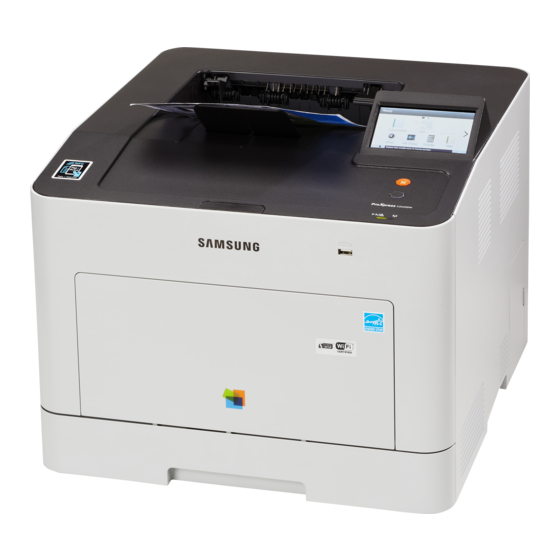
Samsung positioned the ProXpress C2620DW — a business-class color laser printer — for the mid-2010s ProXpress generation, adding automatic duplex printing and wireless networking over the plain C2620 for business workgroups with heavier color workloads. Samsung paired it with the CLT-505L toner line: black CLT-K505L, cyan CLT-C505L, magenta CLT-M505L and yellow CLT-Y505L — four cartridges in total, every one stocked below.
Heavier color workload is the phrase that defines this machine's supplies cupboard. A workgroup that prints presentations, charts and color documents all week does not sip toner — it cycles cartridges, and the levels of the four colors fall at visibly different speeds depending on what the group actually prints. Duplexing saves paper, not toner, so a two-sided color report still drinks from all four cartridges. The practical response is rhythm: know which color your group's work burns first, keep that one ahead, and let the full-set restock be a planned event rather than an emergency.
Toner Cartridges for ProXpress C2620DW
Which cartridge should you buy?
Let your group's output decide. Black anchors most documents even in a color-heavy office, and the two-, three- and five-black packs exist for desks that feel that turnover; the colors are best bought as singles the week each one fades, since a color bought early is cash sitting in a cupboard. After a big color project — a catalogue run, a conference pack — check all four levels before ordering: that is when a four-color or eight-color set, which resets the machine in one pass, genuinely earns its shelf space. Code-named and C2620DW-named listings on this page carry the same cartridges, so choose by the pack size that fits the moment.
Chip, toner and everyday use
Small habits compound on a busy machine. Consolidating many small print jobs into batches lets the printer run through fewer warm-up cycles and use its toner more efficiently across the day. When a cartridge nears its end, rock it gently side to side to redistribute what remains and even out the fading. Spares should sit upright in their original boxes — the box keeps light and knocks off the cartridge — in a cool, dry room, never loose and unwrapped on a shelf. Compatible cartridges here are covered by a 1-year warranty and 1-year returns.
Frequently Asked Questions
What should I look for in a compatible CLT-K505L for this printer?
Consistency. A genuine cartridge is the reference standard, good compatibles match it page after page, and poor ones betray themselves in uneven density and early fading — quality control is where cheap cartridges fail this machine. Pass on the lowest-priced unknown brands, and buy from a supplier who stands behind the cartridge with a real warranty.
What is the best way to store spare C2620DW toner?
Upright, as the cartridges would sit in the printer, sealed in their original boxes. A cool, dry, dark cupboard is the whole recipe: the box shields against light and knocks, the upright position keeps toner evenly distributed, and a spare stored that way is ready the moment a level hits empty.
This printer eats toner — how do I make cartridges last longer?
Start with the defaults, which are rarely tuned for economy: batch small jobs together instead of sending them one by one, use draft or toner-save settings for internal copies, and reserve full quality for client-facing pages. Properly stored spares protect the other half of the equation — no cartridge should ever go stale on the shelf.
More printers that use the same cartridges
The CLT-505L family also serves these related Samsung models: ProXpress C2670FW, Samsung-CLT505L, Xpress C2620DW, Xpress C2670FW.