





 See Compatible Printers
 Read more about our ink!
Samsung
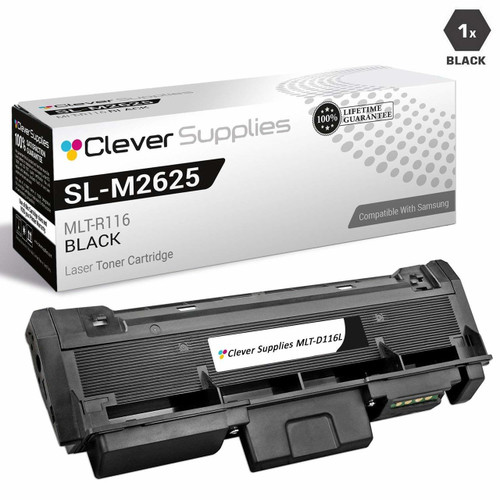
Compatible Samsung SL-M2835 High Yield Laser Toner Cartridge Black

Amazon Price:

- Page Yield:
- 3,000 Pages
- Availability:
- In Stock
- Shipping:
- Calculated at Checkout
- Compatible Printers
- SL-M2835DW
- SL-M2885FW
- Xpress M2626
- Xpress M2676
- Xpress M2826
- Xpress M2835 DW
- Xpress M2875
- Xpress M2875 DW
- Xpress SL-M2625D
- Xpress SL-M2675F
- Xpress SL-M2825DW
- Xpress SL-M2875DW
- Xpress SL-M2875FD
- Xpress SL-M2875FWi>
- SL-M2625
- SL-M2625D
- SL-M2625DW
- SL-M2626
- SL-M2675
- SL-M2675F
- SL-M2675FN
- SL-M2676
- SL-M2825
- SL-M2825DW
- SL-M2825ND
- SL-M2826
- SL-M2835
- SL-M2875
- SL-M2875FD
- SL-M2875FW
- SL-M2876
- SL-M2885
- Samsung-MLTD116L
- Xpress SL-M2875FW
- Specifications
- SKU:
- SL-M2835
- Printer Brand:
- Samsung
- OEM Number:
- MLT-D116L
- Ink Color:
- High Yield Black
- Page Yield:
- 3,000 Pages
- Printer Type:
- Laser Cartridge
- Condition:
- New Compatible
- Description
- Yields up to 3000 pages.
- Ink/toner color: Black
- Maximize printing performance with compatible Samsung supplies
- Designed to reduce toner spillage as well as optimize installation
- Easy-to-install image transfer unit provides cost-effective reliable operation
- Packaging: Each
- Compatible with: Samsung SL M2625 SL M2626 SL M2876 SL M2835 SL M2885 Xpress series: M2625 M2825 M2835 M2885 etc. series laser printers
- Clean and sharp print with ReCP technology
- Print technology: Laser printer/copier/fax
- Replace your printer’s mono toner cartridge with ease
- Ensure print quality with crisp vibrant output from the first page to the last page
- Reviews

/> 

Compatible Samsung SL-M2835 High Yield Laser Toner Cartridge Black maximises performance.
Samsung SL-M2835 Black toner cartridge is ideally designed to deliver superior and professional quality prints for both texts/images. Cartridge is compatible with Samsung SL M2625 SL M2626 SL M2876 SL M2835 SL M2885 Xpress series: M2625 M2825 M2835 M2885 etc. series laser printers and yields up to 3000 pages.
Features:
Frequently Asked Questions
How can I check the page count on my SL-M2835 to plan the next cartridge?
The SL-M2835 can print a supplies information page from its control panel menu, and that report shows the pages printed and an estimate of toner remaining. Checking it every month or two turns cartridge buying into a planned event: once the count tells you the MLT-D116L is in its last few hundred pages, order the replacement and it will be on the shelf before the old one fades.
Does using toner-save mode change what I get from this cartridge?
Yes — toner-save (eco) mode lays down less toner per page, which stretches the cartridge noticeably beyond mixed everyday use, at the cost of slightly greyer text. It suits drafts and internal documents well. For final copies, letters going out of the office and anything archived, switch back to normal mode; the MLT-D116L's 3,000-page rating assumes standard settings at about 5% page coverage.
What yield should a home office realistically expect in the SL-M2835?
For ordinary home-office work — emails, invoices, school documents, the odd form — expect to land close to the 3,000-page rating, because that workload is close to the 5% coverage the rating is based on. At 150 pages a month that is well over a year per cartridge. Work heavy in full-page printouts and dense tables will pull the figure down somewhat, which is normal for any toner cartridge.
Which other Samsung printers take this same cartridge?
The SL-M2835's cartridge is the MLT-D116L, and Samsung used it across a whole generation of mono machines: the SL-M2835DW, SL-M2885FW, Xpress M2626, Xpress M2676, Xpress M2826, Xpress M2835 DW, Xpress M2875, Xpress M2875 DW, Xpress SL-M2625D, Xpress SL-M2675F, Xpress SL-M2825DW and Xpress SL-M2875FD. If a second Samsung printer joins the household or office later, there is a fair chance this same cartridge code already covers it. The Samsung toner range lists the cartridge with the rest of the range.
How is the MLT-D116L different from the MLT-D116S I have seen listed?
They fit the same printers, including your SL-M2835 — the difference is fill. The S cartridge is the standard-yield version with less toner inside; this L version is the high-yield one, rated at 3,000 pages. Because the price gap between them is small compared with the extra pages, the L works out cheaper per page and is the version most owners settle on.
What help is there if print quality drops soon after fitting this cartridge?
Start with the basics — reseat the cartridge and check the fading is not the old unit still fitted by mistake — and if the problem persists, the cartridge is covered: a 1-year warranty plus free returns for a year mean a defective unit comes back to us at no cost. Terms are on our shipping and returns page. Support answers Monday to Friday, 9 AM to 5 PM CST, and orders ship from our IL, PA, GA or CA warehouses.
How should a spare MLT-D116L for the SL-M2835 be stored at home?
Sealed in its box, lying flat, in a cool, dry cupboard away from radiators and direct sunlight. Home storage rarely needs more thought than that: a compatible cartridge kept sealed and dry waits patiently, and fitting the oldest stock first keeps the rotation honest. Avoid a garage or attic shelf where heat swings are sharp — a spare that lives indoors, near the printer, is the one that gets fitted without a hunt.
One edge of the page prints paler than the rest — what is the first move?
Level the toner. When an MLT-D116L has sat for a while, its contents settle toward one end, and the print shows it as a pale band along one side. Remove the cartridge, rock it gently side to side several times, refit it and reprint the page — even density usually returns at once. If the band survives in exactly the same spot, contact support; the cartridge is covered, and there is no need to put up with it.
How do two-sided prints count toward the 3,000 pages?
By sides. A duplex sheet printed on both faces spends two pages of the MLT-D116L's rating while using one sheet of paper, so two-sided printing saves paper rather than toner. A home office that prints reports double-sided should measure consumption in sides when judging how much of a cartridge is left — the sheet count in the tray understates the work the toner has done.
What should we do with the old cartridge after the change?
Keep it for a few days, until the new MLT-D116L has settled in and printed cleanly on real work. The old unit is the comparison piece if anything looks off, and it identifies the cartridge if you need to talk to support. After that, pass it to a toner recycling collection instead of household waste — empties are bulky in a bin and worth more as recycled material.
About This Cartridge for the Samsung SL-M2835
This listing is the high-yield cartridge for a Samsung SL-M2835: code MLT-D116L, a 3,000-page rating and a $32.13 price. Clever Supplies backs it with a warranty lasting one year and will take it back free within that year if it disappoints. It leaves from whichever warehouse — IL, PA, GA or CA — gets it to you fastest, and weekday support runs 9 AM to 5 PM CST.
Related Items

Samsung
Compatible Samsung SL-M2835 High Yield Laser Toner Cartridges Black 5 Pack
/>

Samsung
Compatible Samsung Xpress M2835 High Yield Laser Toner Cartridge Black
/>
Samsung
Compatible Samsung Xpress M2835 High Yield Laser Toner Cartridges Black 5 Pack
/>
Samsung
Compatible Samsung SL-M2620D High Yield Laser Toner Cartridge Black
/>