






 See Compatible Printers
 Read more about our ink!
Hewlett Packard
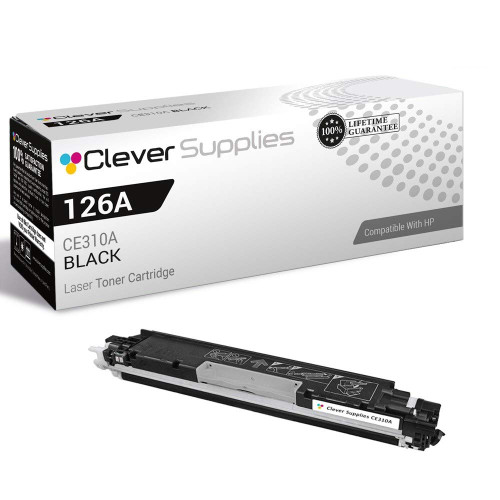
Compatible HP PRO M175NW (CE310A) Toner Cartridge Black

Amazon Price:

- Page Yield:
- Black: 1200
- Availability:
- In Stock
- Shipping:
- Calculated at Checkout
- Compatible Printers
- Color LaserJet 100 MFP M175a
- Color LaserJet 100 MFP M175nw
- Color LaserJet CP1025nw
- Color LaserJet TopShot Pro M275
- LaserJet 100 MFP M175a
- LaserJet 100 MFP M175nw
- LaserJet Pro 100 MFP M175a
- LaserJet Pro 100 MFP M175nw
- LaserJet Pro CP1025nw
- LaserJet Pro TopShot Pro M275i>
- Color CP1020
- Color CP1025
- Color CP1025NW
- Color LaserJet CP1020
- Color LaserJet CP1025
- Color LaserJet M175nw
- Color LaserJet M476
- Color LaserJet M476DN
- Color LaserJet M476DW
- Color LaserJet M476NW
- Color LaserJet Pro 100
- Color LaserJet Pro 100 Color MFP M175A
- Color LaserJet Pro 100 Color MFP M175NW
- Color LaserJet Pro 200 M275NW
- Color LaserJet Pro CP1025
- Color LaserJet Pro M175
- Color LaserJet Pro M175 MFP
- Color LaserJet Pro M175A
- Color LaserJet Pro M175nw
- Color LaserJet Pro M476
- Color LaserJet Pro M476DN
- Color LaserJet Pro M476DW
- Color LaserJet Pro M476NW
- Color LaserJet Pro MFP M476
- Color LaserJet Pro MFP M476dn
- Color LaserJet Pro MFP M476dw
- Color LaserJet Pro MFP M476nw
- Color LaserJet TopShot LaserJet Pro M275
- Color LaserJet TopShot LaserJet Pro M275NW
- Color MFP M175A
- HP 126A
- HP 312A & 312X
- LaserJet Pro 100 Color M175A
- LaserJet Pro 100 Color M175N
- LaserJet Pro 100 Color M175W
- LaserJet Pro 100 color MFP M175NW
- TopShot LaserJet Pro M275 MFP
- Specifications
- SKU:
- CS-HP-PRO M175NW-BK-1
- Printer Brand:
- Hewlett Packard
- OEM Number:
- CE310A
- Ink Color:
- Black
- Page Yield:
- Black: 1200
- Printer Type:
- Laser Cartridge
- Condition:
- New Compatible
- Description
- Reviews



The HP 126A Color LaserJet Series encompasses a range of printers designed to meet various printing needs, including the PRO 100 Color MFP M175A, PRO 100 Color MFP M175NW, CP1020, CP1025, CP1025NW, PRO 100, PRO M175, PRO M175A, PRO M175NW, PRO M175 MFP, TOPSHOT LASERJET PRO M275, TOPSHOT LASERJET PRO M275NW, LASERJET PRO 100 COLOR M175A, LASERJET PRO 100 COLOR M175N, and LASERJET PRO 100 COLOR M175W. Among the compatible cartridges are the CE310A Black, CE311A Cyan, CE313A Magenta, and CE312A Yellow, known collectively as the HP 126A toner cartridge or toner cartridge. These printers offer efficient printing solutions for both personal and professional use. The PRO 100 Color MFP M175A and M175NW models provide multifunction capabilities, including printing, scanning, and copying, while the CP1020 and CP1025 series deliver high-quality color printing for small office environments. The TOPSHOT LASERJET PRO M275 and M275NW models stand out with their innovative top shot scanning feature, ideal for capturing 3D objects and documents. With the HP 126A cartridges, users can expect reliable performance and vibrant color output for their printing tasks. The CE310A Black cartridge ensures crisp and sharp text, while the CE311A Cyan, CE313A Magenta, and CE312A Yellow cartridges deliver vivid hues and accurate color reproduction for graphics and images. Whether you're printing documents, presentations, or photos, the HP 126A Color LaserJet Series printers and cartridges provide the versatility and quality needed to produce professional results. Invest in these reliable printing solutions to streamline your workflow and achieve outstanding printouts with every use.
Frequently Asked Questions
What do you do with the empty cartridge once this one is in?
Slip the spent unit into the bag and box the new CE310A arrived in — that packaging is designed to contain residual toner in both directions — and take it to any office-supply or electronics recycling point. Never bin an open cartridge loose; a sealed one is a tidy parcel. This replacement for your Color LaserJet M175nw is the family's black, $38.66, rated at 1,200 pages.
Before the old one comes out — one last shake?
It is a fair test and sometimes a short reprieve: rock the old cartridge and print a page. If it darkens, you have a little time in hand to arrange this replacement without haste. If it prints exactly as pale, the cartridge was simply done, and no technique will argue with it.
Why not refill the empty instead of replacing it?
Because the cartridge is more than a toner tank — its internal surfaces wear with use, and print quality on a refilled unit is a lottery this machine usually loses. A fresh CE310A restores the whole mechanism of the black supply at once, which is what the faded pages were asking for.
How do you keep toner off your hands and desk during the swap?
Work over the open box, keep the new cartridge in its bag until the moment of fitting, and handle both units by their ends. Cold water and soap handle any stray dust on skin; the bag-first routine means there is rarely any to handle.
Does the M175nw print a confirmation after a change?
Print any document — the first full-strength page is the confirmation. The machine tracks the new supply automatically; your eyes on one dark, even page tell you everything the swap needed to achieve.
What if this new unit is the one with a problem?
Then the cover applies: a 1-year warranty and 1-year free returns stand behind the CE310A, so a faulty example is exchanged. Keep its box until a few clean pages have passed through.
The replacement has arrived while the old cartridge still prints acceptably. Where should it wait?
In its sealed box, flat, in a cool drawer near the M175nw — not fitted early. A cartridge in the machine is being spent whether the pages are urgent or not, and swapping before the old unit is done throws away the pages it still had in it. Kept sealed and out of sunlight, the new CE310A loses nothing by waiting a few weeks, and it will be within reach the day the fade becomes undeniable.
Which kinds of pages drain this black cartridge fastest?
The dense ones. Multi-page statements, reports with dark graphics or shaded tables, and long copy runs off the glass all lay down far more toner per sheet than the standard coverage the 1,200-page rating assumes. A month of light letters can barely move the gauge, while one week of statement printing can visibly drop it. When the level falls faster than expected, the page mix — not a leak — is almost always the explanation.
Before the new cartridge's bag is torn open, what is the one check that matters?
Read the stamp on the unit and the box: CE310A, black. The 126A family's cartridges share a shape and similar packaging across its colors, so the code is the only reliable identity a cartridge has. Confirming it takes seconds and prevents the one mistake no amount of careful fitting can fix — a color unit seated where the black belongs. If the stamp says anything else, that cartridge belongs to a different station or a different order.
The fresh cartridge is in, but one edge of the page prints light. What is the first move?
Reseat it. Lift the CE310A out, confirm nothing is caught or half-seated, rock it gently once or twice, and lower it back until it sits firmly and evenly. A cartridge resting slightly askew can starve one side of the page, and the fix is mechanical rather than electronic. Print a few sheets afterwards; a band that survives a careful reseat and several pages is a genuine problem, and support is available Monday–Friday, 9 AM–5 PM CST for it.
About This CE310A Black Cartridge for the Color LaserJet M175nw
A cartridge change has two halves — the new unit in, the old unit responsibly out — and this listing is the first half for the Color LaserJet M175nw: the CE310A, black of the 126A family, a single at $38.66 rated at 1,200 pages. It restores the black behind the machine's prints and copies in one two-minute exchange.
We send parcels from warehouses in IL, PA, GA and CA, and the shipping & returns page sets out delivery and returns terms. Support is staffed Monday–Friday, 9 AM–5 PM CST. The family's home on this site is HP.
Related Items

Hewlett Packard
Compatible HP PRO M175NW (CE310A) Toner Cartridge Black



Hewlett Packard
Compatible HP PRO M175NW (CE310A) Toner Cartridge 2 Black


Hewlett Packard
Compatible HP PRO M175NW (CE310A) Toner Cartridge 5 Black


Hewlett Packard
Compatible HP PRO 100 CLR MFP M175NW (CE310A) Toner Cartridge Black