







 See Compatible Printers
 Read more about our ink!
Hewlett Packard
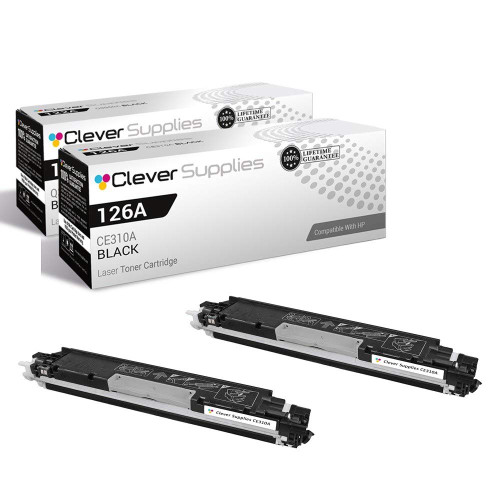
Compatible HP CP1020 (CE310A) Toner Cartridge 2 Black
- Page Yield:
- Black: 1200
- Availability:
- In Stock
- Shipping:
- Free Shipping

Amazon Price:

- Page Yield:
- Black: 1200
- Availability:
- In Stock
- Shipping:
- Free Shipping
- Compatible Printers
- Color LaserJet 100 MFP M175a
- Color LaserJet 100 MFP M175nw
- Color LaserJet CP1025nw
- Color LaserJet TopShot Pro M275
- LaserJet 100 MFP M175a
- LaserJet 100 MFP M175nw
- LaserJet Pro 100 MFP M175a
- LaserJet Pro 100 MFP M175nw
- LaserJet Pro CP1025nw
- LaserJet Pro TopShot Pro M275i>
- Color CP1020
- Color CP1025
- Color CP1025NW
- Color LaserJet CP1020
- Color LaserJet CP1025
- Color LaserJet M175nw
- Color LaserJet M476
- Color LaserJet M476DN
- Color LaserJet M476DW
- Color LaserJet M476NW
- Color LaserJet Pro 100
- Color LaserJet Pro 100 Color MFP M175A
- Color LaserJet Pro 100 Color MFP M175NW
- Color LaserJet Pro 200 M275NW
- Color LaserJet Pro CP1025
- Color LaserJet Pro M175
- Color LaserJet Pro M175 MFP
- Color LaserJet Pro M175A
- Color LaserJet Pro M175nw
- Color LaserJet Pro M476
- Color LaserJet Pro M476DN
- Color LaserJet Pro M476DW
- Color LaserJet Pro M476NW
- Color LaserJet Pro MFP M476
- Color LaserJet Pro MFP M476dn
- Color LaserJet Pro MFP M476dw
- Color LaserJet Pro MFP M476nw
- Color LaserJet TopShot LaserJet Pro M275
- Color LaserJet TopShot LaserJet Pro M275NW
- Color MFP M175A
- HP 126A
- HP 312A & 312X
- LaserJet Pro 100 Color M175A
- LaserJet Pro 100 Color M175N
- LaserJet Pro 100 Color M175W
- LaserJet Pro 100 color MFP M175NW
- TopShot LaserJet Pro M275 MFP
- Specifications
- SKU:
- CLS-HP-CP1020-2BK
- Printer Brand:
- Hewlett Packard
- OEM Number:
- CE310A
- Ink Color:
- Black
- Page Yield:
- Black: 1200
- Printer Type:
- Laser Cartridge
- Condition:
- New Compatible
- Description
- Reviews



The HP 126A Color LaserJet Series encompasses a range of printers designed to meet various printing needs, including the PRO 100 Color MFP M175A, PRO 100 Color MFP M175NW, CP1020, CP1025, CP1025NW, PRO 100, PRO M175, PRO M175A, PRO M175NW, PRO M175 MFP, TOPSHOT LASERJET PRO M275, TOPSHOT LASERJET PRO M275NW, LASERJET PRO 100 COLOR M175A, LASERJET PRO 100 COLOR M175N, and LASERJET PRO 100 COLOR M175W. Among the compatible cartridges are the CE310A Black, CE311A Cyan, CE313A Magenta, and CE312A Yellow, known collectively as the HP 126A toner cartridge or toner cartridge. These printers offer efficient printing solutions for both personal and professional use. The PRO 100 Color MFP M175A and M175NW models provide multifunction capabilities, including printing, scanning, and copying, while the CP1020 and CP1025 series deliver high-quality color printing for small office environments. The TOPSHOT LASERJET PRO M275 and M275NW models stand out with their innovative top shot scanning feature, ideal for capturing 3D objects and documents. With the HP 126A cartridges, users can expect reliable performance and vibrant color output for their printing tasks. The CE310A Black cartridge ensures crisp and sharp text, while the CE311A Cyan, CE313A Magenta, and CE312A Yellow cartridges deliver vivid hues and accurate color reproduction for graphics and images. Whether you're printing documents, presentations, or photos, the HP 126A Color LaserJet Series printers and cartridges provide the versatility and quality needed to produce professional results. Invest in these reliable printing solutions to streamline your workflow and achieve outstanding printouts with every use.
Frequently Asked Questions
Why stock two black cartridges for a one-person printer like the CP1020?
Because a single-desk printer has a single point of failure, and it is this cartridge. This 2-pack at $58.82 installs one CE310A now and parks the second, sealed, in the desk. When the working cartridge fades — always mid-document, never between jobs — the fix is already in the room.
Do I get two full cartridges or one plus a refill?
Two full, factory-sealed CE310A cartridges, each rated at 1,200 pages. There is no refill, no partial unit and no starter fill anywhere in the pair.
How long can the second cartridge sensibly wait?
Far longer than it will. Toner is a dry powder in a sealed shell; stored flat away from heat and sunlight it keeps for a year or more without measurable change. A desk drawer is a perfectly good warehouse.
What is the smart reorder habit with a pair?
Order the next pair on the day the spare is fitted. You then always hold one working cartridge plus inbound stock, and the printer never becomes the reason a letter waits until tomorrow.
Is the CP1020's black really the same as the M175's black?
It is — the CE310A serves the whole 126A compact family, MFPs and print-only models alike. If this pair ever needs to rescue a colleague's M175 across the office, it can.
Anything to check when the pair arrives?
That both boxes are sealed and the labels read CE310A. Then one goes in the printer, one goes in the drawer with the month written on it, and you are done.
The spare has sat in the drawer for months. Anything to do before fitting it?
Just one small step: take the sealed CE310A out of its bag, rock it gently side to side a few times, then pull the seal and fit it as normal. Toner powder can settle toward one side during long storage, and the rocking redistributes it so the first pages print evenly. Check the box is still sealed before you start — an intact seal means the cartridge has waited in perfect condition.
How far do the pair's 2,400 rated pages go on a one-person desk?
Twice as far as a single, obviously — two CE310A cartridges at 1,200 pages each. On a solo CP1020 printing a few dozen pages a day, that is commonly the better part of a year between orders; a heavier desk might see a cartridge every couple of months. Either way, the pair turns toner into a rare, planned purchase, and your own first cartridge's lifespan tells you your true pace.
How do I prove the spare is good once it is fitted?
Reprint the page that exposed the old cartridge's fade — the same document, ideally the one that came out gray. Side by side, the fresh CE310A's copy should be evenly dark across the whole sheet. Proving the new unit on real work, rather than a blank test page, confirms the swap solved the problem and that the job the fade interrupted can go out with confidence.
The spare from my pair rescued a colleague's M175. What happens to my own cover?
Restore it the same day. The CE310A fits the whole 126A family, so lending the spare across the office works perfectly — but it leaves your CP1020 with no reserve until a replacement arrives. Order the next pair as soon as the spare leaves your drawer, and your desk is covered again within days. The pair system only protects you while the second cartridge is actually in the building.
About This CE310A 2-Pack for the LaserJet Pro CP1020
A print-only machine like the LaserJet Pro CP1020 asks very little of its owner — until the black cartridge fades, at which point it asks for exactly this. The 2-pack answers in advance: two standard CE310A black cartridges, one to run and one to wait, each rated at 1,200 pages of the text work this compact printer lives on. For a single desk it converts toner from a recurring errand into a twice-a-year thought.
Both cartridges are covered by a 1-year warranty, and 1-year free returns apply to the order. Parcels ship from warehouses in IL, PA, GA and CA; consult the shipping & returns page for delivery and returns specifics. Our support hours are Monday–Friday, 9 AM–5 PM CST. This black cartridge also fits the family's other machines — the Color LaserJet CP1020 included — and the complete range is organized under HP.
The same cartridge is also sold as the CE310A black single (126A). The rest of the color set is here too: the CE311A cyan (126A). Compatibility covers the whole family: Color LaserJet Pro CP1025, Color LaserJet Pro 200 M275nw, Color LaserJet CP1025nw, LaserJet Pro CP1025nw, Color LaserJet M175nw, LaserJet Pro 100 Color MFP M175nw, Color LaserJet CP1020 and Color LaserJet CP1025.
Related Items

Hewlett Packard
Compatible HP CP1020 (CE310A) Toner Cartridge 2 Black



Hewlett Packard
Compatible HP CP1020 (CE310A) Toner Cartridge Black


Hewlett Packard
Compatible HP CP1020 (CE310A) Toner Cartridge 3 Black


Hewlett Packard
Compatible HP CP1020 (CE311A) Toner Cartridge Cyan