







 See Compatible Printers
 Read more about our ink!
Hewlett Packard
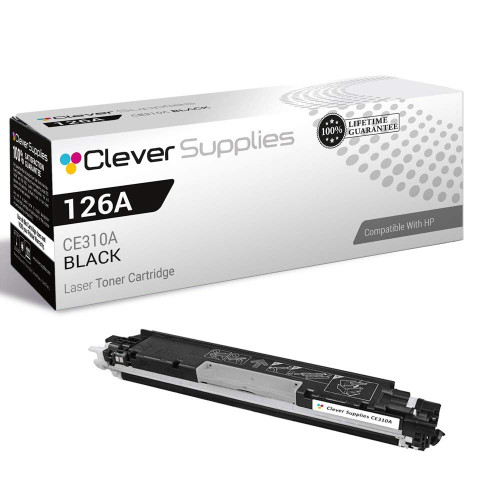
Compatible HP CP1020 (CE310A) Toner Cartridge Black
- Page Yield:
- Black: 1200
- Availability:
- In Stock
- Shipping:
- Calculated at Checkout

Amazon Price:

- Page Yield:
- Black: 1200
- Availability:
- In Stock
- Shipping:
- Calculated at Checkout
- Compatible Printers
- Color LaserJet 100 MFP M175a
- Color LaserJet 100 MFP M175nw
- Color LaserJet CP1025nw
- Color LaserJet TopShot Pro M275
- LaserJet 100 MFP M175a
- LaserJet 100 MFP M175nw
- LaserJet Pro 100 MFP M175a
- LaserJet Pro 100 MFP M175nw
- LaserJet Pro CP1025nw
- LaserJet Pro TopShot Pro M275i>
- Color CP1020
- Color CP1025
- Color CP1025NW
- Color LaserJet CP1020
- Color LaserJet CP1025
- Color LaserJet M175nw
- Color LaserJet M476
- Color LaserJet M476DN
- Color LaserJet M476DW
- Color LaserJet M476NW
- Color LaserJet Pro 100
- Color LaserJet Pro 100 Color MFP M175A
- Color LaserJet Pro 100 Color MFP M175NW
- Color LaserJet Pro 200 M275NW
- Color LaserJet Pro CP1025
- Color LaserJet Pro M175
- Color LaserJet Pro M175 MFP
- Color LaserJet Pro M175A
- Color LaserJet Pro M175nw
- Color LaserJet Pro M476
- Color LaserJet Pro M476DN
- Color LaserJet Pro M476DW
- Color LaserJet Pro M476NW
- Color LaserJet Pro MFP M476
- Color LaserJet Pro MFP M476dn
- Color LaserJet Pro MFP M476dw
- Color LaserJet Pro MFP M476nw
- Color LaserJet TopShot LaserJet Pro M275
- Color LaserJet TopShot LaserJet Pro M275NW
- Color MFP M175A
- HP 126A
- HP 312A & 312X
- LaserJet Pro 100 Color M175A
- LaserJet Pro 100 Color M175N
- LaserJet Pro 100 Color M175W
- LaserJet Pro 100 color MFP M175NW
- TopShot LaserJet Pro M275 MFP
- Specifications
- SKU:
- CLS-HP-CP1020-BK
- Printer Brand:
- Hewlett Packard
- OEM Number:
- CE310A
- Ink Color:
- Black
- Page Yield:
- Black: 1200
- Printer Type:
- Laser Cartridge
- Condition:
- New Compatible
- Description
- Reviews



The HP 126A Color LaserJet Series encompasses a range of printers designed to meet various printing needs, including the PRO 100 Color MFP M175A, PRO 100 Color MFP M175NW, CP1020, CP1025, CP1025NW, PRO 100, PRO M175, PRO M175A, PRO M175NW, PRO M175 MFP, TOPSHOT LASERJET PRO M275, TOPSHOT LASERJET PRO M275NW, LASERJET PRO 100 COLOR M175A, LASERJET PRO 100 COLOR M175N, and LASERJET PRO 100 COLOR M175W. Among the compatible cartridges are the CE310A Black, CE311A Cyan, CE313A Magenta, and CE312A Yellow, known collectively as the HP 126A toner cartridge or toner cartridge. These printers offer efficient printing solutions for both personal and professional use. The PRO 100 Color MFP M175A and M175NW models provide multifunction capabilities, including printing, scanning, and copying, while the CP1020 and CP1025 series deliver high-quality color printing for small office environments. The TOPSHOT LASERJET PRO M275 and M275NW models stand out with their innovative top shot scanning feature, ideal for capturing 3D objects and documents. With the HP 126A cartridges, users can expect reliable performance and vibrant color output for their printing tasks. The CE310A Black cartridge ensures crisp and sharp text, while the CE311A Cyan, CE313A Magenta, and CE312A Yellow cartridges deliver vivid hues and accurate color reproduction for graphics and images. Whether you're printing documents, presentations, or photos, the HP 126A Color LaserJet Series printers and cartridges provide the versatility and quality needed to produce professional results. Invest in these reliable printing solutions to streamline your workflow and achieve outstanding printouts with every use.
Frequently Asked Questions
What black cartridge fits the LaserJet Pro CP1020?
The CE310A, also labeled 126A — this single black cartridge at $38.66. The CP1020 is a print-only member of the same compact family, and its black unit is rated at 1,200 pages. Match the CE310A stamp on the cartridge you take out and you cannot go wrong.
The CP1020 has no screen — how do I check the black level?
Through the printer software on your computer, which reports the black cartridge on its own, or by printing a supplies status page from the driver. Physically, gray or streaked text on ordinary documents is the reliable symptom.
Only my text is fading while color pages still look fine — is that the black?
Almost always, yes. A CP1020 document is nearly all black toner; the color units only wake for graphics. When letters wash out but a color photo page still prints richly, the black cartridge is the one at the end of its life.
How does the swap work on this printer?
Open the cartridge access, note that the black unit sits in its own labeled position, and lift it out. Rock the new CE310A from side to side, pull the seal straight out, and lower it into the black position until it seats. Two minutes, start to finish.
Is 1,200 pages realistic for a small desk printer?
For this class, yes — the rating is a 5%-coverage text measurement, and a CP1020's diet is mostly text. A single cartridge typically covers months of letters, forms and reports on one person's desk.
Can I keep a spare without it going off?
Toner does not expire like ink. A sealed cartridge stored flat, cool and out of direct sun will be ready whenever the working one fades — many CP1020 owners keep the next CE310A in the same drawer as the paper.
A long job is fading halfway through. Swap now or push to the end?
Swap now. The change on the CP1020 takes about two minutes, and pushing on only produces more faded pages to reprint afterward. Pause the run, fit the fresh CE310A, and reprint just the pages that came out pale. The documents already printed well stay in the tray, the job finishes at full density, and you have spent minutes instead of reprinting a whole report at the end.
My new cartridge prints light down one side. What is the first move?
Lift it out and rock it gently from side to side, then reseat it firmly in the black position. Toner settles during shipping and storage, and a one-sided lightness on the first pages is usually distribution, not an empty or faulty CE310A. Print a couple of pages afterward; the density should even out across the sheet. Only if the pale side persists is the cartridge itself suspect.
How do we make sure anyone in the office orders the right black?
Put the code on the machine. A small label on the CP1020 or inside its supply drawer reading CE310A — also sold as 126A — means a colleague covering for you never has to guess from the printer's name or open the machine to check. The stamp on the cartridge you remove says the same thing, but the label answers the question before the printer is even touched.
We print dense pre-printed forms all day. What yield should we plan on?
Plan below the 1,200-page rating. That figure assumes standard coverage, and filling dense forms — heavy lines, shaded boxes, bold headings — draws more toner from the CE310A on every sheet. Form-heavy desks also print in bursts, so the fade tends to arrive mid-batch rather than politely between jobs. Keep the reorder point early and a spare in the drawer; your first cartridge's real lifespan is the planning number.
About This CE310A Black Cartridge for the LaserJet Pro CP1020
The LaserJet Pro CP1020 is the print-only minimalist of HP's compact color family — no scanner, no copier, just a small color printer for a single desk. Its black cartridge is the CE310A listed here at $38.66, a 1,200-page unit under the 126A family name. On a printer like this, black does nearly all the visible work, which makes this modest cartridge the one part the machine cannot do without.
The cartridge carries a 1-year warranty and 1-year free returns. We ship from warehouses in IL, PA, GA and CA, and the shipping & returns page explains delivery times and returns. Questions are answered Monday–Friday, 9 AM–5 PM CST. The same black cartridge serves the family's MFPs and the Color LaserJet CP1020, with the full assortment under HP.
Machines that take this cartridge include Color LaserJet CP1020, Color LaserJet CP1025, Color LaserJet Pro CP1025, Color LaserJet Pro 200 M275nw, Color LaserJet CP1025nw, LaserJet Pro CP1025nw, Color LaserJet M175nw and LaserJet Pro 100 Color MFP M175nw. Color printing needs its partners alongside: the CE311A cyan (126A), the CE313A magenta (126A) and the CE312A yellow (126A).
Related Items


Hewlett Packard
Compatible HP CP1020 (CE310A) Toner Cartridge Black



Hewlett Packard
Compatible HP CP1020 (CE310A) Toner Cartridge 2 Black

Hewlett Packard
Compatible HP CP1020 (CE310A) Toner Cartridge 2 Black


Hewlett Packard
Compatible HP CP1020 (CE310A) Toner Cartridge 3 Black