




C5600
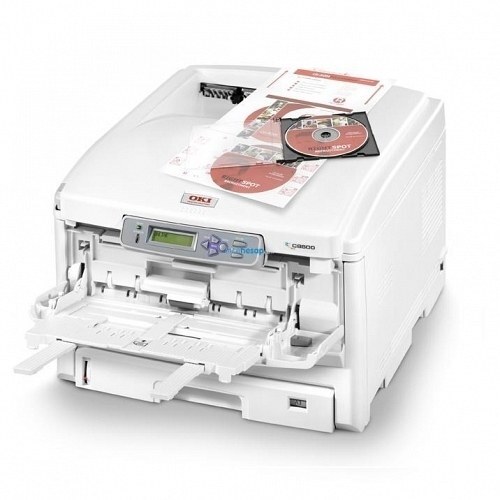
The Okidata C5600 is a color laser printer from OKI's C series, built for offices that need reliable color output from a compact machine. It runs on the Type C8 high-yield toner family stocked on this page: the 43324404 black cartridge, the 43324403 cyan, the 43324402 magenta and the 43324401 yellow. The four colors load as separate cartridges, so the C5600 only ever asks for the one position that has actually run dry.
Most C5600 machines sit with a small team printing a steady mix of letters, reports and color handouts. Because every cartridge on this page belongs to the high-yield Type C8 series, the printer spends its time printing rather than waiting on toner swaps, and a busy month rarely turns into a toner emergency. The one habit that matters with this model is matching numbers exactly: the four part numbers look alike at a glance, and each slot in the machine expects its own.
Toner Cartridges for C5600
| Cartridge | Color | Page Yield |
|---|---|---|
| 43324404 | Black | See product page |
| 43324403 | Cyan | See product page |
| 43324402 | Magenta | See product page |
| 43324401 | Yellow | See product page |
| 43324404 Black (C5500 listing) | Black | See product page |
| 43324402 Magenta (C5500 listing) | Magenta | See product page |
| 43324401 Yellow (C5500 listing) | Yellow | See product page |
| 43324404 — 2 Black | Black, 2 pack | See product page |
| 43324404 — 3 Black | Black, 3 pack | See product page |
| 43324404 — 5 Black | Black, 5 pack | See product page |
| 43324403, 43324402, 43324401 — 3 Color Set | Cyan, magenta, yellow | See product page |
| 43324404, 43324403, 43324402, 43324401 — 4 Color Set | All four colors | See product page |
| 43324404, 43324403, 43324402, 43324401 — 5 Color Set | All four colors | See product page |
| 43324403, 43324402, 43324401 — 6 Color Set | Cyan, magenta, yellow | See product page |
| 43324404, 43324403, 43324402, 43324401 — 8 Color Set | All four colors | See product page |
Which cartridge should you buy?
Start with the single cartridge for whichever color the printer reports as low — with four independent positions there is never a reason to retire toner that still has life in it. If two or three colors are fading together, the color sets on this page cover the color positions in one order, and the 4 Color Set refreshes every slot at once. Offices whose C5600 spends most of its life on text should look at the black multi-packs: the same 43324404 cartridge is stocked in 2, 3 and 5 packs, which suits a shelf that feeds a text-heavy machine. Note that part of this shelf is listed under the C5500 name and part under C5600 — both listings carry the identical Type C8 numbers, so choose by the eight-digit number, not by the model name printed on the listing. Every compatible cartridge here is covered by a 1-year warranty and 1-year returns.
Chip, toner and everyday use
Each cartridge carries a chip the C5600 reads to track its level. If a freshly installed cartridge is not recognized, power the printer down, slide the cartridge out and seat it again firmly until it clicks — a slightly raised cartridge is the usual cause. When output starts to fade near the end of a cartridge's life, removing it and rocking it gently from side to side redistributes the remaining toner and often restores even coverage for a while longer. Keep spare cartridges sealed in their bags, stored flat in a cool, dry place away from direct sunlight, and keep one black spare on hand so a long text job never stalls the office.
Frequently Asked Questions
Which toner cartridges does the OKI C5600 use?
It uses four Type C8 cartridges: black 43324404, cyan 43324403, magenta 43324402 and yellow 43324401. Those are the only numbers stocked for this model on this page, and each one belongs to exactly one color position in the machine.
Why do some cartridges on this page carry the C5500 name?
The C5500 listings and the C5600 listings on this shelf carry the same Type C8 part numbers — the cartridges themselves are the shared family this printer runs on, and part of the range is simply listed under the sibling model's name. Match the 43324404, 43324403, 43324402 or 43324401 number to the slot you are replacing and the listing name does not matter.
Do I have to replace all four cartridges at the same time?
No. Each color depletes at its own rate depending on what you print, and the C5600 tracks them independently. Replace only the cartridge the printer reports as empty; swapping the others early just throws away usable toner.
Is there a standard-yield version of these cartridges?
Not on this page. Everything stocked for the C5600 belongs to the high-yield Type C8 series, so there is no standard-versus-high-yield decision to make here — the choice is between single cartridges, black multi-packs and full color sets.
More printers that use the same cartridges
The same Type C8 black toner family runs across a wide group of OKI color models, so an office running any of these alongside its C5600 draws from the same cartridge numbers: C5500, C5500DN, C5500Ldn, C5500MFP, C5500N, C5650, C5650DN, C5650N, C5700, C5800, C5800DN, C5800LDN, C5800N, C5900 MFP, C5900, C5900CDTN, C5900DN, C5900DTN, C5900N, C5950, C8, MFP.