




C5650
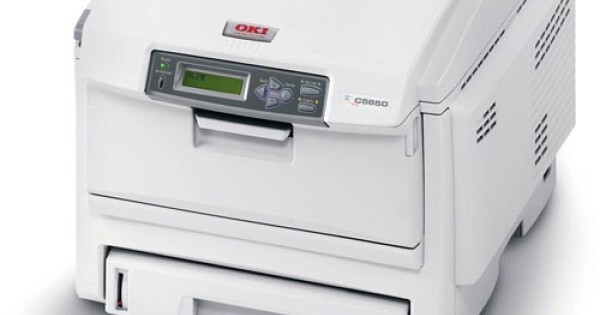
The Okidata C5650 is a workgroup color laser printer with network connectivity as standard, positioned as the faster shared option for office color output. It runs on OKI's Type C8 toner family. The standard set is 43381904 black, 43381903 cyan, 43381902 magenta and 43381901 yellow; this page stocks the high-capacity versions of the same four colors — 43324404 black, 43324403 cyan, 43324402 magenta and 43324401 yellow — which stretch the interval between replacements.
A C5650 usually sits at the center of a small department's printing: several people sending a mix of monochrome paperwork and color documents through the day. That shared duty is exactly where high-capacity cartridges pay off, because a cartridge that runs dry at a personal printer is an annoyance, while one that stops a workgroup machine mid-morning holds up everyone's work. Separate cartridges for each color also mean the printer's appetite for, say, cyan does not force you to retire a half-full magenta.
Toner Cartridges for C5650
| Cartridge | Color | Page Yield |
|---|---|---|
| 43324404 | Black (high yield) | See product page |
| 43324403 | Cyan (high yield) | See product page |
| 43324402 | Magenta (high yield) | See product page |
| 43324401 | Yellow (high yield) | See product page |
Full-set options on this page: the C5650 High Yield 4 Color Set, the C5650 Premium Quality 4 Color Set and the Type C8 High Yield 4 Color Set.
Which cartridge should you buy?
Because this page carries the high-capacity Type C8 builds, the main choice is singles versus a set. Buy singles when the printer flags one color: the C5650 consumes its four cartridges at different rates, and a set bought too early ties up money in colors you will not need for months. Move to a 4-color set when two or more cartridges are nearing empty together — restocking the whole machine in one order is cheaper per cartridge and resets all four levels at once, which suits a shared printer with no natural downtime. If your C5650 still runs the standard 4338190-series cartridges, switching to the high-capacity 4332440-series versions is a straight upgrade in interval length with no changes to the printer itself.
Chip, toner and everyday use
Workgroup printers notice a badly seated cartridge quickly: push each replacement in until it locks, then close the cover and let the C5650 calibrate before sending a large job. Keep one spare of the color your office uses most — for most departments that is black — because next-day surprises usually start with a toner-empty stop on a deadline morning. Toner cartridges store best upright in their boxes, out of direct sun and away from radiators. If a half-used cartridge prints lightly after sitting idle, a gentle side-to-side rock redistributes the toner inside and often restores even coverage.
Frequently Asked Questions
Which cartridges fit the C5650?
The standard Type C8 set is 43381904 black, 43381903 cyan, 43381902 magenta and 43381901 yellow. The high-capacity equivalents stocked here are 43324404, 43324403, 43324402 and 43324401 in the same color order.
What is the difference between the standard and high-capacity Type C8 cartridges?
They fit the same machines and the same slots; the high-capacity 4332440-series cartridges simply hold more toner, so each one prints longer before it needs replacing. Offices that print color daily feel the difference as fewer interruptions.
Must I change all four cartridges when one color runs out?
No. Each color is tracked and replaced independently on the C5650, so an empty yellow never forces you to discard usable black, cyan or magenta.
Are the C5650 set options on this page all high yield?
Yes — the C5650 4 Color Set, the Premium Quality set and the Type C8 set all bundle the four high-capacity cartridges. Choose a set when several colors are running low together; choose singles when only one color is down.
More printers that use the same cartridges
The Type C8 family is shared across a wide range of OKI machines, including: C5500, C5500DN, C5500Ldn, C5500MFP, C5500N, C5600, C5650DN, C5650N, C5700, C5800, C5800DN, C5800LDN, C5800N, C5900 MFP, C5900, C5900CDTN, C5900DN, C5900DTN, C5900N, C5950, C8, MFP.